
- Loaders
- Fabric
- Downloads on Modrinth
- 122
- Followers on Modrinth
- 1
- versions
- 2
- Updated
- July 19, 2026Jul 19
- Published
- in 2026
Rendered trajectory when holding an ender pearl · swipe
At a glance
Runs on Fabric
For Minecraft 26.1–26.1.2
Client only — no need to install it on the server
Latest version — 1.0.0-beta-2 from July 19, 2026
Requires Cloth Config API, Mod Menu and Fabric API
License MIT — free
Where it's neededGame versions26.1–26.1.2
In gamerequiredOn servernot needed
Install in the game only; not needed on the server
ArcPath
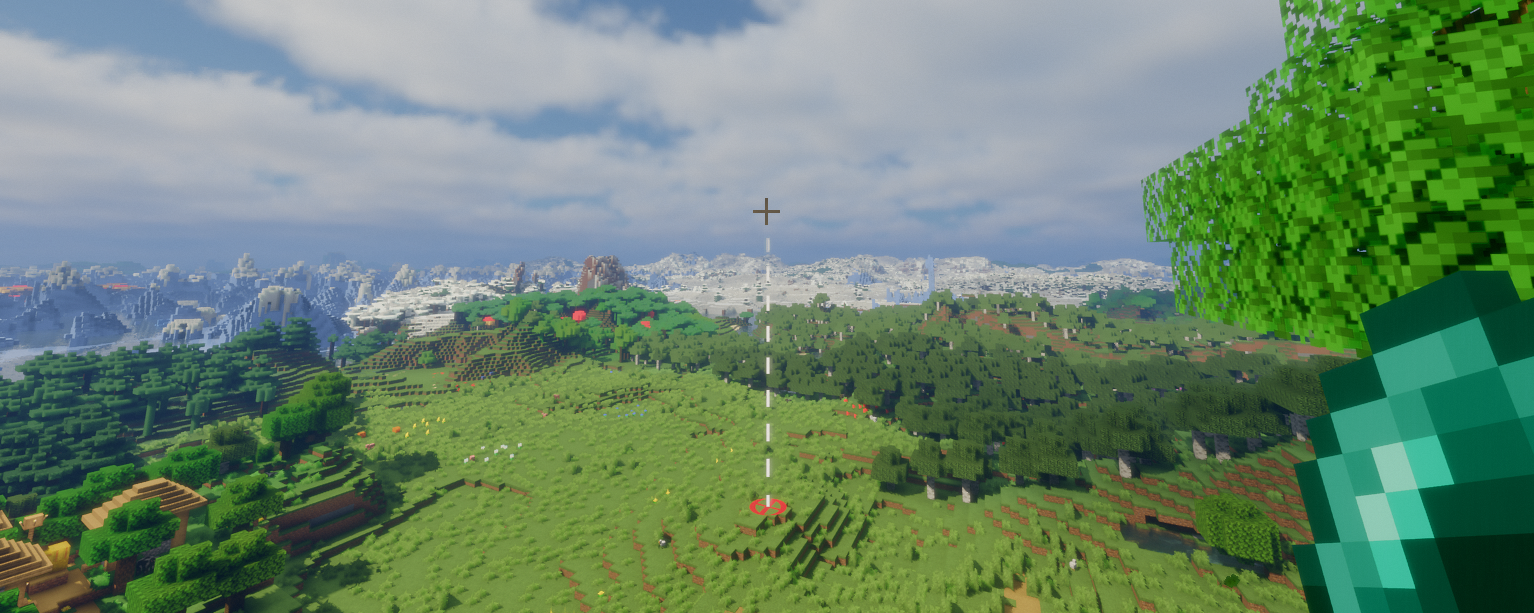
ArcPath is a client-side Fabric mod that displays a trajectory arc when holding a throwable item. The arc shows the predicted flight path of the projectile and marks the landing point with a target.
Features
- Trajectory arc with configurable style per throwable item
- Gradient color support - blend from a start color to a second color along the arc
- Landing target marker with configurable shape per throwable
- Calculated trajectory accounts for player velocity
- Entity hit detection - arc stops at living entities and the target marker appears on them
- Arc toggle keybind (default: Y) to show/hide all arcs without opening the config screen
- Debug overlay (default: U) showing previously calculated trajectories
Supported Throwables
- Ender Pearls
- Snowballs
- Eggs
- Tridents
- Arrows (via Bow & Crossbow)
Configuration
Open Options → Mods → ArcPath → Configure to access the config screen. Each throwable has its own sub-category with independent Arc and Target settings.
Arc Settings (per throwable)
- Enable/disable
- Color
- Line width
- Style (Dashed / Solid)
- Dash length and gap length (Dashed only)
- Transparency
- Gradient color
Target Settings (per throwable)
- Enable/disable
- Color
- Line width
- Shape (Circle / Diamond / Square)
- Radius
- Transparency
Keybinds
| Keybind | Default | Description |
|---|---|---|
| Toggle Arc | Y | Show/hide all arc/marker rendering |
| Toggle Debug | U | Show/hide the debug trajectory overlay |
FAQ
How to install ArcPath?
Install Fabric for your Minecraft version, download ArcPath for the same version and loader, put the file into the mods folder and launch the game with the loader profile.
Which Minecraft versions does ArcPath support?
ArcPath has builds for Minecraft 26.1–26.1.2.
Is ArcPath needed on the server?
Client only — no need to install it on the server
License and source
MIT Licensefree to use and share with credit to the author


