
Vortex
Server-side modpack analytics developed by Atmospace. Tracks player usage of modded blocks, items, crafting, and entities. View in-game summaries and get CSV reports on shutdown to optimize your modpack based on actual player engagement.
- Loaders
- NeoForge
- Downloads on Modrinth
- 996
- Followers on Modrinth
- 7
- versions
- 7
- Updated
- January 10, 2026Jan 10
- Published
- in 2025
At a glance
Install on the server only; players don't need it
Vortex: Mod Usage Analyzer for NeoForge Servers

Vortex is a lightweight, server-side NeoForge mod designed to give server administrators clear insights into how their modpack is actually being used by players.
What it Does:
Tracks Modded Content Usage: Vortex silently monitors player interactions with content from other mods, including:
- Right-clicking on modded blocks.
- Right-clicking with modded items.
- Crafting recipes that output modded items.
- Dealing damage to modded entities.
- Filters Out Vanilla: It intelligently ignores all interactions with vanilla Minecraft content, focusing solely on the mods you've added.
In-Game Summaries: Administrators can use a simple command (
/vortexor/vx) to get an immediate summary of the most and least used mods across all tracked categories directly in the game chat.- Dataview web-panel: A simple web-panel that allows admins to view the data Vortex has collected on their server in an easy to read and sortable manner.
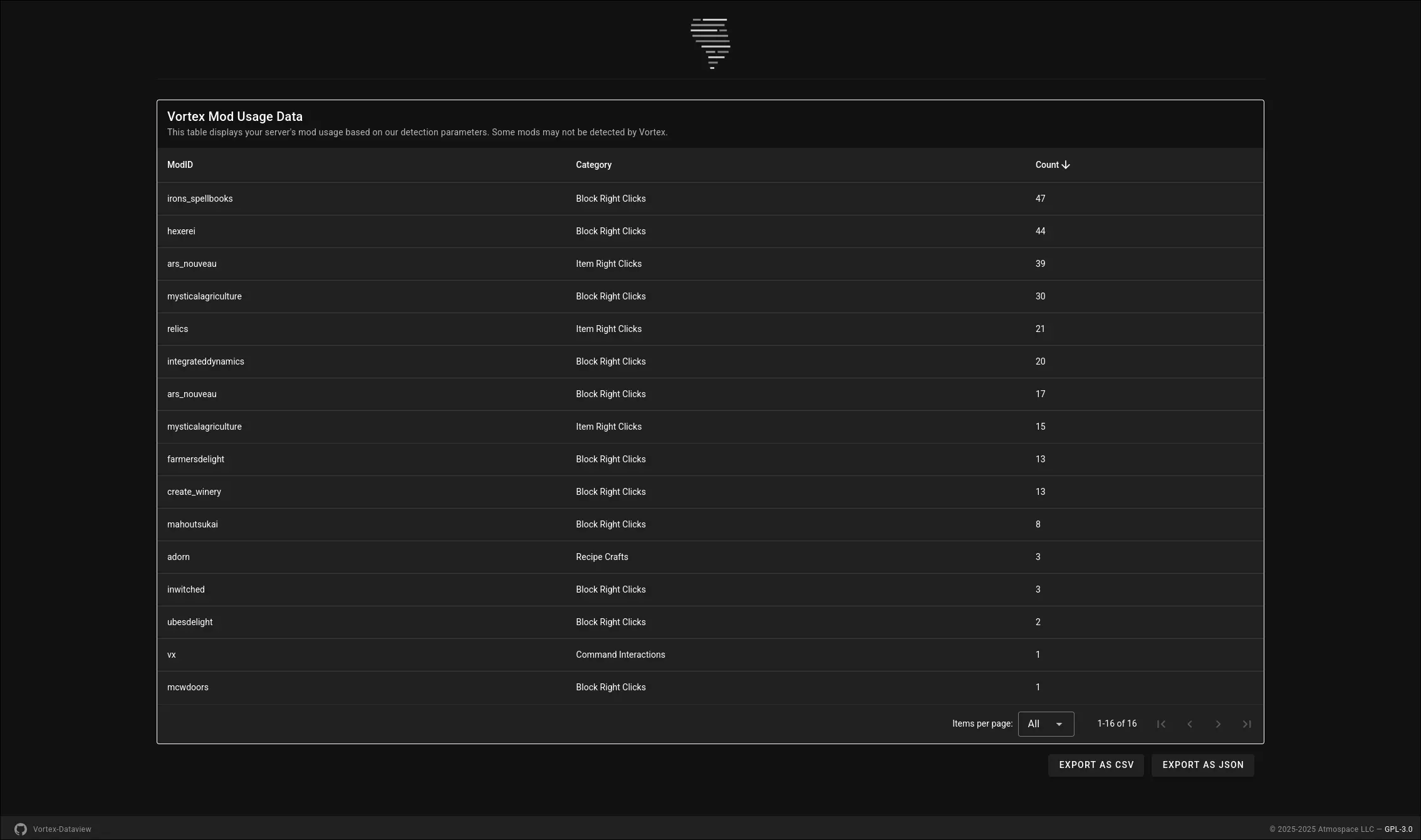
- Detailed CSV Export: When your server shuts down, Vortex automatically generates a detailed CSV file (e.g.,
vortex_mod_usage_data_MM-DD-YYYY.HH-mm.csv) in your server'sconfig/vortex/folder. This file provides raw, organized data for deeper analysis in spreadsheet software or data visualization tools.
Why Your Server Needs Vortex:
- Optimize Your Modpack: Make data-driven decisions to streamline your modpack. Identify mods that are rarely used and consider removing them to reduce server load, client lag, and overall file size.
- Enhance Player Experience: Discover which mods your community loves and uses the most, helping you focus on content that truly engages your players.
- Informed Decisions: Move beyond guesswork or player polls. Vortex provides concrete usage statistics to refine your server's modded experience.
Vortex is an essential tool for any NeoForge server administrator looking to maintain a lean, efficient, and player-centric modpack.
NOTICE!
This mod is still in development.
Features may be added, removed, or modified during the development process.
Atmospace is not responsible for any issues the mod might cause while it is within the beta development cycle, but will try to assist with issues when possible.
FAQ
How to install Vortex?
Install NeoForge for your Minecraft version, download Vortex for the same version and loader, put the file into the mods folder and launch the game with the loader profile.
Which Minecraft versions does Vortex support?
Vortex has builds for Minecraft 1.21–1.21.11.
Is Vortex needed on the server?
Server only — players don't need to install it


