
- Loaders
- FabricNeoForgeQuilt
- Downloads on Modrinth
- 358K
- Followers on Modrinth
- 124
- versions
- 52
- Updated
- September 16, 2026Sep 16
- Published
- in 2024
At a glance
Install in the game only; not needed on the server

AutoReconnect (Reforged)
Automatically reconnect to servers after unintentional disconnection.
Based on AutoReconnect by Bstn1802.





About
If you get disconnected from a world or server without clicking the disconnect button (such as if your internet briefly drops out), this mod will attempt to reconnect you.
By default, it will make 4 attempts after 3, 10, 30 and 60 seconds respectively. The number and timing of attempts is fully configurable.
You can also configure messages or commands to be sent upon successful automatic reconnect to a particular world or server.
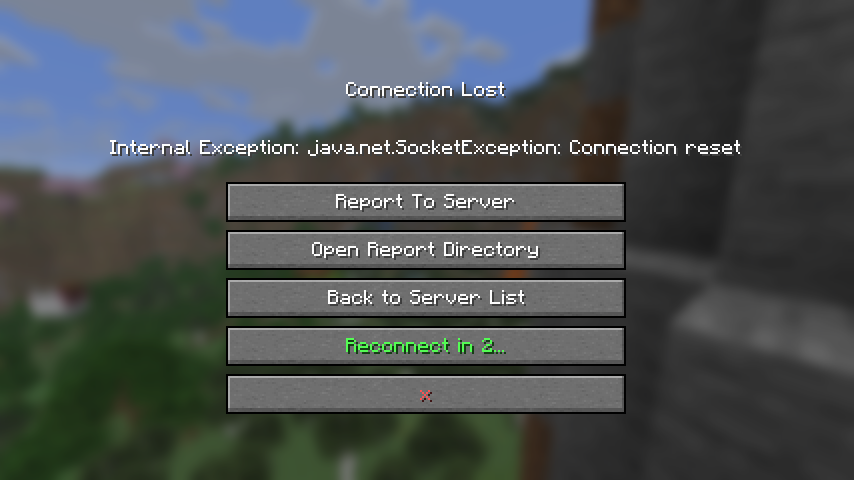 | 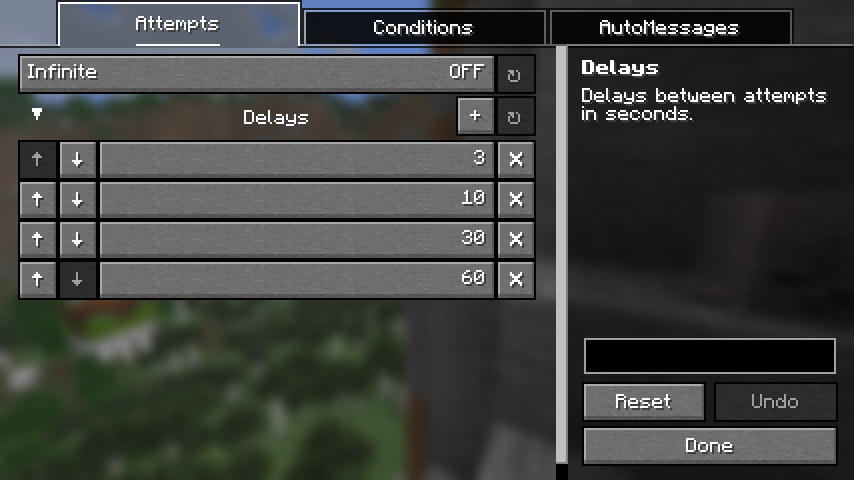 |
Dependencies
Fabric
NeoForge
Credits
AutoReconnect (Reforged) is based on AutoReconnect by Bstn1802 (discontinued), and includes code reused under license.
- For MC versions
1.16.2-1.20.1, refer to the original mod on GitHub, Modrinth or CurseForge. - For MC versions
1.20.2-1.20.6, refer to the original fork on GitHub.
Contact



FAQ
How to install Auto Reconnect Reforged?
Install Fabric for your Minecraft version, download Auto Reconnect Reforged for the same version and loader, put the file into the mods folder and launch the game with the loader profile.
Which Minecraft versions does Auto Reconnect Reforged support?
Auto Reconnect Reforged has builds for Minecraft 1.21–26.3.
Is Auto Reconnect Reforged needed on the server?
Client only — no need to install it on the server
Similar mods
All utility mods →


More mods by this author
 Client Sort↓ 6.6M
 Effect Timer Plus↓ 2.2M
 Command Keys↓ 3.3M
Often needed together
 Mod Menu↓ 162M
 YetAnotherConfigLib (YACL)↓ 136M