
- Loaders
- NeoForge
- Downloads on Modrinth
- 536
- Followers on Modrinth
- 0
- versions
- 2
- Updated
- October 10, 2026Oct 10
- Published
- in 2026
At a glance
Needed both in the game and on the server
A faithful backport of all the modern bundle features to 1.21.1. Includes:
- Updated UI and controls
- Dyed bundles
- Bundles open and display the selected item
- Crafting recipes
- Bundles as loot in village chests
Additional Features
These quality-of-life features are client-configurable and can be disabled individually at any time in the config menu.
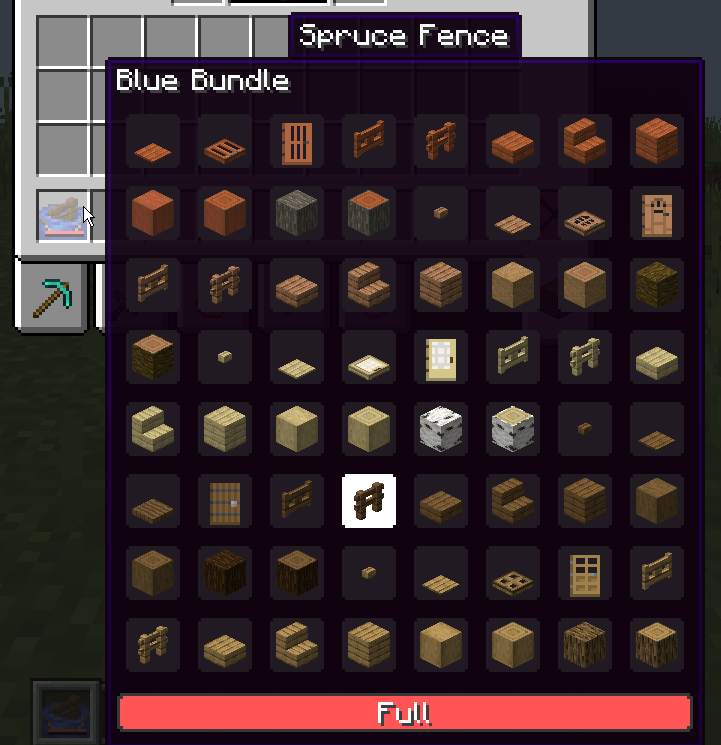
Expanded Bundle Tooltips
Displays every item stored in a bundle, and allows selecting any of them using the scroll wheel.
Bundle Drag Controls
Drag a bundle across inventory slots to insert or remove items.
Notes
- This mod does not require the experimental bundles feature.
- This mod is required on both the client and server.
- Requires NeoForge. Support for other mod loaders is not planned.
Compatibility
Easy Shulker Boxes: Back with the Bundle handles bundle interactions and tooltips by default. To use Easy Shulker Boxes for those features instead, install the Back with the Bundle + Easy Shulker Boxes Compat data pack. Note that while the data pack is enabled, bundles will not open and display the selected item.
Inventory Sorting Mods: Some sorting mods on 1.21.1 do not have support for the newer bundle interactions. If you are experiencing issues while sorting inventories that contain a bundle, please open an issue and include the sorting mod’s name and version. Back with the Bundle already supports Inventory Profiles Next.
FAQ
How to install Back with the Bundle?
Install NeoForge for your Minecraft version, download Back with the Bundle for the same version and loader, put the file into the mods folder and launch the game with the loader profile.
Which Minecraft versions does Back with the Bundle support?
Back with the Bundle has builds for Minecraft 1.21.1.
Is Back with the Bundle needed on the server?
Needed in the game and on the server


