
- Loaders
- FabricNeoForgeForgeQuilt
- Downloads on Modrinth
- 2.5K
- Followers on Modrinth
- 1
- versions
- 6
- Updated
- June 29, 2026Jun 29
- Published
- in 2026
At a glance
Install in the game only; not needed on the server
Better Brightness Setup
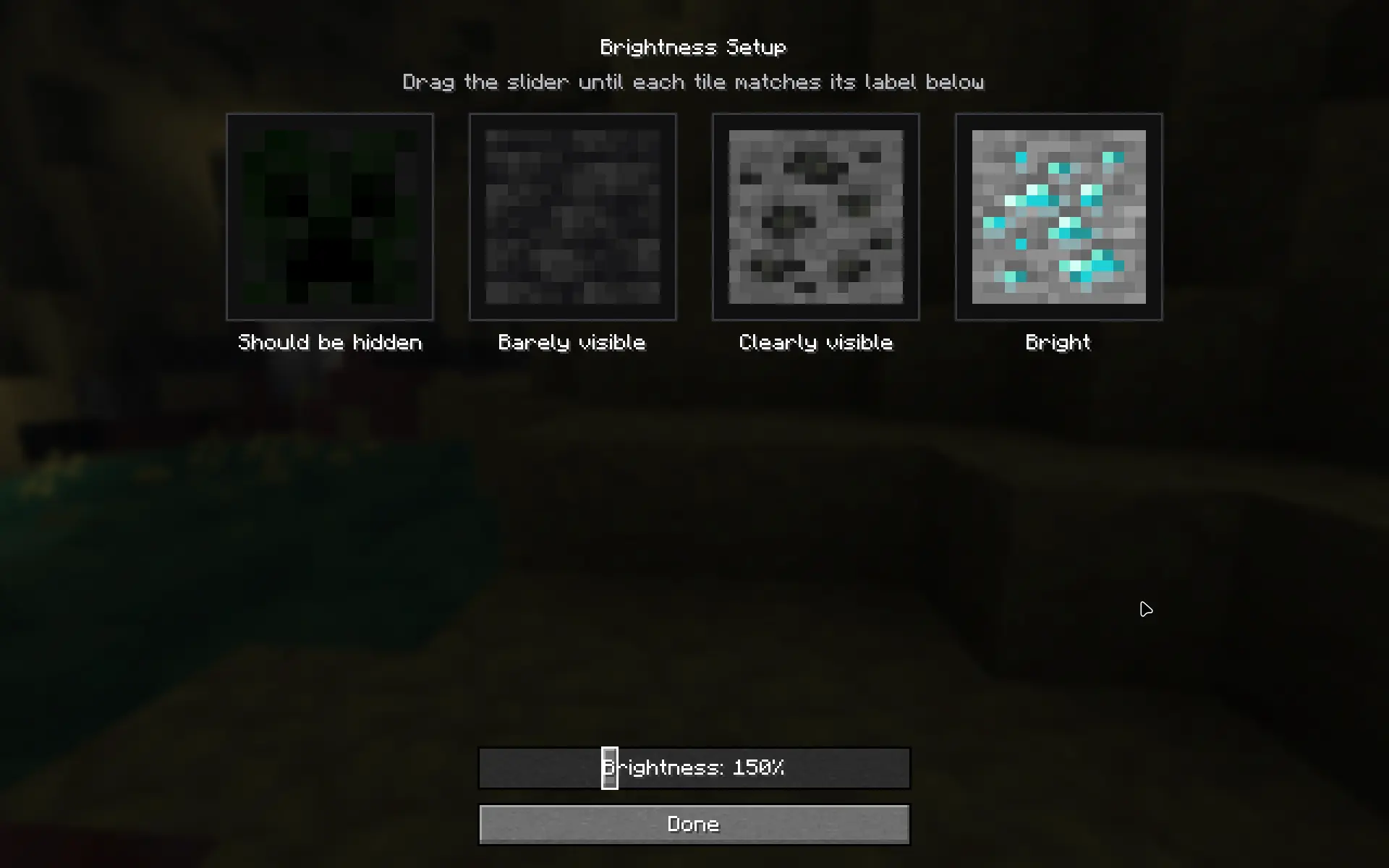
Vanilla Minecraft gives you a single brightness slider with no preview, so you end up setting it blind. Too dark and caves are a black void, too bright and everything looks flat and washed out. This mod adds a real setup screen so you can see what you're actually doing.
What it does
The setup screen shows four tiles: a creeper in the dark, deepslate, coal ore and diamond ore, each at a different light level. As you drag the slider they're lit with Minecraft's real lightmap gamma curve (the same one the game uses), so they brighten and darken exactly like those blocks would down in a cave.
So you just set the slider until the creeper stays hidden but the diamond ore is still clearly visible, and you've got a brightness that fits your screen instead of a guess.
A few other things it does:
- Opens once on a fresh install, after Minecraft's own onboarding/accessibility screens.
- Can be reopened any time: in Video Settings the gamma slider is swapped for a "Setup Brightness" button.
- Works with Sodium - the calibration icons show up inline under its own brightness slider
- Lets you go past vanilla's 100% cap. A config option (in the mod list) raises the max up to 500% for dark monitors, and it sticks across restarts.
- Is translated into every Minecraft language (the major ones checked by hand), plus Pirate, LOLCAT and upside-down.
Compatibility
Client-side only, so it's fine to join any server with it. Runs on Fabric, Quilt, Forge and NeoForge. Requires Cloth Config. Optionally uses Mod Menu (config button on Fabric/Quilt) and Sodium (inline icons).
FAQ
How to install better brightness setup?
Install Fabric for your Minecraft version, download better brightness setup for the same version and loader, put the file into the mods folder and launch the game with the loader profile.
Which Minecraft versions does better brightness setup support?
better brightness setup has builds for Minecraft 1.20.1, 1.21.11, 26.2.
Is better brightness setup needed on the server?
Client only — no need to install it on the server
Similar mods
All utility mods →


More mods by this author
 Echoes Beneath↓ 125
Often needed together
 Cloth Config API↓ 189M
 Architectury API↓ 110M