
Chunkis
Chunkis is a high-performance, sparse storage engine for Minecraft. It slashes world save sizes by only persisting player-made changes on top of chunk snapshots, using a custom binary format (CIS) designed for speed and efficiency.
- Loaders
- Fabric
- Downloads on Modrinth
- 2.3K
- Followers on Modrinth
- 35
- versions
- 28
- Updated
- November 7, 2026Nov 7
- Published
- in 2026
At a glance
Needed both in the game and on the server
Smaller worlds. Lighter saves. Same game.
Your world grows with every area you explore. Chunkis gives Minecraft a different way to store those chunks: CIS, a compact format designed for safe, predictable saving and loading.
It doesn't add blocks, change recipes, or alter rendering. Your world still plays like Minecraft.
What Chunkis does
- Stores chunks compactly, using space-efficient region files.
- Saves in the background, moving encoding and writing to worker threads.
- Caches recently unloaded chunks, helping when you return to an area.
- Preserves more than blocks, including block entities, entities, structures, biomes, light, and pending ticks.
- Protects unreadable entries by refusing to overwrite a chunk that failed to decode.
- Migrates existing singleplayer worlds when you open them.
Performance
In one unpinned test, Chunkis used 31% less disk space and 26% less retained heap than vanilla storage. Results were mixed: tick p99 and reload latency were lower, while tick p50, tick p90, and unload p50 were higher (This is an intetional design to spread the load so the game might run slightly slower on avg but feels overall more consistent).
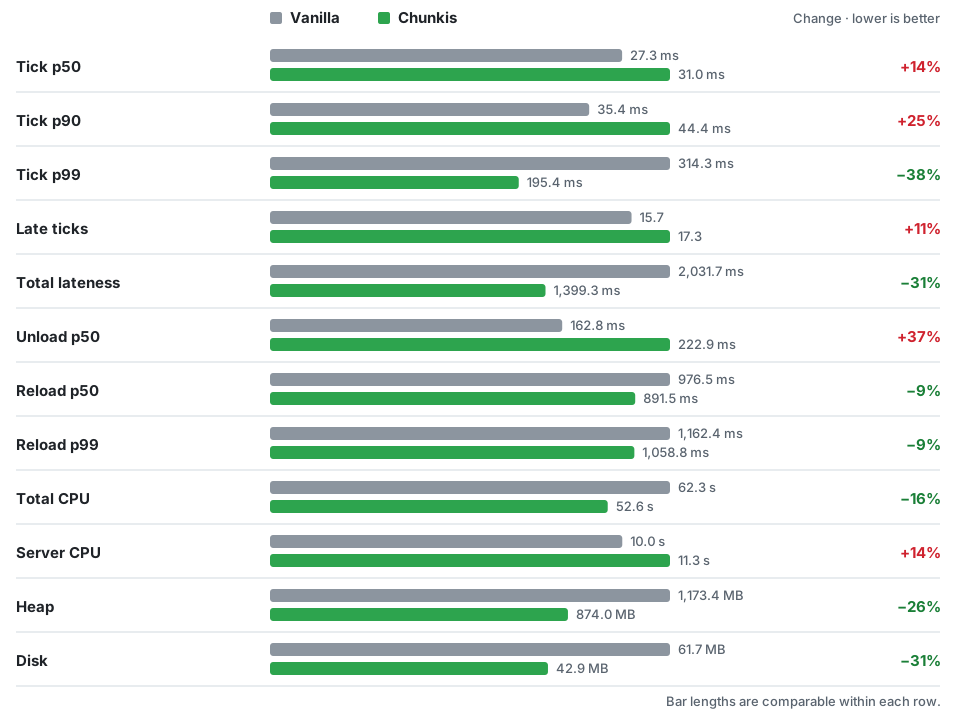
The test unloaded, reloaded, edited, and saved a 64 × 64 chunk area of natural terrain. Each result is the average of three alternating runs per side. The machine had a Ryzen 7 5700X at 4.6 GHz and 32 GB DDR4-3600 RAM. Vanilla storage was tested with Chunkis still loaded; disk was measured before shutdown compaction. Your results will vary with your world, hardware, and other mods.
See the full results · How the test works
Install
Requires: Minecraft 1.21.11, Java 21+, Fabric Loader 0.16.5+, and Fabric API.
- Back up your world and keep the backup somewhere safe.
- Install Fabric Loader and Fabric API, then put the Chunkis
.jarin your.minecraft/modsfolder. - Launch with the Fabric profile. An existing singleplayer world will migrate when opened.
Migration is one-way. Removing Chunkis does not turn a CIS world back into a vanilla save. To go back, restore the backup you made before migration.
Chunkis is beta software: try it on a copy or new world first, restart it, and check your blocks, chests, entities, and dimensions before relying on it.
Compatibility
- Singleplayer and LAN: supported.
- Dedicated servers: not tested yet; existing-world migration is not available on dedicated servers.
- Other mods and tools: test combinations on a copy, especially anything that reads or writes vanilla
.mcafiles directly or changes chunk saving and loading.
Questions?
Will every world be smaller? Not necessarily. Savings depend on terrain, builds, entities, and installed mods.
Will it improve FPS? Chunkis targets storage, not rendering. Its effect on frame rate and tick performance depends on the workload.
Can I use an existing world? Yes, in singleplayer. Back it up first and keep the backup if you may want to return to vanilla.
Found a problem? Open an issue with your Minecraft and Fabric versions, mod list, reproduction steps, and latest.log (plus a crash report if available).
FAQ
How to install Chunkis?
Install Fabric for your Minecraft version, download Chunkis for the same version and loader, put the file into the mods folder and launch the game with the loader profile.
Which Minecraft versions does Chunkis support?
Chunkis has builds for Minecraft 1.21.1, 1.21.11, 26.1.2–26.3.
Is Chunkis needed on the server?
Needed in the game and on the server
Similar mods
All optimization mods →


Often needed together
 Fabric API↓ 284M