
CraftcloudClient
A lightweight Fabric client-side mod for Minecraft 1.21.11 — a clean glass-themed HUD, PvP particle cleanup, and safe performance tweaks, all from one in-game menu.
FabricForge
- Loaders
- FabricForge
- Downloads on Modrinth
- 1.3K
- Followers on Modrinth
- 2
- versions
- 21
- Updated
- October 6, 2026Oct 6
- Published
- in 2026
Settings Page — A Glass alpha Client settings page · swipe
At a glance
Runs on Fabric and Forge
For Minecraft 1.8.9, 1.21.9–26.2
Client only — no need to install it on the server
Latest version — 1.1.6 from October 6, 2026
Requires Fabric API
License Apache-2.0 — free
Where it's neededGame versions1.8.9, 1.21.9–26.2
In gamerequiredOn servernot needed
Install in the game only; not needed on the server

Disclaimer: This is a legitimate Minecraft client, not a cheat client not design to make change packet or unfair gameplay
List Feature
List Feature
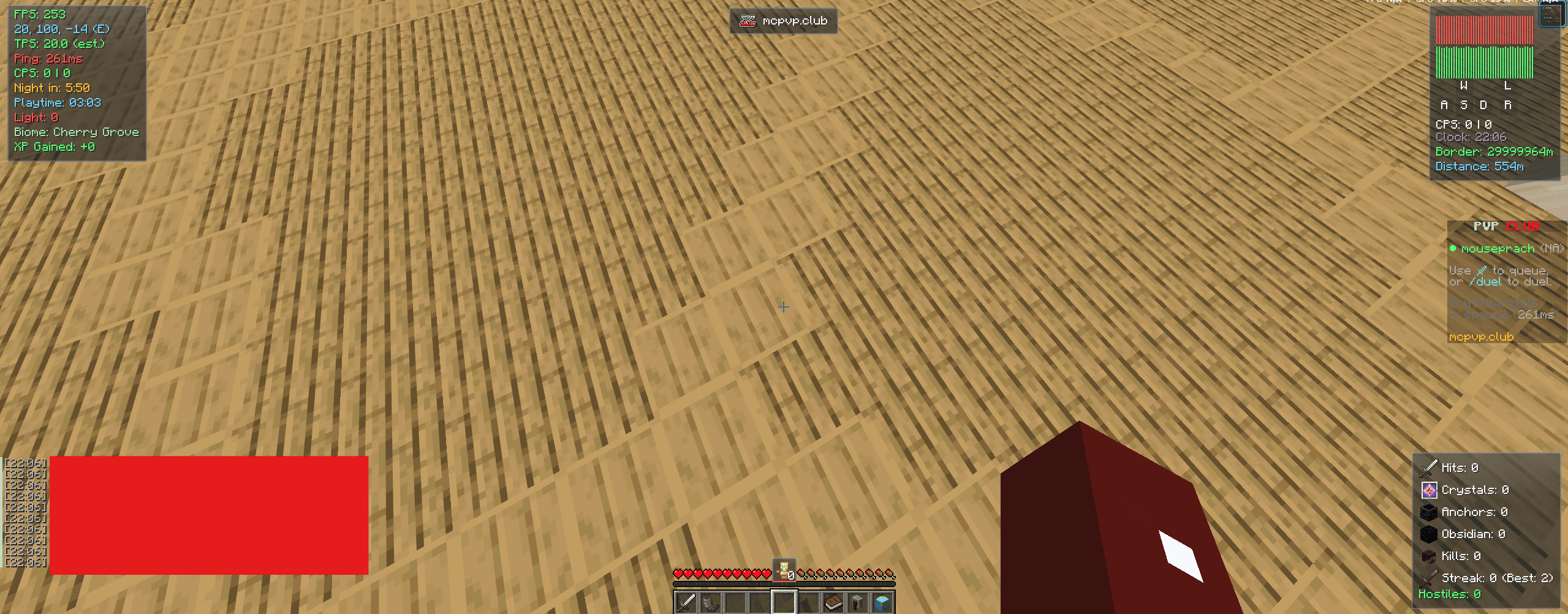
- FPS, TPS (estimate), Ping, Ping Graph, Status Graph, and CPS counters
- Coordinates, Clock (12/24-hour), Biome, Light Level, World Border Distance, and Playtime displays
- Armor Durability display with a low-durability warning
- Stats HUD — hits, crystals, anchors, obsidian, and kills, pulled from the Stats tab tracker below
- Hostile Mob Counter, Distance Traveled, and XP Gained trackers
- Combat Timer, plus optional Low Health and Hunger warnings
- Totem Counter, anchored just above the hotbar
- Kill Streak tracker (current streak + personal best)
- Keystrokes display
- Waypoint HUD card and a compass-style Waypoint Navigator strip pointing toward your nearest waypoint
- Server Banner module showing the current server's icon/name
- Optional Hide Boss Bar and Chat Timestamps
- Each element's corner position is configurable independently (Top-Left / Top-Right / Bottom-Left / Bottom-Right), and most can be freely dragged via the dedicated Edit HUD Layout screen
- Optional glass background for a cleaner look
Stats Tracking
- Persistent counters for Hits, End Crystals, Respawn Anchors, Obsidian, and Kills, viewable in their own Stats tab
- Independent reset options for all-time stats and for your best Kill Streak
PvP & Combat
- Hide Crystal Particles — removes end crystal explosion particles for a clearer view during crystal PvP
- Hide Totem Particles — removes the totem-of-undying burst effect
- Hit Marker — a small crosshair pulse (with optional sound) when your attack connects
- Say GG keybind — sends a quick "gg" in chat, with a built-in cooldown to prevent accidental spam
- Purely visual/audio and locally-triggered — no packet or gameplay changes, safe on any server
Waypoints
- Drop a waypoint anywhere with a keybind, or let the client auto-drop one whenever you die
- Death markers are automatically capped so your file doesn't grow forever; manual waypoints are never trimmed
- Waypoints are per-dimension aware and saved locally to
config/craftcloudclient_waypoints.json
Quality of Life
- Hold-to-Zoom — a spyglass-style camera zoom on a keybind, using the vanilla FOV setting (restores automatically on release)
- Full-Bright toggle — a one-click shortcut for vanilla's own Brightness/Gamma slider, remembers your previous setting
- Auto Sprint and Hide Players toggles, each with their own keybind
- Discord Rich Presence — shows your current server/status on your Discord profile while playing
- In-game Update Checker — a banner lets you know when a new version is available
Performance
- FPS Boost preset: capped render distance, reduced entity distance, Fast graphics, no entity shadows, no ambient occlusion
- Reduce Particles
- Disable Clouds
- Disable Rain
- Smooth FPS Limiter
In-game config menu
- Glass-styled UI, opened with a configurable keybind (default: Right Shift)
- Organized into HUD / PvP / Stats / Waypoints / Performance / Keybinds / Theme / Profiles / About tabs
- Built-in settings search bar to jump straight to a setting by name
- Per-tab On All / Close All bulk toggles
- Config Profiles — save, load, and rename full setting snapshots, so you can swap between setups instantly with no restart
- Multiple accent color themes (Cyan, Violet, Rose, Mint, Amber) that retint the whole menu and HUD instantly
- Legacy Config UI toggle — switch the HUD tab between the newer card-grid layout and the original one-row-per-setting list, if you prefer the classic look
- Optional glass-themed reskin of the title screen and vanilla options menus
- Settings apply live and save automatically to
config/craftcloudclient.json
📋 Requirements
- Minecraft 1.21.9 - 26.2 , 1.8.9
- Fabric Loader Stable version
- Fabric API Latest
- Info 1.8.9 is forge no need to install fabric api
ℹ️ Notes
- TPS is a client-side (vanilla doesn't send real tick timings over the network); it reads a clean 20.0 on singleplayer/LAN.
- All PvP, combat, zoom, and performance options only change what your own client renders or how it applies vanilla settings — nothing here touches gameplay logic, packets, or other players, so it's safe to use on any server.
- Discord Rich Presence runs automatically for the session and currently has no in-menu toggle.
📄 License
Apache 2.0
FAQ
How to install CraftcloudClient?
Install Fabric for your Minecraft version, download CraftcloudClient for the same version and loader, put the file into the mods folder and launch the game with the loader profile.
Which Minecraft versions does CraftcloudClient support?
CraftcloudClient has builds for Minecraft 1.8.9, 1.21.9–26.2.
Is CraftcloudClient needed on the server?
Client only — no need to install it on the server
License and source
Apache License 2.0free to use and share with credit to the author


