
- Loaders
- FabricNeoForgeForge
- Downloads on Modrinth
- 7.2K
- Followers on Modrinth
- 37
- versions
- 6
- Updated
- June 23, 2026Jun 23
- Published
- in 2021
At a glance
Install in the game only; not needed on the server
Damage Tint
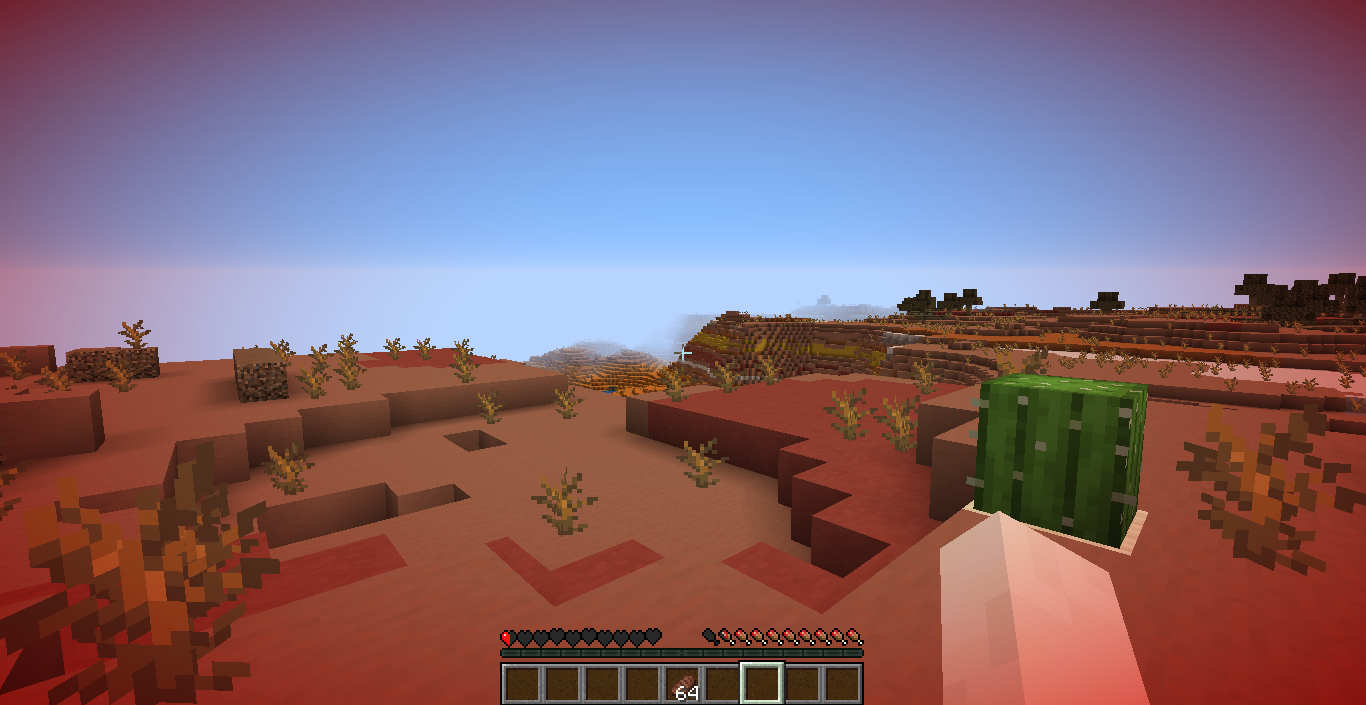





A client-side mod that adds a red vignette around the screen when your health gets low. The lower your health, the stronger the tint becomes.
Commands
/tint: Shows the current configuration.- `/tint :`: Sets the health threshold in HP.
/tint dynamicShows whether Dynamic Mode is enabled./tint dynamic <true|false>: Enables or disables Dynamic Mode./tint reset: Resets all settings to their defaults.
Threshold
The threshold determines when the tint starts appearing.
Examples:
/tint 10: Tint starts at 10 HP (5 hearts)./tint 6: Tint starts at 6 HP (3 hearts).
Dynamic Mode
When enabled, the configured threshold is ignored and your current maximum health is used instead.
Examples:
- 20 max HP (10 hearts): Tint scales from 20 HP down to 0 HP.
- 40 max HP (20 hearts): Tint scales from 40 HP down to 0 HP.
This is useful with mods that increase or decrease your maximum health, as the effect automatically scales with your health pool.
Configuration
Settings are stored in .minecraft/config/damagetint.json. The configuration is global and applies to every world and server.
FAQ
How to install Damage Tint?
Install Fabric for your Minecraft version, download Damage Tint for the same version and loader, put the file into the mods folder and launch the game with the loader profile.
Which Minecraft versions does Damage Tint support?
Damage Tint has builds for Minecraft 1.16.5, 1.17.1, 26.2.
Is Damage Tint needed on the server?
Client only — no need to install it on the server


