
Elementarium
A fully configurable material expansion mod for Minecraft (Perfect for Modpacks)
- Loaders
- NeoForgeForge
- Downloads on Modrinth
- 249
- Followers on Modrinth
- 4
- versions
- 2
- Updated
- August 31, 2026Aug 31
- Published
- in 2026
At a glance
Needed both in the game and on the server
Elementarium
The whole periodic table, real ores with real chemistry, and everything you add works exactly the same way.
Elementarium is a data-driven material library for modpack creators. Out of the box you get all 118 elements as ingots, plates, gears, dusts, fluids and more — plus 60+ real-world ores (magnetite, bauxite, cinnabar, wolframite…) with true chemical compositions, world generation, and a multiblock Mineral Analyzer that can study any ore from any mod. Recipes, tags, loot and a clean consistent look are already wired up.
Need your own alloys or ores? Add them in JSON or KubeJS with a few lines and get the full treatment for free. Don't need something? Turn it off in one config file — every single feature has a switch.
The point is: no two mods shipping three different Steel Plates anymore :)
Highlights
- All 118 elements included by default, fully configurable.
Every material becomes a full set of forms automatically:
- Ingot, Nugget, Block
- Dust, Small Dust, Tiny Dust
- Plate, Double Plate, Rod, Gear, Wire
- Fluids: Molten, Liquid, Gas (each with a fluid block + bucket)
- 60+ real ores — one real mineral per element, placed with geological logic across the Overworld, Nether and End.
- Real chemistry — every mineral carries its true formula (malachite is Cu₂CO₃(OH)₂, not "copper rock").
- Mineral Analyzer — a multiblock scanner that tells you where any ore generates. Works on ores from any mod.
- Recipe unification built in — Almost-Unified-style: duplicate materials across mods resolve to one item, automatically.
- Recipes generated by default — the full compaction web, ore smelting/blasting, everything.
- Cross-mod
c:tags on everything (c:ingots/steel,c:ores/tin,c:raw_materials/tin, …) so your items and other mods' items just work together. - Add your own materials AND ores in seconds — JSON or KubeJS, same result: real items with recipes, tags, models and worldgen.
- Fully modular — disable any material, form, mineral or feature, globally or individually, from one config file.
- JEI built in — element info pages plus every item and recipe in the catalog.
- In-game periodic table — a collectible element browser (default key: P).
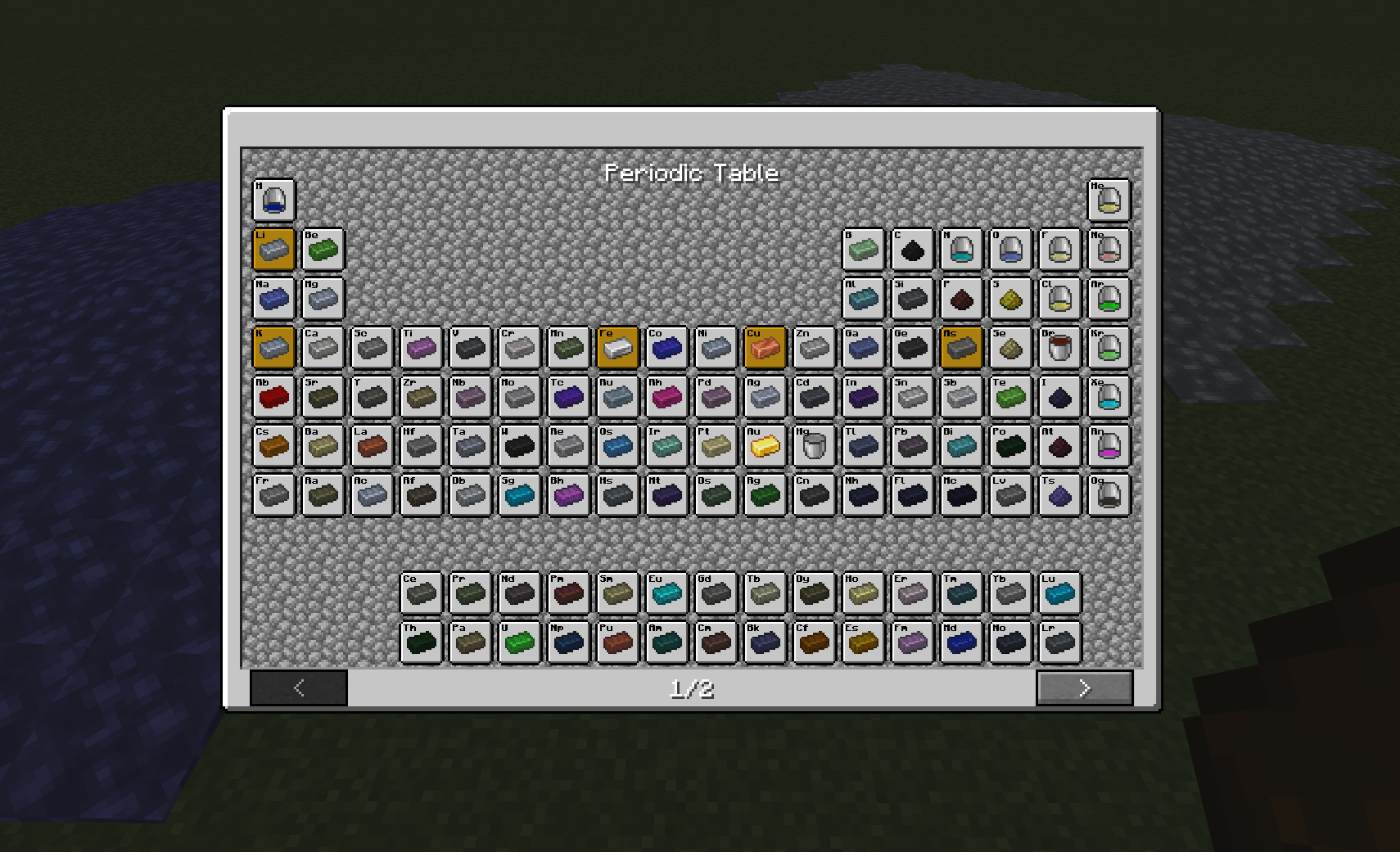
Kinds of Ore — real minerals, real chemistry
You don't mine "Tin Ore" in real life — you mine cassiterite. Elementarium ships 60+ real minerals, one per element, each placed where geology says it belongs:
| Where | What generates there |
|---|---|
| Stone | Common crustal minerals: bauxite, halite, fluorite, cassiterite, quartz, calcite… |
| Deepslate | Deep and dense: chromite, native silver, sperrylite (platinum), uraninite… |
| Nether | The sulfur family only: native sulfur, cinnabar (HgS), stibnite, molybdenite, rheniite — a mineral literally found in volcano fumaroles |
| End | Things you can barely find on Earth: wolframite (tungsten), tantalite, rare-earth minerals (monazite, xenotime…), platinum-group alloys |
Every ore:
- Drops a tinted Raw Mineral (silk touch drops the block, Fortune works) — or drops itself, if you configure it that way.
- Smelts/blasts into its primary element.
- Carries its real chemical formula in the tooltip — and the full composition feeds `elementarium:contains/` tags, ready for byproduct processing.
- Gets baked textures per host rock (stone / deepslate / netherrack / end stone) from a single overlay + your mineral color.
- Generates in the world with per-mineral vein size, count, height range and distribution — all editable.
Name things your way
namingMode: "real"→ Malachite Ore, Raw Cassiterite (immersive)namingMode: "simple"→ Copper Ore, Raw Tin (familiar)renameVanilla: true→ vanilla ores get their real names too: Iron Ore becomes Magnetite Ore, Raw Iron becomes Raw Magnetite (display only — nothing breaks)
Iron, copper, gold, coal and lapis are not duplicated: their minerals exist as rename-only entries so vanilla stays vanilla.
The Mineral Analyzer
Elementarium's single machine — and you can't craft it. Stack a Multiblock Casing with a Lift Post on top and assemble it with the Screw Gun (from Navaronee CoreLib). Breaking it gives your blocks back.
Feed it Forge Energy, insert any ore block from any mod, and it reads the actual world generation data of your instance:
- Which dimensions the ore generates in
- Height range (real Y values, resolved from the actual placed features)
- Vein density
- Chemical formula (for Elementarium minerals)
- A free-text description — written by you, the pack creator, in
config/elementarium/descriptions.json, per block id or per tag. Document your whole pack's ores in one file.
No hardcoded list: if a mod adds an ore, the Analyzer can analyze it.
Recipe unification
Elementarium is the material backbone of your pack. When two mods both add a Tin Ingot, recipes across the pack are rewritten at load time so that:
- Outputs resolve to one dominant item (Elementarium's, or vanilla for iron/gold/copper)
- Inputs widen to the
c:tag, so every equivalent item stays usable - Duplicate recipes are removed, and non-dominant duplicates are hidden from JEI
It understands machine recipe formats generically (validated with Mekanism, Immersive Engineering and Create) and it's all configurable — teach it new recipe fields, exclude recipe types, or turn it off entirely.
Add a material
Ready-made templates ship with the mod. On first launch, look in
config/elementarium/examples/forbronze.jsonandmaterial.js.
With JSON — no other mods required
Drop any *.json file into config/elementarium/:
{
  "materials": [
    {
      "name": "bronze",
      "displayName": "Bronze",
      "color": "#CD7F32",
      "style": "metallic",
      "state": "solid",
      "forms": ["ingot", "nugget", "block", "dust", "plate", "rod", "gear", "wire", "molten"]
    }
  ]
}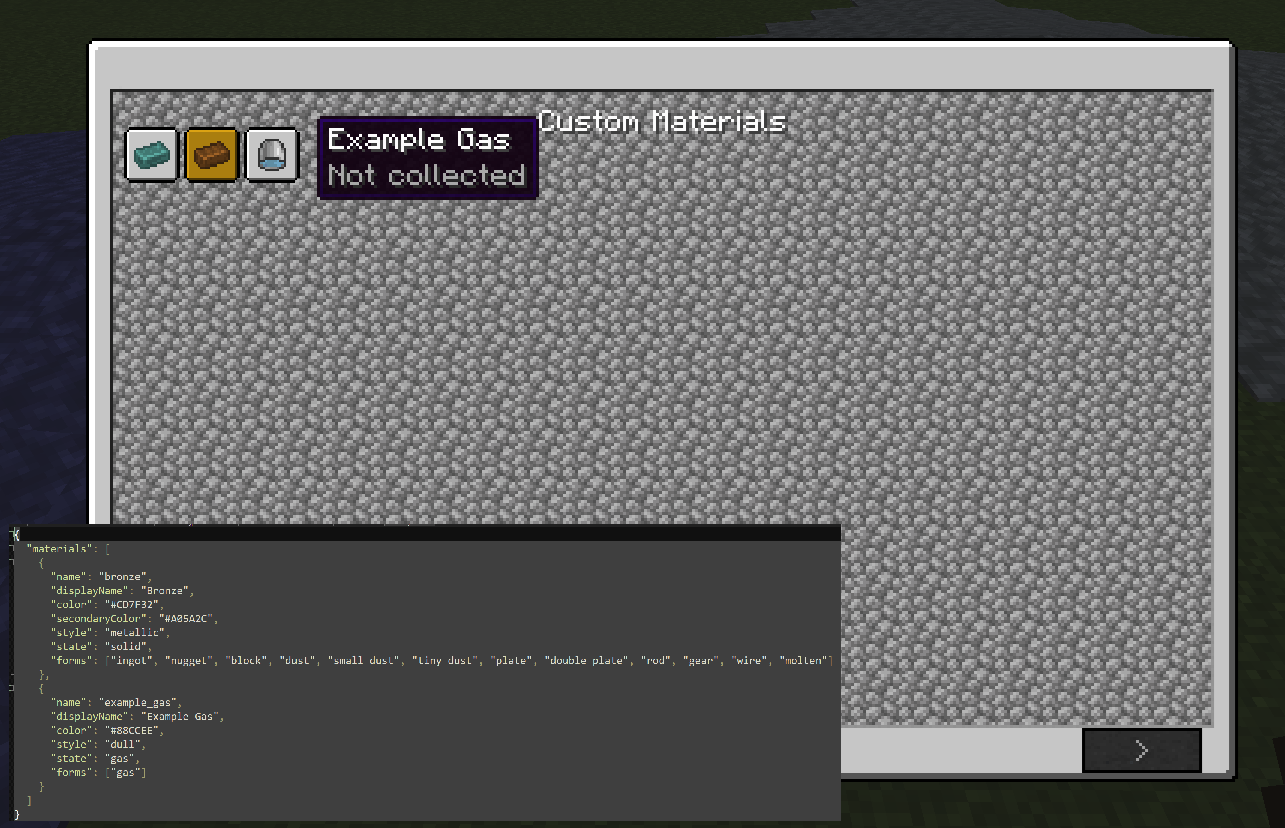
That's it — restart and you have tinted Bronze items, a Bronze block, a molten Bronze fluid + bucket, all the compaction recipes and every c: tag.
| Field | What it does |
|---|---|
name | Lowercase id, unique. Required. |
forms | Which forms to generate (see the list above). Required. |
color | Tint as #RRGGBB. |
style | metallic, shiny, dull (or your own texture folder). |
state | solid, liquid or gas. |
displayName | Shown in-game (optional — derived from name otherwise). |
symbol | Chemical symbol, shown in JEI (optional). |
atomicNumber | Used for ordering (optional). |
secondaryColor | Overlay/secondary tint (optional). |
With KubeJS — same thing, in a script
Put this in kubejs/startup_scripts/:
Elementarium.create('adamantium')
    .displayName('Adamantium')
    .color('#7BE3D8')
    .style('shiny')
    .state('solid')
    .forms('ingot', 'nugget', 'block', 'dust', 'plate', 'rod', 'gear', 'wire', 'molten')
    .register()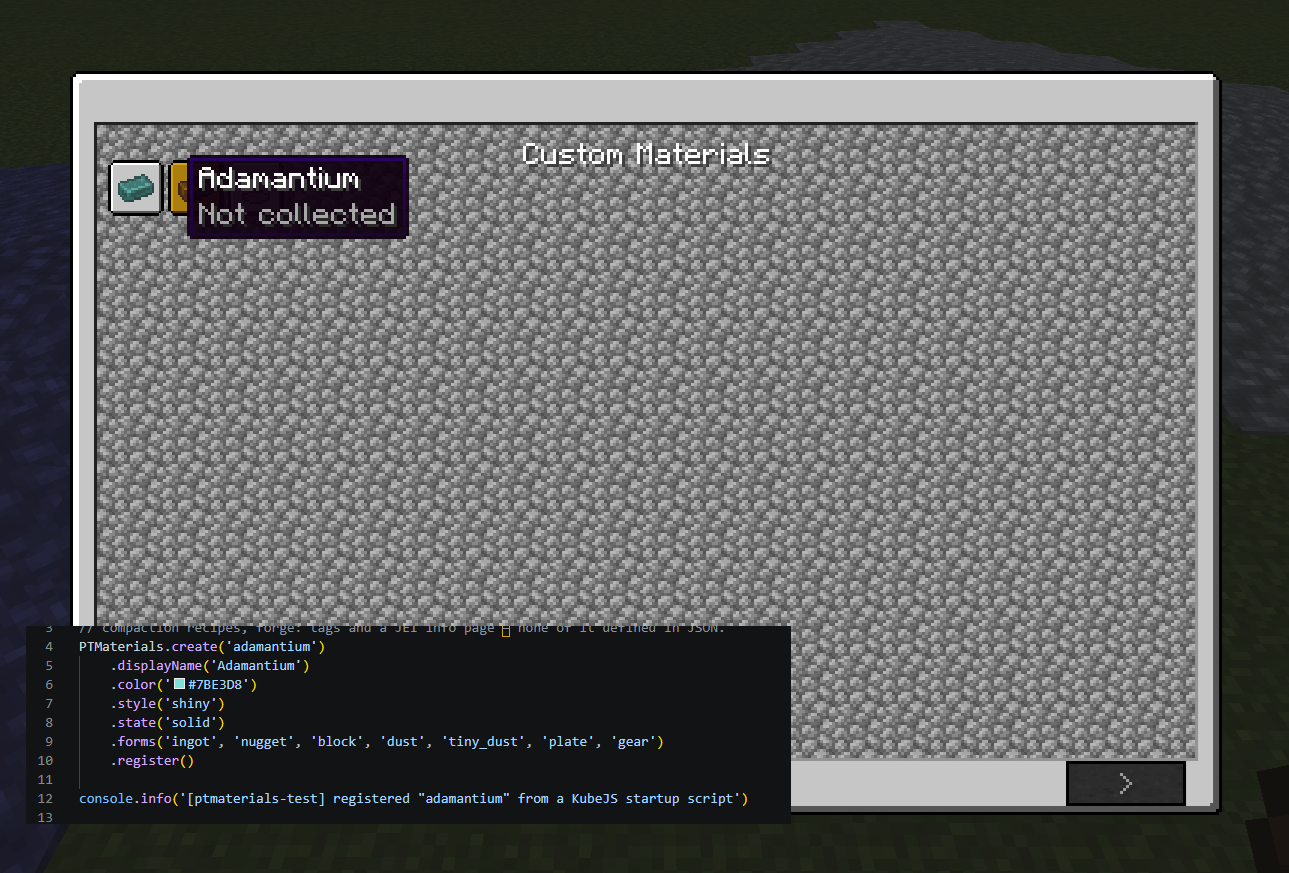
Scripted materials merge on top of JSON, so a script can override a default.
Add an ore
Same philosophy, same two ways. Templates ship in config/elementarium/minerals/examples/ (ilmenite.json and ore.js).
With JSON
Drop any *.json file into config/elementarium/minerals/:
{
  "minerals": [
    {
      "name": "ilmenite",
      "displayName": "Ilmenite",
      "formula": "FeTiO₃",
      "composition": { "titanium": 1, "iron": 1, "oxygen": 3 },
      "oreStyle": "normal3",
      "rawStyle": "raw_1",
      "color": "#4A4E55",
      "variants": ["stone", "deepslate"],
      "miningTier": "iron",
      "drop": "raw",
      "worldgen": { "veinSize": 9, "veinsPerChunk": 8, "minY": -64, "maxY": 112, "distribution": "triangle" }
    }
  ]
}
You get: ore blocks with baked textures for each host rock, a tinted Raw Ilmenite, loot with silk touch + Fortune, smelting into titanium, all the c:ores / c:raw_materials / contains tags, and world generation — from one JSON entry.
| Field | What it does |
|---|---|
composition | Real chemical make-up, element → atom count. First element = smelting target. |
formula | Display formula for the tooltip. |
oreStyle | Ore overlay template: dense, gems, gems2, gems3, lapis, lignite, normal–normal4, sandy. |
rawStyle | Raw chunk look: raw_1, raw_2, raw_3. |
variants | Host rocks: stone, deepslate, nether, end. |
drop | raw (drops a Raw item) or self (the ore drops itself and is what you smelt). |
miningTier | wood, stone, iron, diamond. |
worldgen | Vein size, veins per chunk, Y range, triangle or uniform distribution. |
With KubeJS
Elementarium.createOre('ilmenite')
    .displayName('Ilmenite')
    .formula('FeTiO₃')
    .component('titanium', 1)   // first component = smelting target
    .component('iron', 1)
    .component('oxygen', 3)
    .color('#4A4E55')
    .oreStyle('normal3')
    .drop('raw')
    .variants('stone', 'deepslate')
    .miningTier('iron')
    .worldgen(9, 8, -64, 112)
    .register()
Modularity — everything has a switch
One file: config/elementarium/config.json. No need to edit the datasets.
{
  "disabledMaterials": ["titanium"],
  "disabledForms": ["wire"],
  "materials": { "iron": { "disabledForms": ["gear"] } },

  "ores": {
    "enabled": true,
    "namingMode": "real",
    "renameVanilla": false,
    "recipes": true,
    "worldgen": { "enabled": true },
    "disabledMinerals": ["lorandite"],
    "minerals": { "cassiterite": { "veinsPerChunk": 4, "disabledVariants": ["deepslate"] } }
  },

  "analyzer": { "enabled": true, "energyCapacity": 80000, "energyPerAnalysis": 4000 },

  "unify": { "enabled": true }
}- Disable whole materials, forms (globally or per material), minerals, ore variants, worldgen (globally or per mineral), the analyzer, the unifier, ore recipes — anything.
- Override any mineral's vein size, count and height without touching the dataset.
- Removed content disappears cleanly — items, recipes, tags, loot, worldgen and periodic-table entries all go together, no leftovers.
- The full mineral dataset itself lives in
config/elementarium/minerals/minerals.json— it's the default, and it's yours to edit.
Tweak the recipes
Every Elementarium item is a normal, c:-tagged item, so CraftTweaker and KubeJS can retweak the generated recipes with zero special support:
// CraftTweaker: replace the default block recipe
recipes.remove(<item:elementarium:steel_block>);
Want to create new materials or ores from a script? Use JSON or KubeJS (above). CraftTweaker is for tweaking existing content, since its scripts run after the game's registries are built.
Built for modpacks
Most tech mods reinvent the same basic resources — duplicate items, clashing textures, incompatible IDs. Elementarium is a shared material foundation: one naming scheme, one look, one set of tags, one unifier for your whole pack. Define materials once, keep everything consistent, and let mods speak a common language instead of each rolling their own Copper Gear.
Compatibility
| Mod | What it adds |
|---|---|
| Navaronee CoreLib | Required. Multiblock assembly (Screw Gun) and the recipe-load hook the unifier uses. |
| JEI | Optional. Element info pages + full item/recipe catalog. |
| KubeJS | Optional. Create materials and ores from startup scripts. |
| CraftTweaker | Optional. Tweak the generated recipes/tags out of the box. |
| Mekanism / Immersive Engineering / Create | Optional. Their machine recipes are unified automatically. |
Note for 1.20.1 (legacy): the old Forge 1.20.1 version uses the
ptmaterials:id andforge:tags, and does not include ores, worldgen or the Mineral Analyzer. All new development targets NeoForge 1.21.1 with theelementarium:id andc:tags.
License
You are free to include Elementarium in any public or private modpack without asking for permission.
The only requirement is that you provide proper credit by linking back to this project page.
If you'd like to further support the project, I'd greatly appreciate including a link to my YouTube channel as well. https://www.youtube.com/@Navaronee It helps the project grow and supports the development of future mods.
Thank you for your support! ❤️
MIT.
FAQ
How to install Elementarium?
Install NeoForge for your Minecraft version, download Elementarium for the same version and loader, put the file into the mods folder and launch the game with the loader profile.
Which Minecraft versions does Elementarium support?
Elementarium has builds for Minecraft 1.20.1–1.20.6, 1.21.1.
Is Elementarium needed on the server?
Needed in the game and on the server


