
- Loaders
- Fabric
- Downloads on Modrinth
- 86.8K
- Followers on Modrinth
- 69
- versions
- 8
- Updated
- October 1, 2026Oct 1
- Published
- in 2022
At a glance
Install in the game only; not needed on the server
Flat Lighting 💡
Adds a new video setting to make lighting flatter. It does this by removing the shading differences between the sides and top of blocks, which gives the game's lighting a softer or flat appearance.
The effect is similar to the Old Lighting setting from Optifine's internal shaders.
Comparison 🎨
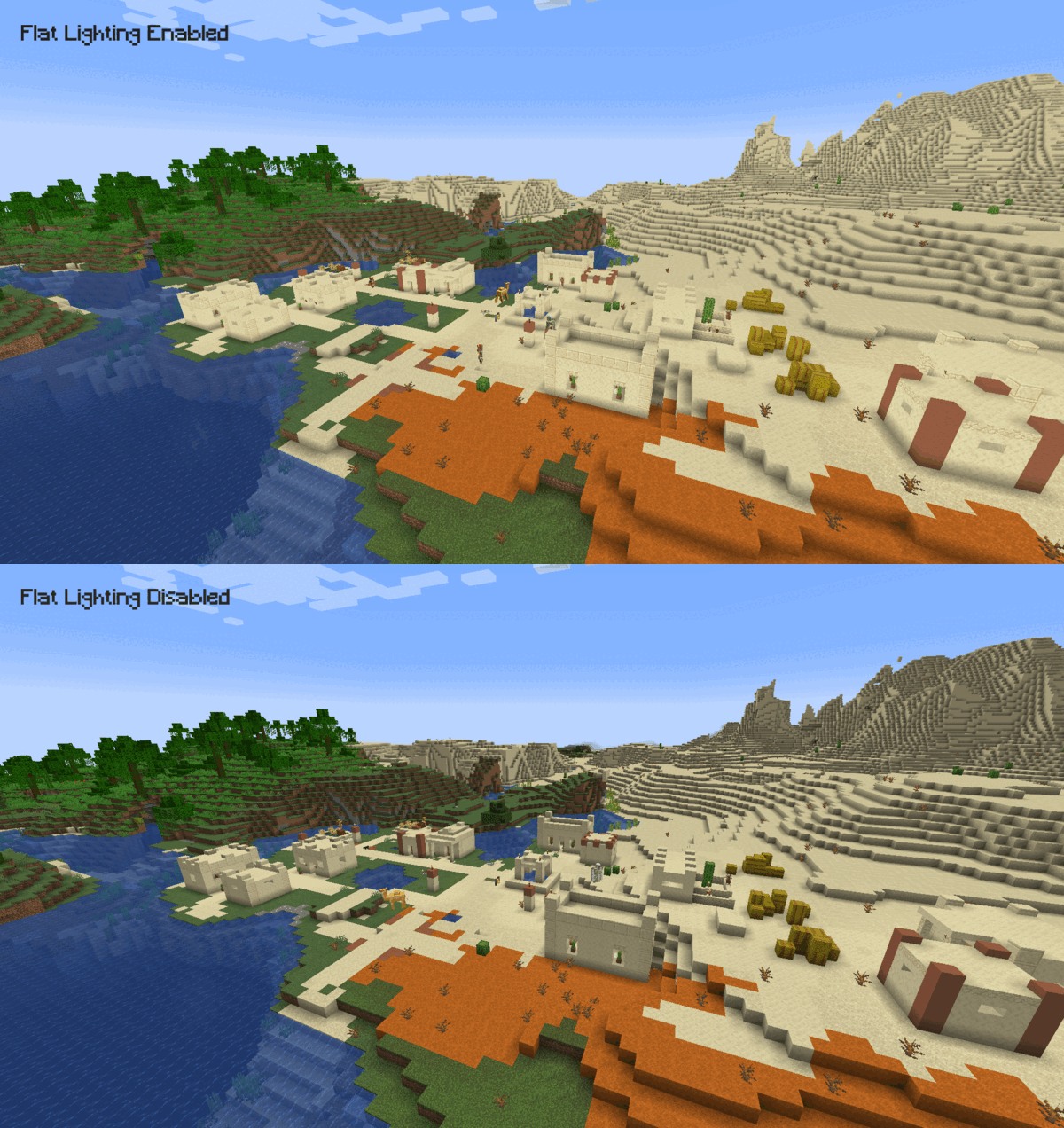
Usage 👤
After installing the mod, navigate to the game's video settings and set Cardinal Lighting to off to make the lighting flatter. Keeping the setting on will keep lighting identical to the vanilla game. 
Dependencies & Compatibility 🔌
This mod has no dependencies. It is compatible with Fabric API, Sodium and Iris.
FAQ
How to install Flat Lighting?
Install Fabric for your Minecraft version, download Flat Lighting for the same version and loader, put the file into the mods folder and launch the game with the loader profile.
Which Minecraft versions does Flat Lighting support?
Flat Lighting has builds for Minecraft 1.18.2–26.3.
Is Flat Lighting needed on the server?
Client only — no need to install it on the server


