
- Loaders
- FabricNeoForgeQuilt
- Downloads on Modrinth
- 1.9M
- Followers on Modrinth
- 341
- versions
- 34
- Updated
- October 22, 2026Oct 22
- Published
- in 2022
At a glance
Install in the game only; not needed on the server
Your one-drop-shop for everything Consumable
Quite a few food items grant the player bonuses in the form of status effects. These effects, however, are never listed ingame. Which is a nuisance, especially in modded scenarios, where the player is not acquainted with all food options and their effects.
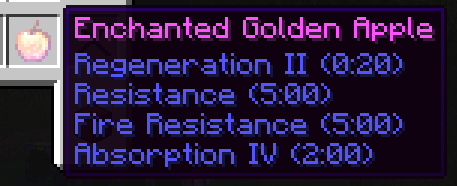
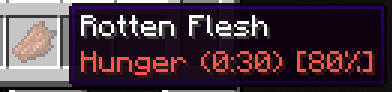
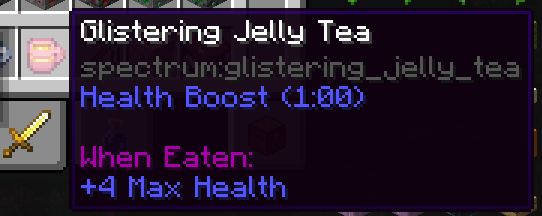
With Food Effect Tooltips all effects are shown in the items tooltip!
- fully client side
- handles effects that only get applied with a % chance
- shows stat changes for effects
- compatible with other mods that display food information, like AppleSkin
- also lists effects of items that clear status effects (like Milk), items that teleport (like Chrorus Fruit), Mushromm Stew and items that apply effects on death (like Totems of Undying)
- Fully compatible with other mods
How it works
The mod reads components of hovered items, parses their data and displays them in the tooltip. As of v2.0.0 FoodEffectTooltips handles:
consume_componentapply_effectsremove_effectsclear_all_effectsteleport_randomly
death_protectionsuspicious_stew_effects
FAQ
How to install Food Effect Tooltips [Fabric / NeoForge]?
Install Fabric for your Minecraft version, download Food Effect Tooltips [Fabric / NeoForge] for the same version and loader, put the file into the mods folder and launch the game with the loader profile.
Which Minecraft versions does Food Effect Tooltips [Fabric / NeoForge] support?
Food Effect Tooltips [Fabric / NeoForge] has builds for Minecraft 1.20.6–1.21.1, 1.21.3–1.21.5, 1.21.8, 1.21.11–26.3 ….
Is Food Effect Tooltips [Fabric / NeoForge] needed on the server?
Client only — no need to install it on the server


