
- Loaders
- Fabric
- Downloads on Modrinth
- 2.5K
- Followers on Modrinth
- 0
- versions
- 23
- Updated
- October 19, 2026Oct 19
- Published
- in 2026
Grave Close-up · swipe
At a glance
Runs on Fabric
For Minecraft 26.1–26.3
Server only — players don't need to install it
Latest version — 1.1.5+26.2 from October 19, 2026
License GPL-3.0-or-later — free
Where it's neededGame versions26.1–26.3
In gamenot neededOn serverrequired
Install on the server only; players don't need it
Graves
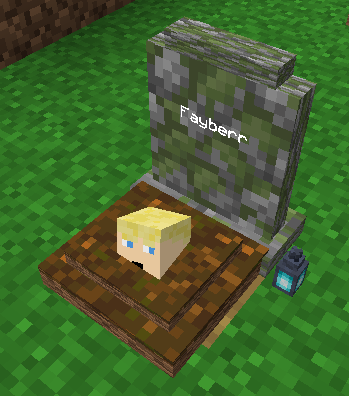
Die and a grave marks the spot, holding your inventory and XP so you can come back and recover everything instead of losing it to a five-minute timer.
Features
- A grave spawns where you die (with keepInventory off), holding your items and XP.
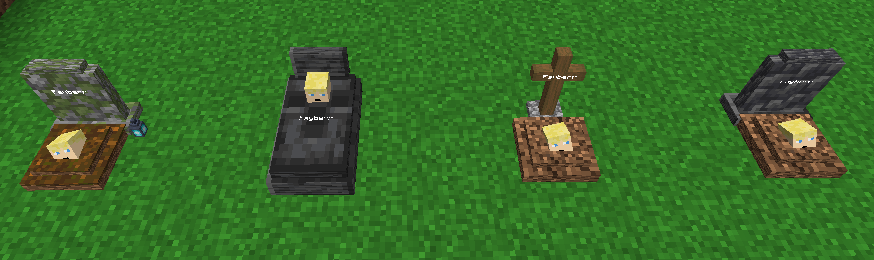
- Four grave looks: a deepslate headstone, a wooden cross, a tombstone, or a mossy soulgrave. One is picked at random, each can be turned off.
- Recover everything at once: items return to their original slots, XP is paid back, anything that does not fit drops on the ground.
- Graves are owner-only by default; robbing can be turned on to let anyone take the loot.
- Grave Keys let admins open any grave.
- Graves persist across restarts, and ones that fall into the void get a cobblestone platform to rest on.
Commands
/graves listlists your active graves./graves locatepoints you to your nearest grave./graves keyhands you a Grave Key (operator level 2)./graves configshows or changes the config (operator level 2).
Notes
- The config lives in
config/graves.json, changed with/graves configor from the Mods screen in singleplayer. That GUI needs Mod Menu and Cloth Config, but they are optional and only needed for the GUI. - Server-side. Clients do not need the mod installed.
Inspired by the classic Vanilla Tweaks Graves datapack.
FAQ
How to install Graves?
Install Fabric for your Minecraft version, download Graves for the same version and loader, put the file into the mods folder and launch the game with the loader profile.
Which Minecraft versions does Graves support?
Graves has builds for Minecraft 26.1–26.3.
Is Graves needed on the server?
Server only — players don't need to install it
License and source
GNU General Public License v3.0 or laterfree to use and share; changes to the mod itself must be published under the same license
Similar mods
All utility mods →


More mods by this author
 Infinite Trading↓ 3.9K
 Villager Pickup↓ 3.3K
 Timber↓ 1.9K