
- Loaders
- Fabric
- Downloads on Modrinth
- 2.2K
- Followers on Modrinth
- 43
- versions
- 11
- Updated
- September 11, 2026Sep 11
- Published
- in 2025
At a glance
Install in the game only; not needed on the server




📑 Description
A Simple Fabric Mod that allows you to record the game GUI separately, i.e. having a transparent background! All records are saved to the .minecraft/gui-recorder folder. You can also save last recording frames for manual processing, for this enable "Create Backup For Last Frames" in the mod configuration screen. After finishing recording, last frames will be copied to .minecraft/gui-recorder-latest-backup.
You can also:
- Disable some GUI elements from being captured
- Crop rendering area
- Take screenshots
- Record in any formats (which allow FFMpeg)
And yeah, it requires FFMpeg installed!
📹 Showcase

Result Webp (Compressed for this readme)

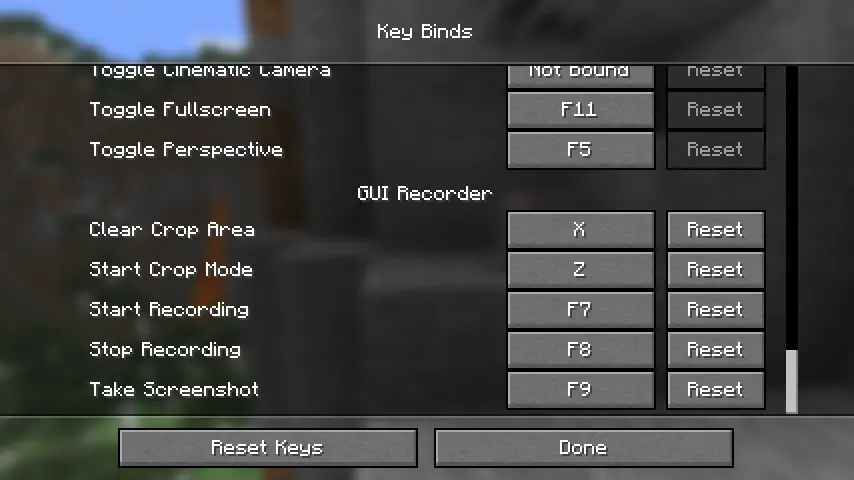
🎮 Keybinds
To use this mod you will need to bind some keys, just keeping you informed 😉
FAQ
How to install GUI Recorder?
Install Fabric for your Minecraft version, download GUI Recorder for the same version and loader, put the file into the mods folder and launch the game with the loader profile.
Which Minecraft versions does GUI Recorder support?
GUI Recorder has builds for Minecraft 1.20.1, 1.21–1.21.8, 1.21.11.
Is GUI Recorder needed on the server?
Client only — no need to install it on the server


