
IconButtons API
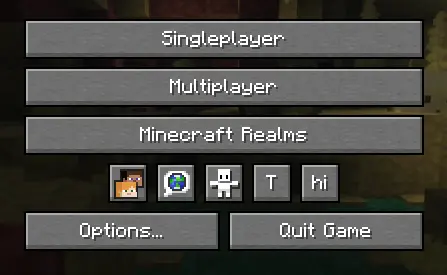
API for easily adding buttons to the Icon Buttons row in the title menu and pause menu
- Loaders
- Fabric
- Downloads on Modrinth
- 2.4K
- Followers on Modrinth
- 2
- versions
- 3
- Updated
- September 19, 2026Sep 19
- Published
- in 2026
At a glance
Install in the game only; not needed on the server
IconButtons API
API for easily adding buttons to the Icon Buttons row in the title menu and pause menu
Implementation
1. Configure build.gradle
repositories {
    maven {
        url "https://api.modrinth.com/maven"
    }
}
dependencies {
    implementation "maven.modrinth:iconbuttonsapi:${project.iconbuttonsapi_version}+mc-${project.minecraft_version}"
}
2. Configure gradle.properties
Add the following lines to your gradle.properties file and replace the values with your target versions:
iconbuttonsapi_version=1.0.03. Configure fabric.mod.json
Don't forget to declare the dependency in your fabric.mod.json so Fabric Loader can verify it at runtime:
"depends": {
    ...
    "iconbuttonsapi": ">=1.0.0"
}
Usage
The main entry point of the API is the IconButtons class. It provides methods to easily add any AbstractWidget (like buttons, sliders, etc.) to the Minecraft Title Screen or Pause Menu rows.
You can register buttons to stay visible permanently or control their visibility dynamically using a BooleanSupplier.
Example
public class ExampleModClient implements ClientModInitializer {
    public static final String MOD_ID = "iconbuttonsapi";
    public static final Logger LOGGER = LoggerFactory.getLogger(MOD_ID);
    public static boolean willShow = true;

    @Override
    public void onInitializeClient() {
        Button buttonHi = Button.builder(
                Component.literal("hi"),
                b -> {
                    LOGGER.info("Hi!");
                }
        ).size(IconButtons.getButtonWidthAndHeight(), IconButtons.getButtonWidthAndHeight()).build();
        Button buttonToggleShow = Button.builder(
                Component.literal("T"),
                b -> {
                    willShow = !willShow;
                }
        ).size(IconButtons.getButtonWidthAndHeight(), IconButtons.getButtonWidthAndHeight()).build();

        IconButtons.addTitleScreenButton(buttonHi, () -> willShow);
        IconButtons.addPauseScreenButton(buttonHi, () -> willShow);

        IconButtons.addTitleScreenButton(buttonToggleShow);
        IconButtons.addPauseScreenButton(buttonToggleShow);
    }
}
Features
- Automatic Positioning: You don't need to specify coordinates (
XandY) for your widgets. The API calculates and applies positioning automatically, arranging your buttons into a neat row. - Size: It is recommended to use
IconButtons.getButtonWidthAndHeight()(returns20) for the correct size to ensure your icons fit perfectly alongside vanilla icons.
FAQ
How to install IconButtons API?
Install Fabric for your Minecraft version, download IconButtons API for the same version and loader, put the file into the mods folder and launch the game with the loader profile.
Which Minecraft versions does IconButtons API support?
IconButtons API has builds for Minecraft 26.2–26.3.
Is IconButtons API needed on the server?
Client only — no need to install it on the server
Similar mods
All library mods →


More mods by this author
 MinigamesMod↓ 4.9K
 Minesweeper In Game↓ 8.2K
 Grayscale Pale Garden↓ 410
Often needed together
MinigamesMod↓ 4.9K