
- Loaders
- Fabric
- Downloads on Modrinth
- 52.2K
- Followers on Modrinth
- 16
- versions
- 10
- Updated
- August 27, 2026Aug 27
- Published
- in 2026
At a glance
Install in the game only; not needed on the server
Iconographic
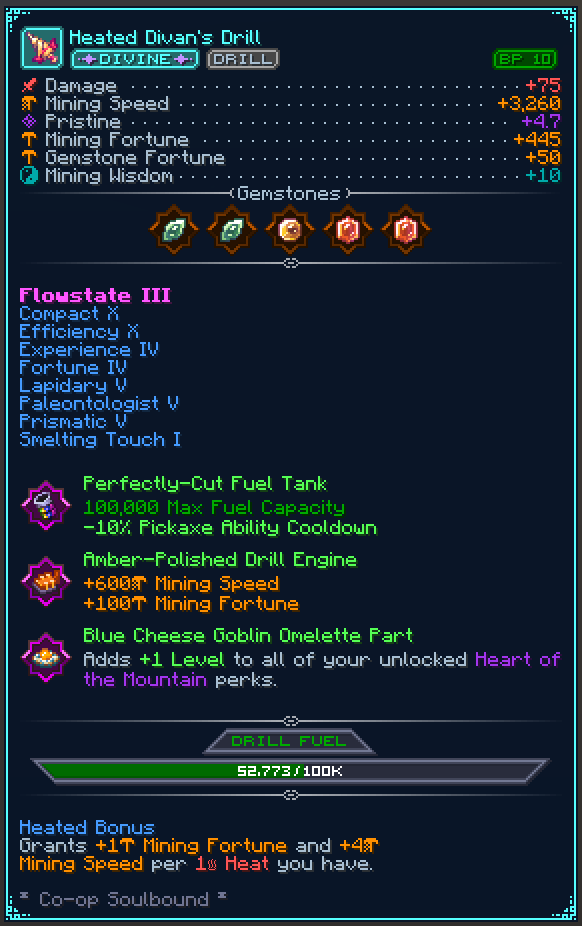
Remodel your Hypixel SkyBlock item tooltips completely to look much more fancy and organized.
Tired of walls of plain text? Instead, look at beautiful icons, progress bars, perfectly aligned stats, and custom categorized tags in your tooltips.
Features
- Aligned Stat Lines: Aligns item stats (Pristine, Strength, Wisdom, etc.) and adds icons to them.
- Progress Bars: Replaces boring text with progress bars for Pet Levels and Drill Fuel.
- Clean Tags: Converts standard text into clean tags for an item's Category, Rarity, Dungeon Stars, and more!
- Pet Enhancements: Centers pet abilities, adds separators, and renders your favourite pet star.
- Spinny Items: Enable an optional 3D spinning item render in the top left corner of the tooltip.
- Fancy Gemstones: Gemstones now get displayed with their texture to be easily identifiable.
- ...and more, checkout the config ingame.
Customizing
You can configure all features to how you like it using the config at /iconographic or /ttt for short.
Mod Compatability
As Minecraft's system is limited, other mods need to add their own Compatability with Iconographic to have their Tooltips be rendered with Iconographic applied.
Are you a mod dev trying to add compatability? Read here.
FAQ
How to install Iconographic?
Install Fabric for your Minecraft version, download Iconographic for the same version and loader, put the file into the mods folder and launch the game with the loader profile.
Which Minecraft versions does Iconographic support?
Iconographic has builds for Minecraft 26.1–26.2.
Is Iconographic needed on the server?
Client only — no need to install it on the server


