
- Loaders
- FabricNeoForgeQuilt
- Downloads on Modrinth
- 808
- Followers on Modrinth
- 2
- versions
- 8
- Updated
- September 16, 2026Sep 16
- Published
- in 2026
Configuration · swipe
At a glance
Runs on Fabric, NeoForge and Quilt
For Minecraft 26.1–26.3
Client only — no need to install it on the server
Latest version — mc26.3-0.1.2-neoforge from September 16, 2026
License LGPL-3.0-only — free
Where it's neededGame versions26.1–26.3
In gamerequiredOn servernot needed
Install in the game only; not needed on the server
Key Filter
A client-side Minecraft mod that lets you lock, hide, and disable key bindings. Supports both Fabric and NeoForge.
Features
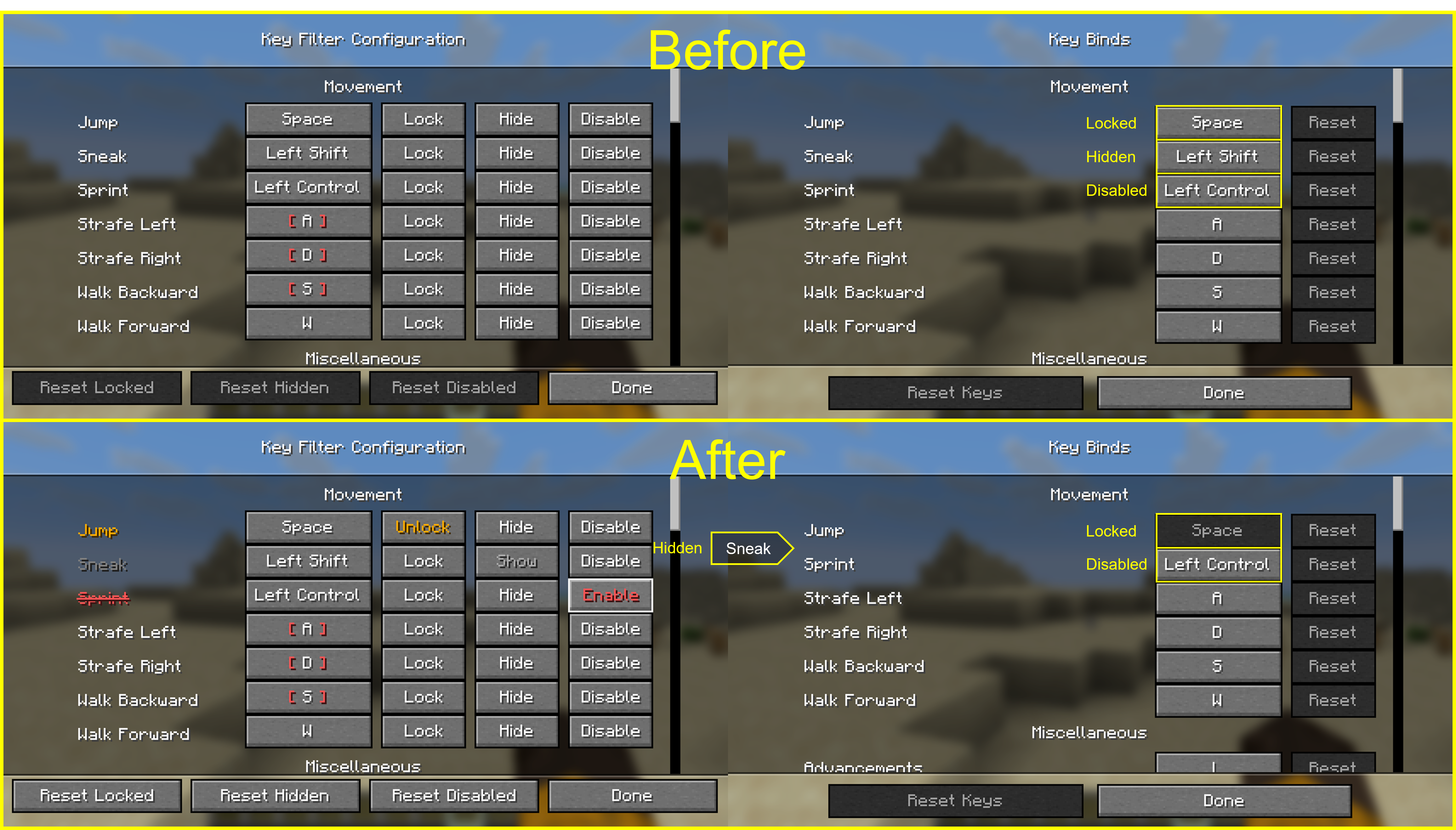
For every key binding you can toggle three independent states:
- Lock — prevents the binding from being changed, so you don't overwrite it by accident.
- Hide — hides the entry from the vanilla Controls screen to keep the list clean.
- Disable — makes the game ignore the key entirely, even if another mod or feature would normally consume it.
Usage
- Press F8 in-game to open the Key Filter config screen. (Default binding — it can be rebound from the vanilla Controls menu.)
In the list, use the buttons next to each binding to toggle its state:
Lock/UnlockHide/ShowDisable/Enable
Settings are stored in config/keyfilter.json.
FAQ
How to install Key Filter?
Install Fabric for your Minecraft version, download Key Filter for the same version and loader, put the file into the mods folder and launch the game with the loader profile.
Which Minecraft versions does Key Filter support?
Key Filter has builds for Minecraft 26.1–26.3.
Is Key Filter needed on the server?
Client only — no need to install it on the server
License and source
GNU Lesser General Public License v3.0 onlyfree to use and share; changes to the mod itself must be published under the same license
Similar mods
All utility mods →


More mods by this author
 Koreanify↓ 21.6K
 Blur Server Address↓ 6.4K
 Tab Name Tag↓ 6.3K