
Litematica Zone Focus
Breaks scheme into zones, searches for incorrectly placed blocks in real time, and improves performance.
- Loaders
- Fabric
- Downloads on Modrinth
- 846
- Followers on Modrinth
- 5
- versions
- 10
- Updated
- October 10, 2026Oct 10
- Published
- in 2026
At a glance
Install in the game only; not needed on the server
Litematica Zone Focus is a client-side Litematica addon for Fabric that lets you build a schematic piece by piece.

A placed schematic is split into zones. You pick the zone you're working on right now, and the schematic is rendered, counted and verified only inside that zone — the rest stays out of the way until you get to it.
Requirements: Fabric Loader, Fabric API, MaLiLib and Litematica. Client-side only — nothing to install on the server, and it works on vanilla servers.
What it does

- Splits a schematic into zones — as a grid (set either the number of zones per axis or the size of one zone in blocks, with a live preview of how many zones you'll get and how big they'll be), by dragging out a zone with your mouse, or from a Litematica selection.
- Works inside the active zone only — rendering, misplaced-block detection, layer-by-layer building and every other calculation are limited to the zone you selected.
- Tracks progress for every zone — percentage, blocks remaining and distance to the zone. The list can be sorted by any of them, or by zone number.
- Reduces the rendering load on large schematics — geometry outside the active zone isn't built at all, so there's less to draw and fewer chunk rebuilds. How much you gain depends on the schematic and your zone size.
- Lets you mark zones with the mouse — a new hotbar slot: hold Attack (left mouse button by default) and drag to mark out a zone, release to save it.
- Verifies the schematic within the zone — the same breakdown as Litematica's Schematic Verifier: missing (red), wrong block (orange), wrong state (yellow), extra (light blue), drawn through walls. Toggled with a keybind.
- Updates in real time — place a block and its marker disappears, the progress bar moves instantly.
- Remembers your zones — zone layout and progress survive leaving a server or switching dimensions.
How to use it
- Place a schematic with Litematica as usual.
- Open the zones screen and split the placement into a grid — or mark a single zone by dragging with the mouse.
- Select a zone. Only that part of the schematic is rendered and counted.
- Build it, watch the progress bar, then move on to the next zone — manually or automatically.
Settings
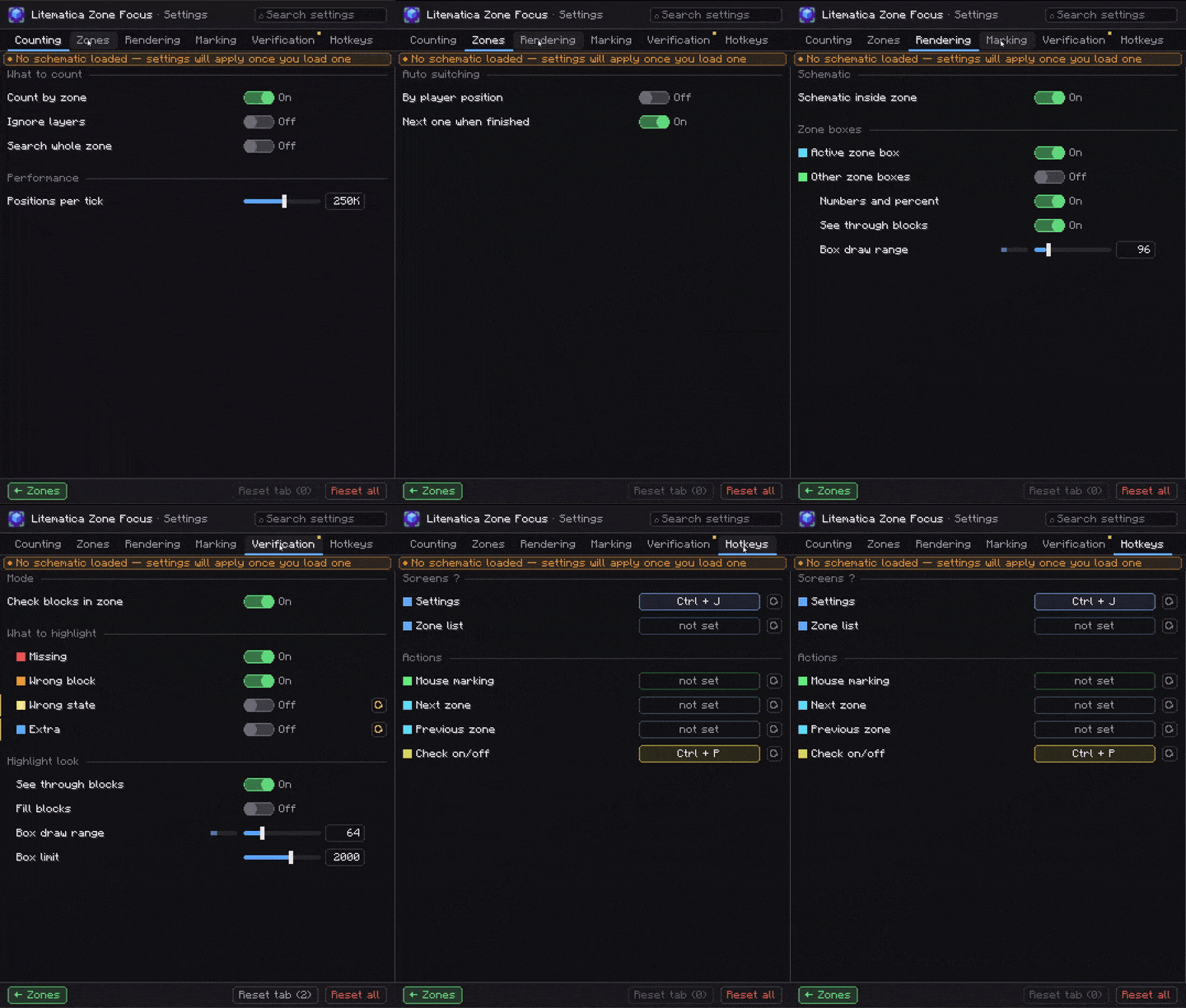
Open with Ctrl + J, or from the zones screen. Everything above can be turned off individually; on top of that:
| Section | What you can tweak |
|---|---|
| Zone automation | Make the zone you're standing in the active one; move on to the next zone once there's nothing left to place in the current one. |
| Whole zone | Ignore Litematica's layer range and count the entire zone. |
| Rendering | Outlines for the active zone and for the rest of the grid (completed zones turn green), zone numbers with percentages in the world, visibility through blocks, outline draw distance 16–512. |
| Marking | Clamp a marked zone to the schematic's bounds, ray distance 8–512. |
| Verification | Semi-transparent block fill, highlight distance 8–256, marker limit per category 50–20000 — so a huge zone doesn't cost you frames. |
| Scan budget | How many positions are checked per tick while calculating progress, 10k–4M. |
Keybinds
Only one is bound by default — the rest are up to you.
| Action | Default |
|---|---|
| Open settings | Ctrl + J |
| Zones screen | unbound |
| Next / previous zone | unbound |
| Mouse marking | unbound |
| Verify zone | unbound |
Pairs well with
Litematica Material HUD & Chest Finder — a material list HUD for the layer you're building, plus colored markers on the chests holding those blocks. Zone Focus tells you where to build; Material HUD tells you what to bring.

💬 Questions, bugs or ideas? Join the Discord
FAQ
How to install Litematica Zone Focus?
Install Fabric for your Minecraft version, download Litematica Zone Focus for the same version and loader, put the file into the mods folder and launch the game with the loader profile.
Which Minecraft versions does Litematica Zone Focus support?
Litematica Zone Focus has builds for Minecraft 26.2–26.3.
Is Litematica Zone Focus needed on the server?
Client only — no need to install it on the server


