
MobStacker
Greatly increases performance by stacking mobs together reducing the physical number of entities in the world with a config for further customization. Includes a mob cap module.
- Loaders
- FabricNeoForgeForgeQuilt
- Downloads on Modrinth
- 34.5K
- Followers on Modrinth
- 95
- versions
- 62
- Updated
- October 18, 2026Oct 18
- Published
- in 2024
At a glance
Install on the server only; players don't need it
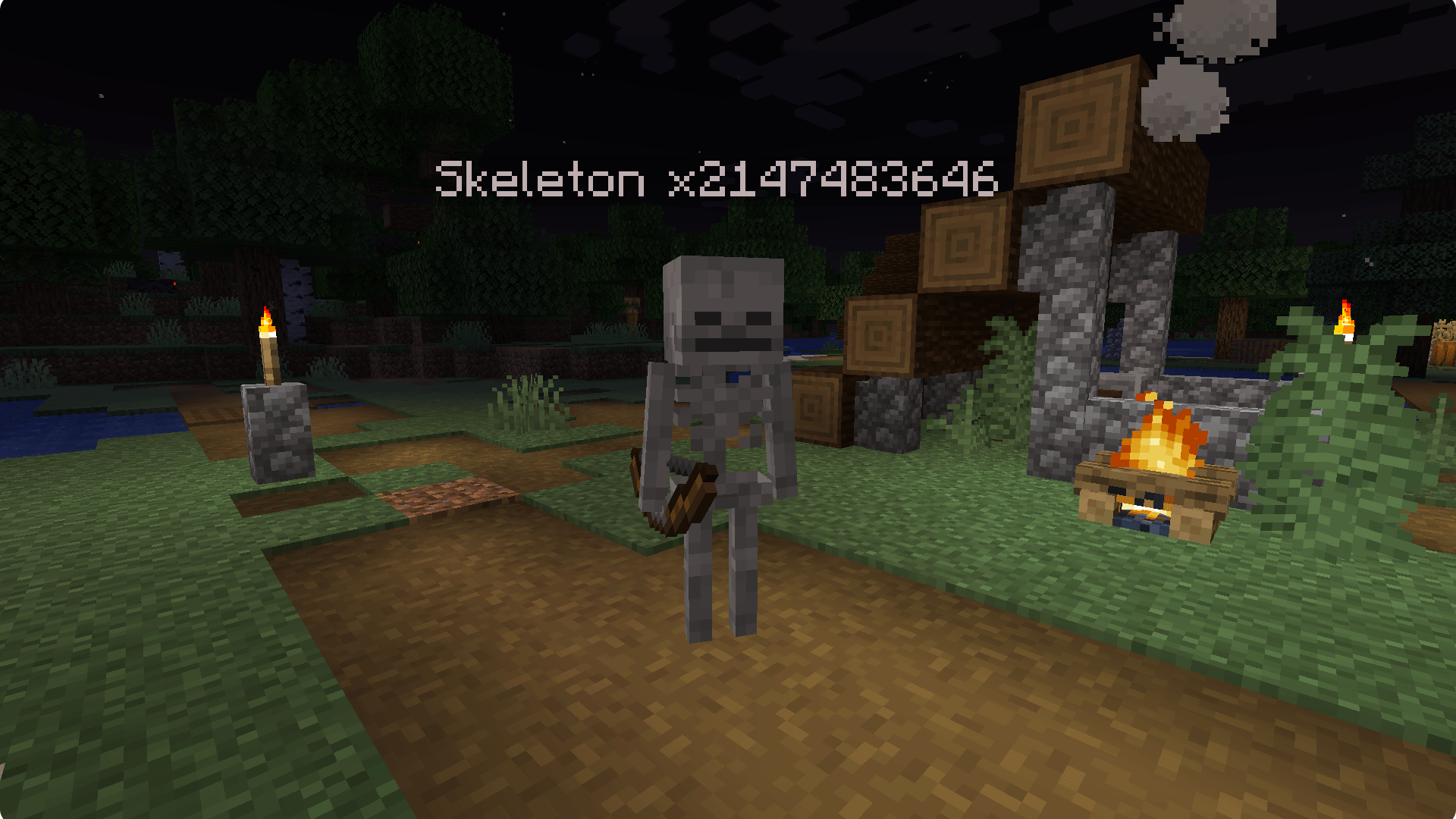

MobStacker is a performance Minecraft mod to optimize entity handling, addressing a common cause of performance issues in vanilla and modded environments. By intelligently "stacking" similar mobs in close proximity, MobStacker significantly reduces server load and enhances client-side performance without compromising gameplay mechanics.
Requires: Dungeon Config and Fabric API. MobStacker is server side only: players don't need it installed to join.
Note: MobStacker preserves all loot and mob properties within stacked entities. Named mobs (via name tags) are exempt from stacking to maintain uniqueness.
Key Benefits
- Server Performance Boost: Dramatically reduces entity processing overhead.
- Enhanced Client FPS: Lowers strain on client-side rendering.
- Optimized Network Traffic: Minimizes entity data transmission.
- Cleaner Gameplay: Reduces visual clutter in mob-dense areas.
- Memory Usage Reduction: Lowers overall memory footprint.
Performance Improvement
While actual performance gains vary based on server specifications, player count, and mod configurations, MobStacker can provide substantial improvements, especially in environments with:
- High mob density
- Numerous entity-adding mods
- Large, active player bases
🔗 Note:
- MobStacker has a built in configurable spawn cap module to reduce mob spawns per chunk.
Features
| Feature | Description |
|---|---|
| Smart Stacking | Automatically combines identical mob types within a configurable radius |
| Strict Matching | Only stacks mobs whose visible variant and saved data match, including data added by other mods (elite affixes, levels, owners...) |
| Customizable Stacks | Set preferred maximum stack sizes, globally or per rule |
| Flexible Health Management | Configurable options for stack health, death mechanics and batch kills |
| Multiplied Drops | Shearing, brushing and natural drops (eggs, scutes...) scale with the stack size |
| Batch Breeding | Breed several mobs of a stack with one feeding |
| Stack Combat | Optionally multiply a stack's melee damage by its size |
| Selective Stacking | Exclude specific entities, entity tags or entire mods |
| Rules | Change any setting for specific mobs, dimensions, biomes, chunks or areas |
| Claim Support | Players can make rules for their own claims (FTB Chunks, Open Parties and Claims) |
| Stack Splitting | Separator item splits a mob off a stack; assimilator item toggles whether a mob can stack |
| Stack Names | Per-player localized stack labels (e.g. "Zombie x5") that are never saved onto the mob |
| In-game Config | Every option is editable from the Dungeon Config settings screen |
What Never Stacks
To keep gameplay intact, MobStacker leaves these mobs alone:
- Babies, mobs with no AI and mobs with a custom name
- Riding, ridden or leashed mobs, saddled mobs and mobs wearing body armor
- Tamed or owned mobs, horses and their relatives, and mobs released from a bucket
- Mobs carrying items, animals in love mode and player-built iron golems
- Raiders in an active raid and patrol leaders
- Villagers with a job, bed or meeting point (jobless villagers and nitwits can stack; a villager leaves its stack the moment it claims a workstation or bed, so trading halls, breeders and iron farms keep working)
- Mobs holding equipment that is guaranteed to drop
- Bosses (anything in
#c:bossesor with at leastbossHealthThresholdbase health), unlessstackBossesis on - Anything in the
#mobstacker:unstackableentity type tag, which by default includes the Ender Dragon, Wither, Warden, Elder Guardian, Wandering Trader, Allay, Bee, Vex, Happy Ghast, Copper Golem and Creaking
Configuration
The config lives at config/mobstacker/mobstacker.json5 and can also be edited in-game from the Dungeon Config screen. Old mobstacker.json configs (including mob groups and chunk overrides) are imported automatically on first launch.
Stacking
| Option | Description | Default |
|---|---|---|
maxMobStackSize | Maximum number of mobs in a single stack (1 - 4096) | 16 |
stackRadius | Radius in blocks within which mobs attempt to stack | 6.0 |
stackCheckInterval | How often, in ticks, each mob looks for a stack to join | 20 |
strictDataComparison | Only stack mobs whose saved data also matches, including modded data | true |
matchSoundVariants | Also require pigs, cows, chickens, wolves and cats to sound the same | false |
Death & Loot
| Option | Description | Default |
|---|---|---|
killWholeStackOnDeath | Kill the whole stack at once, dropping loot and XP for every mob | false |
killBatchSize | How many mobs die per kill when the whole stack doesn't die. Loot is multiplied to match | 1 |
stackHealth | Combines health of stacked mobs; the stack is worn down as a whole. Implies killWholeStackOnDeath | false |
multiplyShearDrops | Shearing or brushing a stack does it to every mob and multiplies the drops | true |
scaleToolDamage | Shears and brushes used on a stack wear down as if used on every mob | true |
damageWeaponPerHit | When a stack dies as a whole, each hit wears the weapon down for every mob in it | false |
multiplyGiftDrops | Multiply drops a mob produces on its own (chicken eggs, armadillo scutes...) | true |
instantKillWholeStack | /kill and falling out of the world remove the whole stack | true |
Breeding
| Option | Description | Default |
|---|---|---|
breedBatchSize | How many mobs of a stack can be bred with one feeding. 1 keeps vanilla breeding | 1 |
breedCooldown | Ticks before a stack can be batch bred again | 6000 |
Combat
| Option | Description | Default |
|---|---|---|
stackOutgoingDamage | Multiply a stack's melee damage by its size | false |
maxDamageMultiplier | The largest damage multiplier stackOutgoingDamage can apply | 16 |
Items
| Option | Description | Default |
|---|---|---|
enableSeparator | Right-clicking a stack with the separator splits one mob off (the split mob won't stack again) | false |
consumeSeparator | Determines if separator item is consumed (or damaged) on use | true |
separatorItem | Specifies the item used as a separator | "minecraft:diamond" |
enableAssimilator | Right-clicking a mob with the assimilator toggles whether it can stack | false |
consumeAssimilator | Determines if assimilator item is consumed (or damaged) on use | true |
assimilatorItem | Specifies the item used as an assimilator | "minecraft:emerald" |
Display
| Option | Description | Default |
|---|---|---|
showStackNames | Show the stack size above stacked mobs. Only sent to players, never saved on the mob | true |
alwaysShowStackNames | Show the stack size at all times, not only when looking at the mob | false |
stackNameFormat | Label format. {name} is the mob's name in each player's language, {count} the stack size | "{name} x{count}" |
Filters
| Option | Description | Default |
|---|---|---|
ignoredEntities | List of entities excluded from stacking | ["minecraft:ender_dragon", "minecraft:vex"] |
ignoredMods | List of mod IDs whose entities are excluded from stacking | ["corpse", "cobblemon"] |
stackVillagers | Let jobless villagers and nitwits stack | true |
stackBosses | Allow bosses to stack | false |
bossHealthThreshold | Untagged mobs with at least this much base max health count as bosses. 0 turns this off | 150.0 |
Mob Caps
| Option | Description | Default |
|---|---|---|
enableMobCapOverrides | Replace the vanilla per-category mob caps with the values below | true |
monsterMobCap | Monsters (vanilla 70) | 25 |
creatureMobCap | Animals (vanilla 10) | 5 |
ambientMobCap | Bats (vanilla 15) | 7 |
axolotlsMobCap | Axolotls (vanilla 5) | 2 |
undergroundWaterCreatureMobCap | Glow squid (vanilla 5) | 2 |
waterCreatureMobCap | Squid and dolphins (vanilla 5) | 2 |
waterAmbientMobCap | Fish (vanilla 20) | 8 |
Rules & Claims
| Option | Description | Default |
|---|---|---|
claimRules | Let non-operators make rules for chunks they or their team have claimed | true |
maxRulesPerTeam | How many rules one player or team can own | 10 |
| `playerRules.` | Which settings players may change in rules for their own claims | Stacking, max stack size, data/sound matching, stack names and villager stacking |
Rules
Rules change settings for some mobs or some places, like a bigger stack size in your mob farm or no stacking at all in a boss arena. A rule can match:
- Mobs: ids like
minecraft:zombie, tags like#minecraft:undead, or a whole mod like@alexsmobs(empty = every mob) - Dimensions: like
minecraft:the_nether(empty = all) - Biomes: ids like
minecraft:plainsor tags like#minecraft:is_ocean(empty = all) - Places: chunks or block areas, e.g.
minecraft:overworld 0 0 63 63(empty = everywhere)
Inside a rule every setting from the sections above (except filters for mods/entities, mob caps and the check interval) can be overridden or left on Global, and stacking itself can be switched off. When several rules match a mob, the one listed first wins. Rules are saved per world in serverconfig/mobstacker-rules.json.
With FTB Chunks (with FTB Teams) or Open Parties and Claims installed, players who aren't operators can create rules too. Their rules only apply inside chunks their team has claimed, and they can only change the settings the server allows.
Commands
All commands are prefixed with /mobstacker. Everything except /mobstacker rule requires operator permissions (level 2).
General
# Reload the config from disk
/mobstacker reload

# Show stack information for a mob
/mobstacker info [entity]

# Set stack size for specific entity
/mobstacker setStackSize [entity] [size]
Configuration Commands
# Toggle whole stack death
/mobstacker stackerConfig killWholeStackOnDeath [true|false]

# Toggle health stacking
/mobstacker stackerConfig stackHealth [true|false]

# Set maximum stack size
/mobstacker stackerConfig maxStackSize [value]

# Set stack radius
/mobstacker stackerConfig stackRadius [value]

# Set how often mobs look for a stack (ticks)
/mobstacker stackerConfig stackCheckInterval [value]

# Toggle stack melee damage multiplier
/mobstacker stackerConfig stackOutgoingDamage [true|false]

# Set how many mobs die per kill
/mobstacker stackerConfig killBatchSize [value]

# Set batch breeding size and cooldown
/mobstacker stackerConfig breedBatchSize [value]
/mobstacker stackerConfig breedCooldown [value]

# Toggle tool and weapon wear scaling
/mobstacker stackerConfig scaleToolDamage [true|false]
/mobstacker stackerConfig damageWeaponPerHit [true|false]

# Toggle villager stacking
/mobstacker stackerConfig stackVillagers [true|false]

# Toggle separator functionality
/mobstacker stackerConfig separator enableSeparator [true|false]

# Toggle separator consumption
/mobstacker stackerConfig separator consumeSeparator [true|false]

# Set separator item
/mobstacker stackerConfig separator separatorItem [item_id]

# Toggle assimilator functionality
/mobstacker stackerConfig assimilator enableAssimilator [true|false]

# Toggle assimilator consumption
/mobstacker stackerConfig assimilator consumeAssimilator [true|false]

# Set assimilator item
/mobstacker stackerConfig assimilator assimilatorItem [item_id]
Entity and Mod Management
# Ignore specific entity
/mobstacker ignore entity [entity_id]

# Ignore all entities from a mod
/mobstacker ignore mod [mod_id]

# Remove entity from ignore list
/mobstacker unignore entity [entity_id]

# Remove mod from ignore list
/mobstacker unignore mod [mod_id]NOTE: An entity can be given the tag {StackData: {CanStack:0b}} to prevent it from stacking. Entity types can also be added to the #mobstacker:unstackable tag with a datapack.
Mob Cap Management
# Toggle mob cap overrides
/mobstacker mobCapConfig enableMobCapOverrides [true|false]

# Set the cap for a mob category
/mobstacker mobCapConfig monsterMobCap [value]
/mobstacker mobCapConfig creatureMobCap [value]
/mobstacker mobCapConfig ambientMobCap [value]
/mobstacker mobCapConfig axolotlsMobCap [value]
/mobstacker mobCapConfig undergroundWaterCreatureMobCap [value]
/mobstacker mobCapConfig waterCreatureMobCap [value]
/mobstacker mobCapConfig waterAmbientMobCap [value]
Rule Management
Rule pages in chat are clickable, so most of this can be done without typing the full commands.
# List rules (or just /mobstacker rule)
/mobstacker rule list

# Create or delete a rule
/mobstacker rule add [name]
/mobstacker rule remove [rule]

# Open a rule's page
/mobstacker rule [rule]

# Turn a rule on or off
/mobstacker rule [rule] enable
/mobstacker rule [rule] disable

# Change which rule wins when several match (operators only)
/mobstacker rule [rule] priority [position]

# Edit which mobs, dimensions and biomes a rule covers
/mobstacker rule [rule] mob [add|remove] [mob_id|#tag|@mod_id]
/mobstacker rule [rule] mob clear
/mobstacker rule [rule] dimension [add|remove] [dimension_id]
/mobstacker rule [rule] dimension here
/mobstacker rule [rule] biome [add|remove] [biome_id|#tag]
/mobstacker rule [rule] biome here

# Add places to a rule
/mobstacker rule [rule] place chunk [chunkX] [chunkZ]
/mobstacker rule [rule] place chunks [radius]
/mobstacker rule [rule] place area [x1] [z1] [x2] [z2]
/mobstacker rule [rule] place remove [number]
/mobstacker rule [rule] place clear

# View and change a rule's settings
/mobstacker rule [rule] settings [page]
/mobstacker rule [rule] set [setting] [value]
/mobstacker rule [rule] reset [setting]
API
Other mods can integrate through MobStackerAPI:
getStackSize(mob): how many mobs a mob stands foraddMergingCondition(...): extra conditions two mobs must meet to mergeaddDeathHandler(...): runs when a stacked mob dies and the rest of the stack takes its placeaddEntityDataModifiers(...): adjust the mob that replaces a dead or exploded stacked mobaddEntityDataModifiersOnSeparation(...): adjust a mob split off with the separatorregisterClaimProvider(...): add support for another land claim mod
Additional Notes
- Mobs periodically look for a nearby stack to join (every
stackCheckIntervalticks). - When a stacked creeper explodes or an enderman picks up a block, only that one mob does it; the rest of the stack stays behind.
- Stacked mobs display stack size in their name (e.g., "Zombie x5"), shown in each player's own language.
- Compatible with various entity types: animals, monsters, and NPCs.
Report issues to the issue tracker on github.
FAQ
How to install MobStacker?
Install Fabric for your Minecraft version, download MobStacker for the same version and loader, put the file into the mods folder and launch the game with the loader profile.
Which Minecraft versions does MobStacker support?
MobStacker has builds for Minecraft 1.20.1–1.20.4, 1.21–1.21.5, 26.1.2, 26.3.
Is MobStacker needed on the server?
Server only — players don't need to install it
Similar mods
All management mods →


More mods by this author
 Let Me Despawn↓ 25.4M
 Almanac↓ 22.6M
 Villager API↓ 178K
Often needed together
 Fabric API↓ 285M