
Notch, Please!
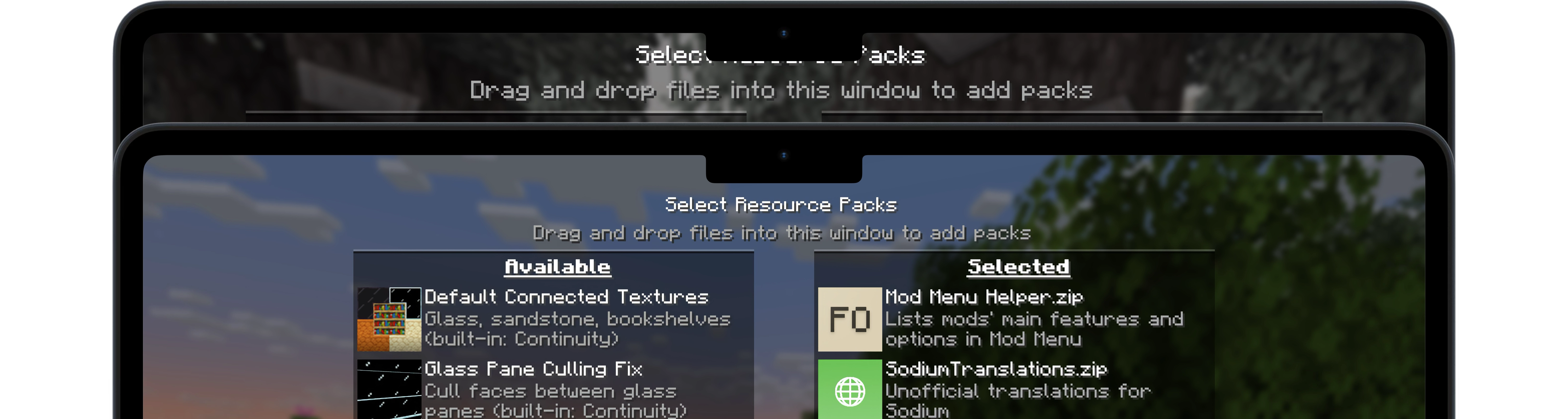
A simple Fabric mod for Minecraft 1.21.4 – 26.1.2 that aims to make vanilla UI elements fit better on Apple's notched MacBooks.
- Loaders
- Fabric
- Downloads on Modrinth
- 1K
- Followers on Modrinth
- 7
- versions
- 9
- Updated
- August 10, 2026Aug 10
- Published
- in 2025
At a glance
Install in the game only; not needed on the server
Notch, Please!
A simple Fabric mod for Minecraft 1.21.4 – 1.21.10 that aims to make vanilla UI elements fit better on Apple's notched MacBooks when in fullscreen mode.
🖥️ Installation
Notch, Please! requires the Fabric mod loader & the Fabric API.
Notch, Please! is designed specifically for MacBooks with display notches (M1 Pro, M2 and later) running macOS.
🔧 Usage
Since macOS's default fullscreen mode doesn't allow the game to extend into the notched area, you'll first need to enable Fullscreen under Options → Video Settings.
Then, make sure your screen resolution is set to something like 2560x1664 (not the notch-less 2560x1600) to take full advantage of the available space.
Once that's set up, I recommend using RenderScale to reduce your resolution to Retina levels (typically by half). This can significantly improve performance with little to no visible loss in quality on a MacBook display.
📜 License
Except where otherwise stated, the content of this repository is provided under the GPL v3 license by namekeptanonymous.
FAQ
How to install Notch, Please!?
Install Fabric for your Minecraft version, download Notch, Please! for the same version and loader, put the file into the mods folder and launch the game with the loader profile.
Which Minecraft versions does Notch, Please! support?
Notch, Please! has builds for Minecraft 1.21.4–26.1.2.
Is Notch, Please! needed on the server?
Client only — no need to install it on the server
Similar mods
All utility mods →


Often needed together
 Fabric API↓ 279M