
Potion Bar
Potion bar mod that adds a progress bar for potions
FabricNeoForge
- Loaders
- FabricNeoForge
- Downloads on Modrinth
- 38.1K
- Followers on Modrinth
- 96
- versions
- 29
- Updated
- September 15, 2026Sep 15
- Published
- in 2025
At a glance
Runs on Fabric and NeoForge
For Minecraft 1.20.1–1.20.4, 1.21.1–26.3
Client only — no need to install it on the server
Latest version — 1.5.4-fabric from September 15, 2026
Requires Fabric API
License MIT — free
Where it's neededGame versions1.20.1–1.20.4, 1.21.1–26.3
In gamerequiredOn servernot needed
Install in the game only; not needed on the server
🧪 Potion Bar
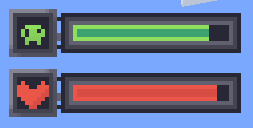
Potion Bar adds clean and simple progress bars for active potion effects.
No more guessing — see exactly how much time is left for each effect, with a bar and an icon on the side.

✅ Features:
- Displays potion duration as a progress bar
- Colored bars depending on the potion type
- Fully client-side — no need to install on servers
⚙️ Commands:
Position Hud:
- /potionbar position center (default)
- /potionbar position left
- /potionbar position right
- /potionbar position custom — opens HUD editor (drag & drop)
Show Vanilla effects:
- /potionbar vanilaEffects show
- /potionbar vanilaEffects hide (default)
Timer system:
- /potionbar timer on — enable potion effect timer
- /potionbar timer off — disable potion effect timer
- /potionbar timer left — show timer on the left
- /potionbar timer right — show timer on the right (default)
- /potionbar timer above — show timer above the icon
- /potionbar timer below — show timer below the icon
Custom icons:
- /potionbar CustomIcons on — enable custom textures (default)
- /potionbar CustomIcons off — disable (vanilla textures)
Level:
- /potionbar level on — enable level effects (default)
- /potionbar level off — disable level effects
📸 Screenshots:

🧪 Stay informed. Stay alive. Use Potion Bar.
FAQ
How to install Potion Bar?
Install Fabric for your Minecraft version, download Potion Bar for the same version and loader, put the file into the mods folder and launch the game with the loader profile.
Which Minecraft versions does Potion Bar support?
Potion Bar has builds for Minecraft 1.20.1–1.20.4, 1.21.1–26.3.
Is Potion Bar needed on the server?
Client only — no need to install it on the server
License and source
MIT Licensefree to use and share with credit to the author
Similar mods
All adventure mods →


More mods by this author
 Achievement Style↓ 16.3K
Often needed together
 Fabric API↓ 292M