
QuickHearth
QuickHearth is a server side homes GUI that allows your players to set homes and to request to teleport to others, or request others to teleport to them. This reworks /spawn /home /homes /tpa and /tpr
- Loaders
- Fabric
- Downloads on Modrinth
- 252
- Followers on Modrinth
- 0
- version
- 1
- Updated
- April 27, 2026Apr 27
- Published
- in 2026
At a glance
Install on the server only; players don't need it
QuickHearth
A new take on homes and tpa teleports! QuickHearth is a server-side homes and teleport mod for Minecraft 26.1.x Fabric. This will allow server players to save spots (as a home), return to them with a click, share teleports with friends, and snap back to spawn. Designed for survival servers that want a friendlier GUI than larger teleport command bundles, with rank-aware home limits that scale as players progress. LuckPerms friendly!
Works on dedicated servers and in single-player worlds. Vanilla clients connecting to a dedicated server need nothing extra installed.
This mod also uses SGUI by Patbox. This is already pre-bundled.
What it adds
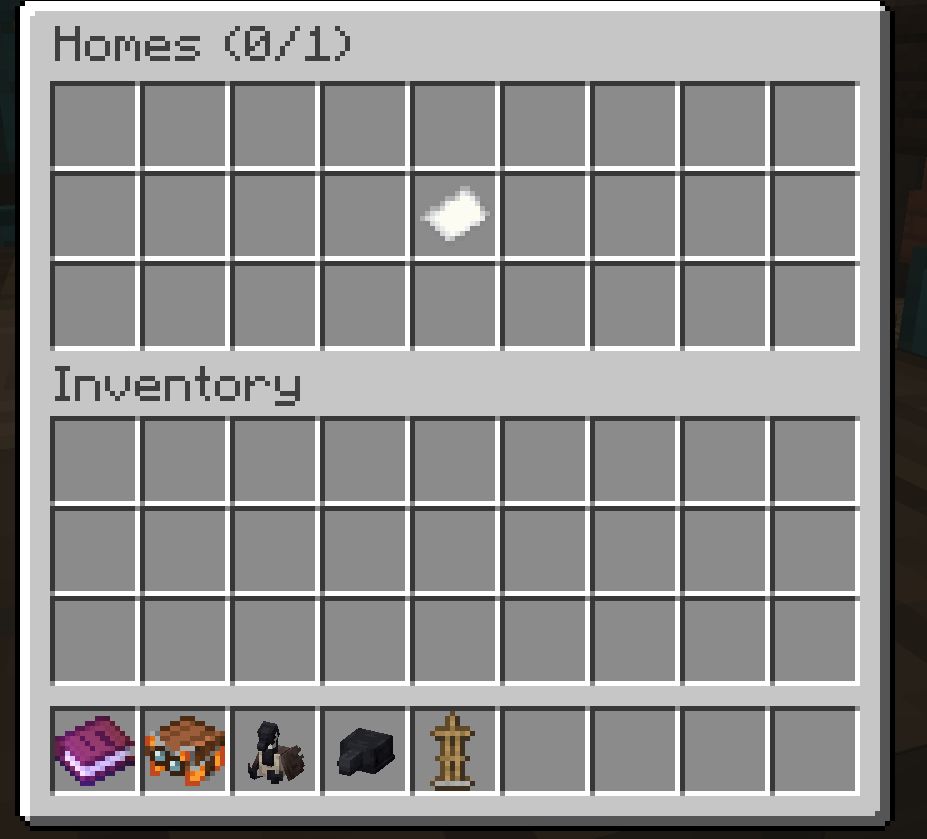
- A chest-style home picker GUI. Run
/homeand click a slot to teleport. Shift-click a slot to delete the home. - Custom icons for each home. Whatever you hold when running
/sethomebecomes that home's slot icon. Use a custom-named banner with patterns, a player head, a flower, or anything else to label your homes visually.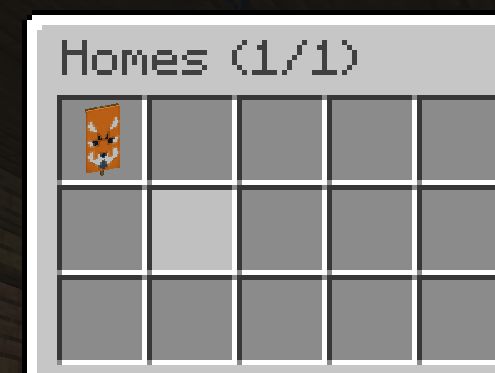
/spawnfor instant return to world spawn./tpa,/tpahere(alias/tpr),/tpaccept,/tpdeny, and/tpatogglefor teleport requests between players.- Rank-aware home limits. Admins give different ranks different home counts via LuckPerms and grant individual bonus homes as rewards via a vanilla scoreboard objective. The two layers stack.
Commands
Homes
/sethome saves your current location as "home" (the default name).
`/sethome ` saves with a custom name like "basecamp" or "iron-farm". Names accept letters, numbers, underscores, and hyphens, up to 24 characters.
The item in your main hand when you run /sethome becomes that home's slot icon in the picker. Empty hand falls back to a plain white banner. Re-running /sethome with the same name overwrites both the location and the icon.
/home opens the home picker, a 27-slot chest GUI showing all your homes. Click a slot to teleport. Shift-click to delete.
`/home ` teleports directly to a home, with tab-completion.
/home help prints the command list in chat.
/homes is the same as /home (opens the picker).
`/delhome ` deletes a home, with tab-completion.
Spawn
/spawn teleports you to world spawn.
Teleport requests
`/tpa asks the target if you can teleport to them. They see a chat prompt to/tpacceptor/tpdeny`.
`/tpahere (alias/tpr`) asks the target to teleport to you instead.
/tpaccept accepts the most recent pending request directed at you.
/tpdeny declines it.
/tpatoggle blocks incoming teleport requests until you toggle it back on. Persists across server restarts.
Pending requests expire automatically after 60 seconds.
Teleport behavior
All teleports share these rules:
- 3-second warmup. Countdown appears in chat. Moving cancels the teleport.
- 30-second cooldown after a successful teleport before another can start.
- Only one teleport can be queued at a time.
Home limits
A player's maximum number of homes is calculated as:
max_homes = LuckPerms meta "homes-max" + scoreboard "homes_bonus"
The two layers are independent. Rank changes do not reset bonus grants, and bonus grants do not depend on LuckPerms at all.
Setting up LuckPerms ranks (optional)
Install LuckPerms-Fabric in your mods/ folder, then set the home count per group:
/lp group default meta set homes-max 2
/lp group member meta set homes-max 3
/lp group veteran meta set homes-max 5
Or per individual user, to override their group:
/lp user Steve meta set homes-max 4If LuckPerms is not installed, or no homes-max value is set, the rank base falls back to 1.
Granting bonus homes (no LuckPerms required)
QuickHearth auto-creates a dummy scoreboard objective named homes_bonus on first server start. Admins grant extra homes per player using the vanilla scoreboard command:
/scoreboard players add Steve homes_bonus 2
/scoreboard players set Steve homes_bonus 5
/scoreboard players reset Steve homes_bonus
The scoreboard value is added to the rank base. So a member (rank base 3) with homes_bonus = 2 can save up to 5 homes.
Worked example
| Player | Rank | LP homes-max | homes_bonus | Total |
|---|---|---|---|---|
| Alice | newcomer | 2 | 0 | 2 |
| Bob | member | 3 | 1 (event prize) | 4 |
| Carol | veteran | 5 | 2 (gifted) | 7 |
| Dave | (no LP) | 1 (default) | 3 (granted) | 4 |
The picker GUI title shows usage as Homes (used/max) so players can see at a glance how many slots they have left.
Permission nodes
Every command is allowed by default. To restrict a command for a group, set its node to false in LuckPerms.
quickhearth.command.homequickhearth.command.sethomequickhearth.command.delhomequickhearth.command.homesquickhearth.command.spawnquickhearth.command.tpaquickhearth.command.tpahere(covers/tprtoo)quickhearth.command.tpacceptquickhearth.command.tpdenyquickhearth.command.tpatoggle
Example, to revoke /tpa from the default group:
/lp group default permission set quickhearth.command.tpa falseIf LuckPerms is not installed, permission gating falls back to vanilla OP level checks.
FAQ
How to install QuickHearth?
Install Fabric for your Minecraft version, download QuickHearth for the same version and loader, put the file into the mods folder and launch the game with the loader profile.
Which Minecraft versions does QuickHearth support?
QuickHearth has builds for Minecraft 26.1–26.1.2.
Is QuickHearth needed on the server?
Server only — players don't need to install it


