
Sound Reloader
Sound Reloader automatically reloads your audio whenever you reconnect your output device.
- Loaders
- Fabric
- Downloads on Modrinth
- 395
- Followers on Modrinth
- 1
- version
- 1
- Updated
- March 5, 2026Mar 5
- Published
- in 2026
At a glance
Install in the game only; not needed on the server
Sound Reloader
Ever accidentally unplugged your headphones and Minecraft just didn't reload the audio? Does that annoy the shit out of you because it should just do it by default? Well I've got just the mod for you!
Sound Reloader makes sure your audio comes back AUTOMATICALLY whenever you plug your speakers or headphones back in!
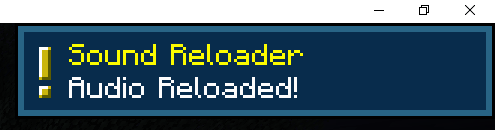
There's even a litte popup when it does it. (WOW!!) (you can even turn off the popup in the Music & Sound menu WOWWOW!!)
Note
There's a chance it wont detect when your audio device is reconnected. Replugging your device back in should fix it.
How it works
Sound Reloader uses two detection paths to notice when your audio output changes.
First, it checks OpenAL every second via the ALC_EXT_disconnect extension to see if the current device has disconnected and then reconnected.
Second, a background thread polls Java’s AudioSystem every 2 seconds for new output mixers (e.g., when you plug in headphones or a USB DAC).
When either path detects a change, it waits 3 seconds for the device to stabilize, then calls Minecraft’s SoundManager.reloadSounds() to reinitialize the sound engine.
Tested on 1.21.1 and 1.21.11. Requires Fabric API.
FAQ
How to install Sound Reloader?
Install Fabric for your Minecraft version, download Sound Reloader for the same version and loader, put the file into the mods folder and launch the game with the loader profile.
Which Minecraft versions does Sound Reloader support?
Sound Reloader has builds for Minecraft 1.21.1–1.21.11.
Is Sound Reloader needed on the server?
Client only — no need to install it on the server
Similar mods
All optimization mods →


Often needed together
 Fabric API↓ 294M