
- Loaders
- Fabric
- Downloads on Modrinth
- 26.7K
- Followers on Modrinth
- 26
- versions
- 16
- Updated
- September 19, 2026Sep 19
- Published
- in 2023
At a glance
Install in the game only; not needed on the server
SpecSpoof: A fabric mod to modify the hardware string in the F3 menu!
SpecSpoof is a Fabric mod that allows you to modify the hardware string displayed in the F3 menu. With this mod, you can customize the hardware information shown in the F3 menu to your liking. Whether you want to show off your (fraud) high-end hardware or keep your specs private. Now depends on Roselib!
Compatibility
This mod should be highly compatible with other mods, but if you find any incompatibilities or bugs, just open up an issue in the GitHub repo. I'll probably try to implement a workaround.
Additional Infos:
ModMenu is recommended for easier config modification!
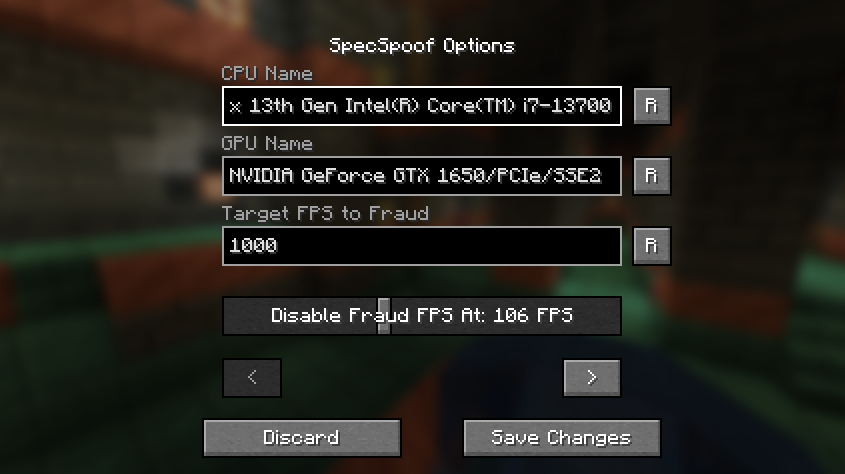
All options should be straightforward, so go nuts!
JSON Instructions (for legacy versions):
Quick Documentation JSON:
{
  "CPU": "your cpu name", //desired fake CPU name
  "GPU": ""your gpu name", // desired fake GPU name
  "FPS": 1000, // desired FPS to be faked as
  "disableFPSThreshold": 100 // The FPS Threshold for the fake fps to be deactivated, you see, to make it more believable, if your frames are dipping, the fps should actually reflect to that. imagine saying you have 1000 fps but your game runs like a slideshow, that just wouldn't work. (set to 999999 if you don't want this feature, set to 0 if you want to always fake your FPS)
  "GPUVendor": "the vendor", // This is what shows in the brackets right beside your resolution, you might want to change this to your desired GPU brand if you want to make it believable.
  "GPUDriver": "the driver" // This is the GPU driver string, which shows below the GPU string, you should also change this if you want to make your fake GPU believable.
}
The formatting is also your choice, you can make it actually believable or just put random nonsense on the string.
Examples:
{
  "CPU": "112x Intel(R) Xeon(R) w9-3495X",
  "GPU": "NVIDIA GeForce RTX 2080 SUPER/PCIe/SSE2",
  "FPS": 3400,
  "disableFPSThreshold": 100
  "GPUVendor": "NVIDIA Corporation",
  "GPUDriver": "3.2.0 NVIDIA 531.37"
}
{
"CPU": "Rose Flowers",
"GPU": "Pigeons",
"FPS": 10,
"disableFPSThreshold": 0
"GPUVendor": "Eggs Inc",
"GPUDriver": "1.2 months"
}FAQ
How to install SpecSpoof?
Install Fabric for your Minecraft version, download SpecSpoof for the same version and loader, put the file into the mods folder and launch the game with the loader profile.
Which Minecraft versions does SpecSpoof support?
SpecSpoof has builds for Minecraft 1.14–1.20.4, 1.21–26.3.
Is SpecSpoof needed on the server?
Client only — no need to install it on the server


