
TabManager
TabManager gives you total control over your creative inventory by restructuring tabs, changing icons, and filtering items with Regex and Glob support. Easily manage, export, and switch between multiple configurations through an intuitive in-game GUI.
- Loaders
- Fabric
- Downloads on Modrinth
- 327
- Followers on Modrinth
- 6
- versions
- 5
- Updated
- July 5, 2026Jul 5
- Published
- in 2026
At a glance
Install in the game only; not needed on the server
TabManager
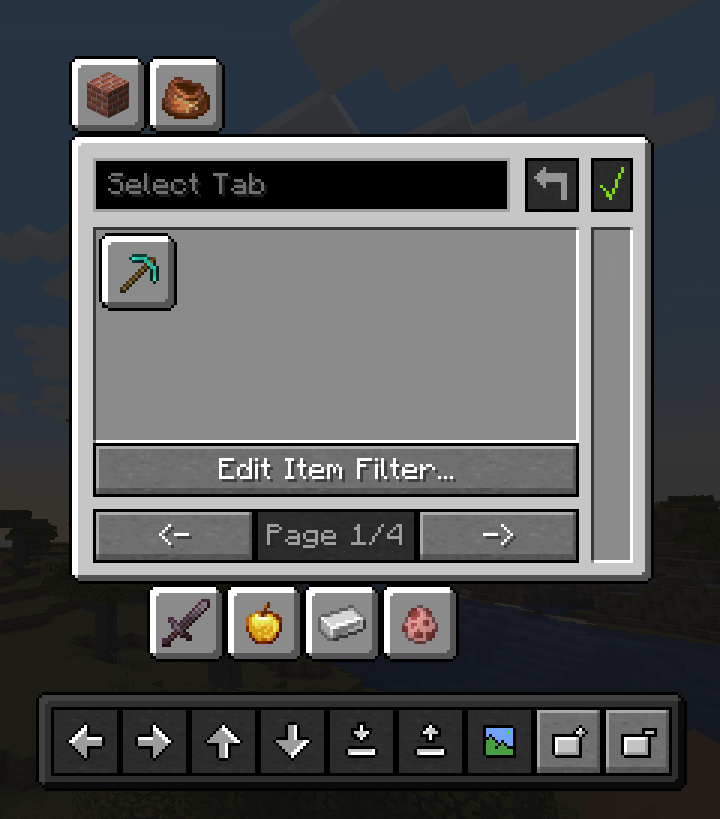
TabManager gives you total control over your creative inventory to organise it however you want with a simple and easy-to-understand GUI. Don't need a specific tab? Hide it! Want the tab on a separate page? Move it! Unhappy with items cluttering your tab? Simply get them out of your way!
In short, TabManager gives you control of the following things:
- reorganise your creative inventory by moving and hiding icons
- add pages to your creative inventory
- customise the icons of the tabs
- filter out items from tabs with either glob or regex
- save multiple different configurations of your creative inventory
- load saved configurations on the fly
Dependencies
The mod requires OwoLib to function, which wraps vanilla GUI widgets from Minecraft and provides additional functionality for mod developers. The dependency is licensed under the MIT License and therefore freely available.
Installation
- Make sure you have Minecraft and Fabric Loader installed.
- Download the latest version of Tab Manager from the releases page
- Place the downloaded .jar file into your
modsfolder located in your Minecraft directory. - Download OwoLib for the matching version: Modrinth or CurseForge or GitHub
- Place the OwoLib .jar file into your
modsfolder as well. - Launch Minecraft with the Fabric profile.
How to use
There is a basic documentation on the GitHub Page that should give you a good idea of how to work with this mod. The parts you mainly want to focus on is the item filter and the tray as those two might be a little complex.
License & Attribution
This project is licensed under the LGPL-3.0 License.
For Developers (Code Usage)
If you use parts of this project (code, logic, or assets) in your own mod, please include the following in your README or "About" section:
TabManager by SnackBag Studios (https://studios.snackbag.net/)
- Original Source: https://github.com/snackbag/TabManager/
- Original Author: Tobiazsh (https://github.com/tobiazsh)
- Licensed under: LGPL-3.0
Portions of this mod use code from TabManager.
For Modpack Creators
You are free to include this mod in any modpack! While not strictly required by the license to list every mod on your main page, we appreciate a link back to our project:
TabManager by SnackBag Studios ([Modrinth/GitHub Link])
Disclaimer
This project actually belongs to SnackBag Studios, although I have currently taken control of it on my Modrinth profile while the owner is setting up the organisation. I am the original author and developer of the project. TabManager may move to SnackBag Studios in the future.
FAQ
How to install TabManager?
Install Fabric for your Minecraft version, download TabManager for the same version and loader, put the file into the mods folder and launch the game with the loader profile.
Which Minecraft versions does TabManager support?
TabManager has builds for Minecraft 1.20.1, 1.21.1.
Is TabManager needed on the server?
Client only — no need to install it on the server
Similar mods
All management mods →


More mods by this author
 MyWorld Traffic Addition↓ 1.9K
 ImGui Blaze3D↓ 177
Often needed together
 oωo (owo-lib)↓ 50.3M