
Technical Utilities
Tech Utils is a mod providing client-side tweaks for Litematica, WorldEdit and other small utilities.
- Loaders
- FabricQuilt
- Downloads on Modrinth
- 105K
- Followers on Modrinth
- 271
- versions
- 72
- Updated
- October 2, 2026Oct 2
- Published
- in 2022
At a glance
Install in the game only; not needed on the server
Technical Utilities
Tech Utils is a mod providing client-side tweaks for Litematica, WorldEdit and other small utilities.
Mod config
To access mod config open Mod Menu and select this mod.
Dependency version lock
Tech Utils locks to (i.e. requires you to play) a specific version of each of its dependencies (Litematica and WorldEdit) to prevent conflicts from happening when you try to install a newer version of a dependency. You are on your own if you decide to remove these restrictions using Dependency Overrides. Do not report problems if you do this.
Features
Inventory Verifier addon to Litematica's Schematic Verifier
- Conveniently displays the difference between the expected and found inventory contents side-by-side.
- Has semantic slot highlighting (view feature
inventoryScreenOverlayfurther down). - Turning on
verifyItemComponentswill require item components to match and will also visualize them in the item tooltip for you to compare. - Enables schematic creators to use item predicates - a flexible way to specify what properties items should have. Here's an impractical but exhaustive example via Misode's handy generator.
Check out the feature's showcase video:
This feature only works if your server has Servux (or PCA Protocol in 1.20.1-4), or you have nbt query permissions (e.g. by being an operator or installing a permissions mod/plugin), or you're in Singleplayer.
On Multiplayer, make sure you have enabled entityDataSync and entityDataSyncBackup in Litematica's settings.
Sync WorldEdit selection
Snap WorldEdit region to active Litematica selection -autoWeSync.
Region synchronizes shortly after you modify a selection, showing you a confirmation message above the hotbar.
Litematic preview (1.21 and below)
Show 3D render of selected litematic in Load Schematics menu -renderPreview.
This only works for .litematic files.
- Image selection dialog for litematica preview:
Set litematic preview image to one you select, which unlike the 3D preview feature will be shown to any player, even without this mod.
In main Litematica menu go to Schematic Manager, select a litematic and ctrl + click on Set Preview button to open the prompt.
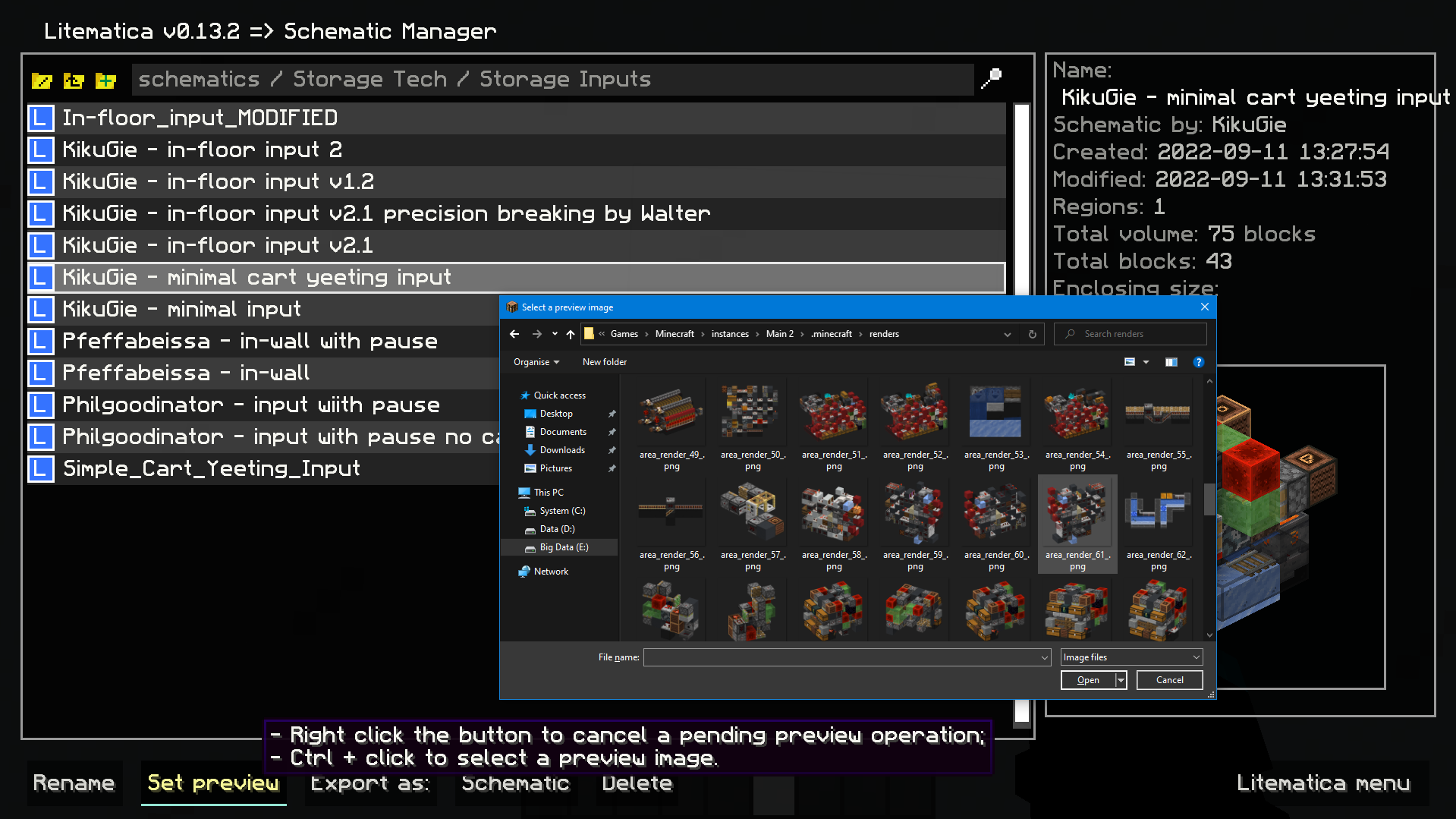
Inventory setup preview:
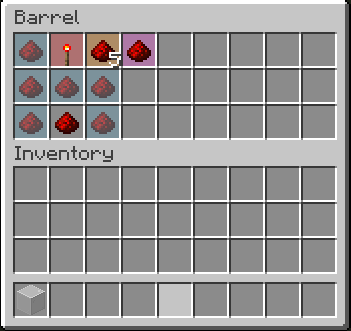
Show items that have to be in a container and highlights wrong or mismatched ones -inventoryScreenOverlay.
*Item colors match your placement block colors. By default its:- Light blue: missing item;
- Orange: mismatched amount or nbt data;
- Magenta: extra item that shouldn't be present;
- Red: wrong item type.*
Compact scoreboard (ported from my old mod) -
compactScoreboard.
Using short number format:- 1000 -> 1k
- 1000000 -> 1M
- 1000000000 -> 1B
- Disable WorldEdit neighbor updates on log-in -
autoDisableUpdates. - Hotkeys for litematic placement rotation & mirror -
rotatePlacementandmirrorPlacement. /isorender selectionshortcut for rendering current Litematica selection in Isometric Renders.- A hotkey to give yourself a container full of the item you're holding -
giveFullInv. Supports boxes, chests, and bundles. Nesting them is possible. - A hotkey to refresh the material list -
refreshMaterialList. - Make easy place act as if all blocks are full blocks. Useful for placing blocks with small hit boxes.
- And more to come!
Dependencies
Mod logo by Mizeno
FAQ
How to install Technical Utilities?
Install Fabric for your Minecraft version, download Technical Utilities for the same version and loader, put the file into the mods folder and launch the game with the loader profile.
Which Minecraft versions does Technical Utilities support?
Technical Utilities has builds for Minecraft 1.19.2–1.20.1, 1.20.4, 1.21–1.21.1, 1.21.4–26.3.
Is Technical Utilities needed on the server?
Client only — no need to install it on the server
Similar mods
All management mods →


More mods by this author
 Elytra Trims↓ 5.5M
 Elytra Trims Extensions↓ 522K
 Stackable Shulkers Fix↓ 40.8K
Often needed together
 Litematica↓ 28.5M
 MaLiLib↓ 39.8M