
Gallery of Trims
Gallery of Trims is a datapack for spawning every trimmed armor for inspecting it.
- Loaders
- FabricNeoForgeForgeQuilt
- Downloads on Modrinth
- 588
- Followers on Modrinth
- 2
- versions
- 15
- Updated
- July 4, 2026Jul 4
- Published
- in 2026
At a glance
Needed on the server; optional in the game
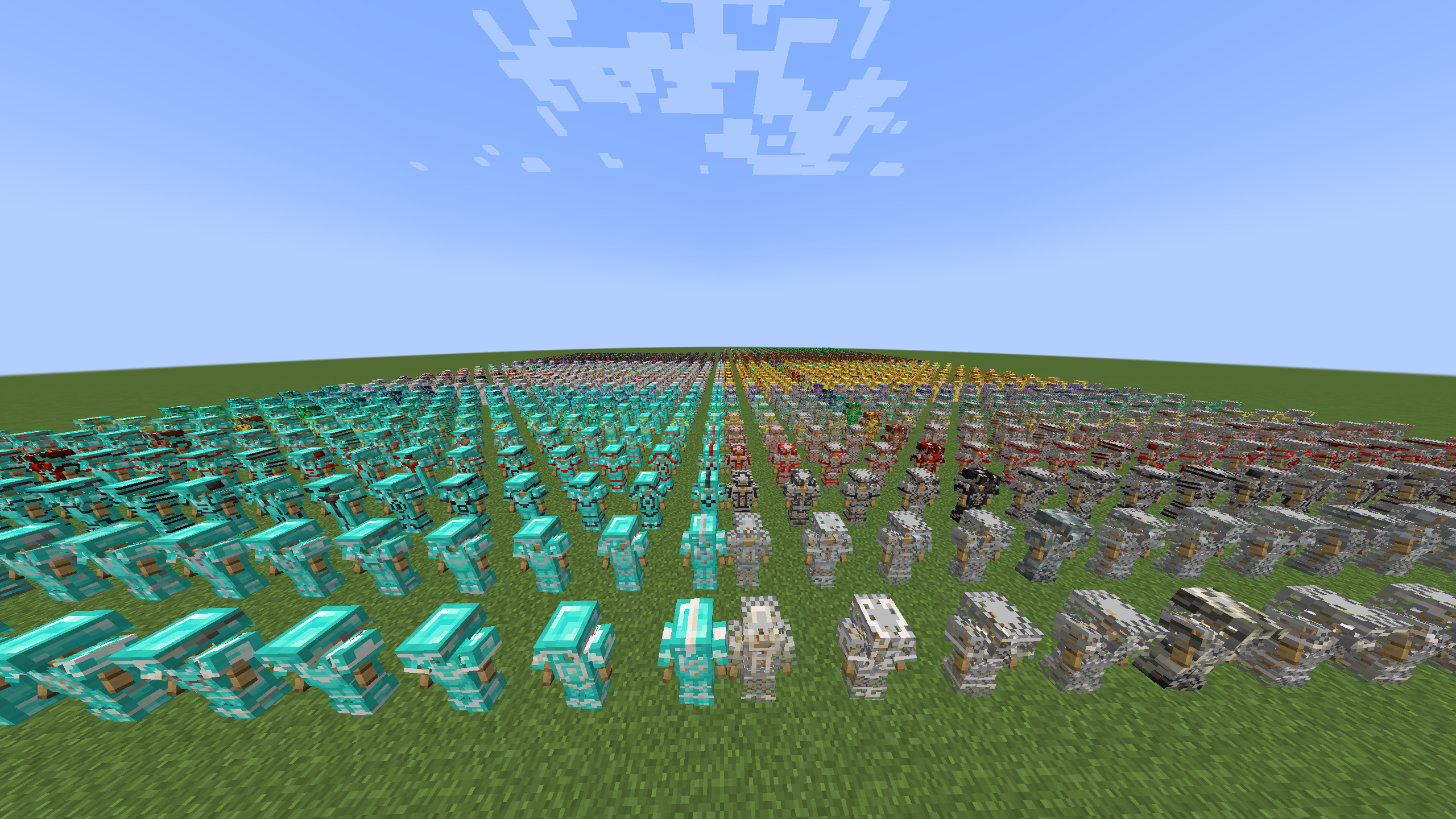
Gallery of Trims
Organized chest galleries and armor stand previews for every vanilla armor trim.









Gallery of Trims is a Minecraft Java datapack that spawns organized armor trim galleries. It can create chest galleries for every vanilla trim combination, smaller filtered galleries, and armor stand preview grids.
Minecraft target: 1.21 and 1.21.1 Data pack format: 48 Namespace: gallery_of_trims
Installation
Datapack install:
- Put
gallery-of-trims-datapack-1.0.0.zipin a world'sdatapacksfolder. - Run
/reload. - Run
/function gallery_of_trims:help.
Modloader install:
Put the loader-specific JAR in the
modsfolder:- Fabric:
gallery-of-trims-fabric-1.0.0.jar - Quilt:
gallery-of-trims-quilt-1.0.0.jar - Forge:
gallery-of-trims-forge-1.0.0.jar - NeoForge:
gallery-of-trims-neoforge-1.0.0.jar
- Fabric:
- Remove any older
gallery-of-trims-modloader-1.0.0.jarfrom themodsfolder. - Start the game or server with the matching loader.
- Run
/reload. - Run
/function gallery_of_trims:help.
The modloader JARs are no-code mods. Each one contains the datapack plus metadata for one loader. Fabric requires Fabric API's resource loader module. Quilt requires Quilt Standard Libraries' resource loader module unless Fabric API compatibility provides fabric-resource-loader-v0. Forge and NeoForge use lowcodefml.
Permissions
All commands use /function, so they require cheats in singleplayer or operator permission on a server. The modloader JAR only loads the datapack; it does not let non-operator players run these commands.
Quick Start
Spawn the full chest gallery:
/function gallery_of_trims:spawnSpawn the compact full gallery:
/function gallery_of_trims:spawn/compactShow armor stand preview commands:
/function gallery_of_trims:spawn/standClear the nearest spawned gallery:
/function gallery_of_trims:teardown/clear_nearestThe default layouts expand toward positive X and positive Z from the command position. Chests are spaced two blocks apart so they stay single chests. Spawn commands create an invisible origin marker so clear commands can be run later from anywhere.
Public Commands
These are the commands intended for players/admins. Functions under gallery_of_trims:z_internal/... are generated internals and should not be run directly.
| Command | What It Does |
|---|---|
/function gallery_of_trims:help | Prints the main command list in chat. |
/function gallery_of_trims:info | Prints compatibility, layout counts, and clearing notes. |
/function gallery_of_trims:spawn | Spawns the full chest gallery with signs. |
/function gallery_of_trims:spawn/compact | Spawns the full chest gallery in a staggered compact layout. |
/function gallery_of_trims:spawn/no_signs | Spawns the full chest gallery, then removes its signs. |
/function gallery_of_trims:spawn/stand | Prints armor stand view commands in chat. |
/function gallery_of_trims:teardown/clear | Safely clears all tracked Gallery of Trims spawns. |
/function gallery_of_trims:teardown/clear_last | Safely clears the most recently spawned tracked gallery/view. |
/function gallery_of_trims:teardown/clear_nearest | Safely clears the nearest tracked gallery/view. |
/function gallery_of_trims:teardown/clear_here | Clears from your current position as if it were the original spawn origin. |
/function gallery_of_trims:teardown/fast_clear | Clears all tracked spawns with broad fill commands for chest/sign areas. |
Chest Gallery Commands
Full Gallery
/function gallery_of_trims:spawnSpawns every vanilla armor trim pattern/material combination in chest rows. The default full gallery contains 175 chests, 175 signs, and 4500 trim item stacks.
Each chest is named and has a sign above it showing the armor piece and trim range inside that chest. Leather armor items explicitly remove the dyed-color component so they use the default leather appearance.
Compact Gallery
/function gallery_of_trims:spawn/compactSpawns the same full gallery, but rows are staggered closer together. This uses the same chest contents as the normal full gallery.
Full Gallery Without Signs
/function gallery_of_trims:spawn/no_signsSpawns the full chest gallery and removes the generated signs afterward. Chest contents and chest names are unchanged.
Spawn By Armor Slot
These commands spawn rows for a specific armor slot across all armor base materials that support that slot. Each row still contains every trim pattern/material combination for that armor item.
| Command | What It Spawns |
|---|---|
/function gallery_of_trims:spawn/helmets | Helmet rows for leather, chainmail, iron, gold, diamond, netherite, and turtle. |
/function gallery_of_trims:spawn/chestplates | Chestplate rows for leather, chainmail, iron, gold, diamond, and netherite. |
/function gallery_of_trims:spawn/leggings | Legging rows for leather, chainmail, iron, gold, diamond, and netherite. |
/function gallery_of_trims:spawn/boots | Boot rows for leather, chainmail, iron, gold, diamond, and netherite. |
Example:
/function gallery_of_trims:spawn/helmetsSpawn By Armor Base Material
These commands spawn the full trim rows for one armor base material.
| Command | What It Spawns |
|---|---|
/function gallery_of_trims:spawn/leather | Leather helmet, chestplate, leggings, and boots. |
/function gallery_of_trims:spawn/chainmail | Chainmail helmet, chestplate, leggings, and boots. |
/function gallery_of_trims:spawn/iron | Iron helmet, chestplate, leggings, and boots. |
/function gallery_of_trims:spawn/gold | Golden helmet, chestplate, leggings, and boots. |
/function gallery_of_trims:spawn/diamond | Diamond helmet, chestplate, leggings, and boots. |
/function gallery_of_trims:spawn/netherite | Netherite helmet, chestplate, leggings, and boots. |
/function gallery_of_trims:spawn/turtle | Turtle helmet only. |
Example:
/function gallery_of_trims:spawn/diamondSpawn By Trim Pattern
Pattern commands spawn 25 chests: one chest for each armor item. Each chest contains that one trim pattern across all 10 trim materials.
Available pattern commands:
/function gallery_of_trims:spawn/pattern/sentry
/function gallery_of_trims:spawn/pattern/dune
/function gallery_of_trims:spawn/pattern/coast
/function gallery_of_trims:spawn/pattern/wild
/function gallery_of_trims:spawn/pattern/ward
/function gallery_of_trims:spawn/pattern/eye
/function gallery_of_trims:spawn/pattern/vex
/function gallery_of_trims:spawn/pattern/tide
/function gallery_of_trims:spawn/pattern/snout
/function gallery_of_trims:spawn/pattern/rib
/function gallery_of_trims:spawn/pattern/spire
/function gallery_of_trims:spawn/pattern/wayfinder
/function gallery_of_trims:spawn/pattern/shaper
/function gallery_of_trims:spawn/pattern/silence
/function gallery_of_trims:spawn/pattern/raiser
/function gallery_of_trims:spawn/pattern/host
/function gallery_of_trims:spawn/pattern/flow
/function gallery_of_trims:spawn/pattern/bolt
Example:
/function gallery_of_trims:spawn/pattern/sentrySpawn By Trim Material
Trim material commands spawn 25 chests: one chest for each armor item. Each chest contains that one trim material across all 18 trim patterns.
Available trim material commands:
/function gallery_of_trims:spawn/material/quartz
/function gallery_of_trims:spawn/material/iron
/function gallery_of_trims:spawn/material/netherite
/function gallery_of_trims:spawn/material/redstone
/function gallery_of_trims:spawn/material/copper
/function gallery_of_trims:spawn/material/gold
/function gallery_of_trims:spawn/material/emerald
/function gallery_of_trims:spawn/material/diamond
/function gallery_of_trims:spawn/material/lapis
/function gallery_of_trims:spawn/material/amethyst
Example:
/function gallery_of_trims:spawn/material/goldArmor Stand Views
Armor stand view commands spawn visual trim previews instead of chests. Each armor base view creates 180 armor stands: 18 trim patterns times 10 trim materials. The layout expands toward positive X and positive Z. Turtle uses helmet-only stands.
List armor stand commands in chat:
/function gallery_of_trims:spawn/standSpawn armor stand views:
/function gallery_of_trims:spawn/stand/leather
/function gallery_of_trims:spawn/stand/chainmail
/function gallery_of_trims:spawn/stand/iron
/function gallery_of_trims:spawn/stand/gold
/function gallery_of_trims:spawn/stand/diamond
/function gallery_of_trims:spawn/stand/netherite
/function gallery_of_trims:spawn/stand/turtle
Examples:
/function gallery_of_trims:spawn/stand/leather
/function gallery_of_trims:spawn/stand/netherite
There is no spawn/stand/all command. Spawning every armor base view at once would create 1260 armor stands.
Colored Leather Armor Stands
Leather armor colors use decimal RGB values. Only leather armor can be dyed. The normal chest galleries keep leather armor at the default leather color.
Spawn one dyed leather armor stand with no trim:
/function gallery_of_trims:spawn/stand/leather_color {color:16711680}Spawn one dyed leather armor stand with a specific trim:
/function gallery_of_trims:spawn/stand/leather_color_trim {color:16711680,trim_material:"gold",pattern:"sentry"}Spawn all 180 leather trim armor stands with one dye color:
/function gallery_of_trims:spawn/stand/leather_color_all {color:16711680}Common color values:
| Color | Decimal RGB |
|---|---|
| Black | 0 |
| Blue | 255 |
| Green | 65280 |
| Cyan | 65535 |
| Purple | 8388736 |
| Red | 16711680 |
| Orange | 16753920 |
| White | 16777215 |
Decimal RGB formula:
color = red * 65536 + green * 256 + blueExample for RGB 255, 80, 20:
255 * 65536 + 80 * 256 + 20 = 16732180Use it like this:
/function gallery_of_trims:spawn/stand/leather_color_all {color:16732180}Clearing Commands
Safe clear is the default. It removes only expected chest/sign positions for chest galleries and tagged armor stands for armor stand views.
Clear all tracked spawns:
/function gallery_of_trims:teardown/clearClear the most recently spawned tracked gallery/view:
/function gallery_of_trims:teardown/clear_lastClear the nearest tracked gallery/view:
/function gallery_of_trims:teardown/clear_nearestClear from the current position:
/function gallery_of_trims:teardown/clear_hereUse clear_here when an old gallery has no origin marker. Stand at the original spawn position before running it.
Fast clear:
/function gallery_of_trims:teardown/fast_clearfast_clear uses broad fill ... replace minecraft:chest and fill ... replace minecraft:oak_sign commands over each tracked chest gallery footprint. It is faster, but it can remove unrelated chests or oak signs inside that footprint. For armor stand views, it still removes tagged Gallery of Trims armor stands.
Counts
| Item | Count |
|---|---|
| Armor items | 25 |
| Trim patterns | 18 |
| Trim materials | 10 |
| Combinations per armor item | 180 |
| Default chests per armor item | 7 |
| Default full gallery chests | 175 |
| Default full gallery signs | 175 |
| Default full gallery trim item stacks | 4500 |
| Pattern-filtered spawn | 25 chests, 250 trim item stacks |
| Material-filtered spawn | 25 chests, 450 trim item stacks |
| Armor stand view per armor base | 180 stands |
| Colored leather all-trims view | 180 stands |
FAQ
How to install Gallery of Trims?
Install Fabric for your Minecraft version, download Gallery of Trims for the same version and loader, put the file into the mods folder and launch the game with the loader profile.
Which Minecraft versions does Gallery of Trims support?
Gallery of Trims has builds for Minecraft 1.21–26.3.
Is Gallery of Trims needed on the server?
Needed on the server; optional in the game


