
- Loaders
- NeoForgeForge
- Downloads on Modrinth
- 66K
- Followers on Modrinth
- 6
- versions
- 15
- Updated
- July 19, 2026Jul 19
- Published
- in 2026
At a glance
Needed both in the game and on the server
Cell⁴
Infinite ME Storage Cells for Applied Energistics 2
Cell⁴ is an AE2 addon designed for modpack development. It adds three types of Infinity Cells that can be bound to specific items via NBT or data components, allowing infinite extraction from the ME network. Inserted matching items are silently discarded, consuming no actual storage.
Supported versions: 1.20.1 (Forge), 1.21.1 (NeoForge), 26.1.2 (NeoForge)
Infinity Cell Types
- Infinity Item Cell — bind specific items/fluids
- Infinity Tag Cell — bind all items matching tags and/or from specified mods
- Infinity ModID Cell — bind all items from a mod
Cell Configurator
The Cell Configurator is an in-game tool for editing cell data visually. Right-click while holding it to open the configuration GUI, then place a cell into the slot. 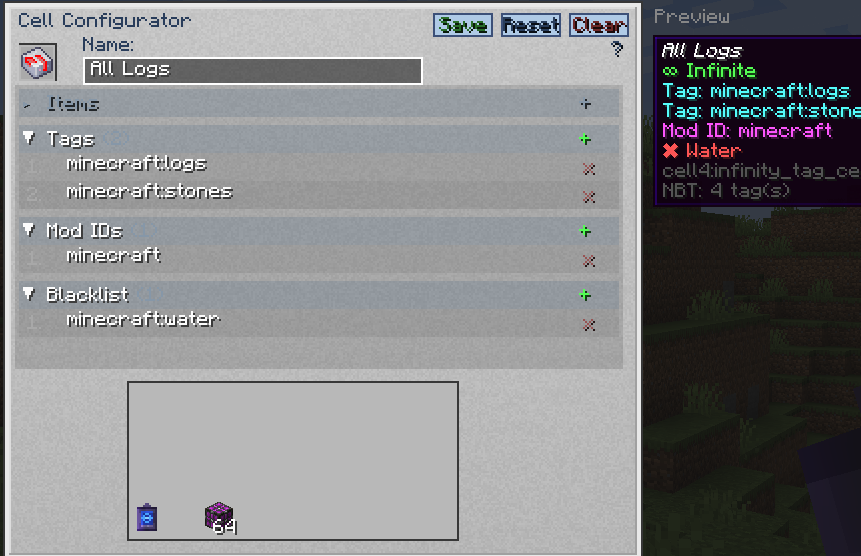
- Editable fields change based on the cell type placed in the slot.
- Inactive fields are shown in gray and cannot be edited.
- Separate multiple values with commas (e.g.
minecraft:diamond,minecraft:oak_log). - In the blacklist field, prefix tags with
#(e.g.#minecraft:birch_logs) and mod IDs with@(e.g.@mekanism). - Press Tab to cycle between editable fields.
- Press Enter to save changes.
- Click Save to apply changes, Reset to revert, or Clear to erase all fields.
| Cell Type | Editable Fields |
|---|---|
| Item Cell | cell4item, cell4blacklist |
| Tag Cell | cell4tag, cell4modid, cell4blacklist |
| ModID Cell | cell4modid, cell4blacklist |
Preview
The right side of the GUI displays a Preview panel showing the cell's tooltip as it would appear in your inventory. If a custom name is set in the name field, the preview updates in real time with the new name shown in italic style.
Data Keys
| Key | Target | Example |
|---|---|---|
cell4item | Specific items/fluids | "minecraft:diamond" |
cell4tag | Tag | "minecraft:logs" |
cell4modid | Mod ID (Tag Cell also supports this) | "mekanism" |
cell4blacklist | Exclude items/tags/mods (optional) | See below |
cell4name | Custom display name (optional) | "My Diamond Cell" |
1.20.1 stores these keys as raw NBT (
{...}). 1.21.1 & 26.1.2 store them inside data components ([custom_data={...}]).
Command Examples
1.21.1 & 26.1.2 use [custom_data={...}] syntax; 1.20.1 uses {...} syntax. Tag namespace: c: in 1.21.1/26.1.2, forge: in 1.20.1.
Single Value
# 1.21.1 / 26.1.2
/give @p cell4:infinity_item_cell[custom_data={cell4item:"minecraft:diamond"}]
/give @p cell4:infinity_tag_cell[custom_data={cell4tag:"minecraft:logs"}]
/give @p cell4:infinity_modid_cell[custom_data={cell4modid:"mekanism"}]

# 1.20.1
/give @p cell4:infinity_item_cell{cell4item:"minecraft:diamond"}
/give @p cell4:infinity_tag_cell{cell4tag:"minecraft:logs"}
/give @p cell4:infinity_modid_cell{cell4modid:"mekanism"}
Multiple Values
# 1.21.1 / 26.1.2
/give @p cell4:infinity_item_cell[custom_data={cell4item:["minecraft:diamond","minecraft:oak_log"]}]
/give @p cell4:infinity_tag_cell[custom_data={cell4tag:["minecraft:logs","c:ingots/iron"]}]
/give @p cell4:infinity_modid_cell[custom_data={cell4modid:["mekanism","thermal"]}]

# 1.20.1
/give @p cell4:infinity_item_cell{cell4item:["minecraft:diamond","minecraft:oak_log"]}
/give @p cell4:infinity_tag_cell{cell4tag:["minecraft:logs","forge:ingots/iron"]}
/give @p cell4:infinity_modid_cell{cell4modid:["mekanism","thermal"]}
Tag Cell with Mod ID Filter
The Infinity Tag Cell supports both cell4tag and cell4modid simultaneously:
# 1.21.1 / 26.1.2
/give @p cell4:infinity_tag_cell[custom_data={cell4tag:"minecraft:logs",cell4modid:"mekanism"}]
/give @p cell4:infinity_tag_cell[custom_data={cell4tag:["minecraft:logs","c:ingots/iron"],cell4modid:["mekanism","thermal"]}]

# 1.20.1
/give @p cell4:infinity_tag_cell{cell4tag:"minecraft:logs",cell4modid:"mekanism"}
/give @p cell4:infinity_tag_cell{cell4tag:["minecraft:logs","forge:ingots/iron"],cell4modid:["mekanism","thermal"]}
Blacklist
Blacklist entries support three types:
- Item — plain identifier (e.g.
minecraft:birch_log) - Tag — prefixed with
#(e.g.#minecraft:birch_logs) - Mod ID — prefixed with
@(e.g.@mekanism)
# 1.21.1 / 26.1.2
/give @p cell4:infinity_tag_cell[custom_data={cell4tag:"minecraft:logs",cell4blacklist:"minecraft:birch_log"}]
/give @p cell4:infinity_modid_cell[custom_data={cell4modid:"mekanism",cell4blacklist:["mekanism:steel_ingot","#c:ingots/steel","@thermal"]}]

# 1.20.1
/give @p cell4:infinity_tag_cell{cell4tag:"minecraft:logs",cell4blacklist:"minecraft:birch_log"}
/give @p cell4:infinity_modid_cell{cell4modid:"mekanism",cell4blacklist:["mekanism:steel_ingot","#forge:ingots/steel","@thermal"]}
Blacklisted items are shown in the cell tooltip with a ✖ marker.
FAQ
How to install Cell⁴?
Install NeoForge for your Minecraft version, download Cell⁴ for the same version and loader, put the file into the mods folder and launch the game with the loader profile.
Which Minecraft versions does Cell⁴ support?
Cell⁴ has builds for Minecraft 1.20.1, 1.21.1, 26.1.2.
Is Cell⁴ needed on the server?
Needed in the game and on the server


