
Chat Animation [Smooth Chat]
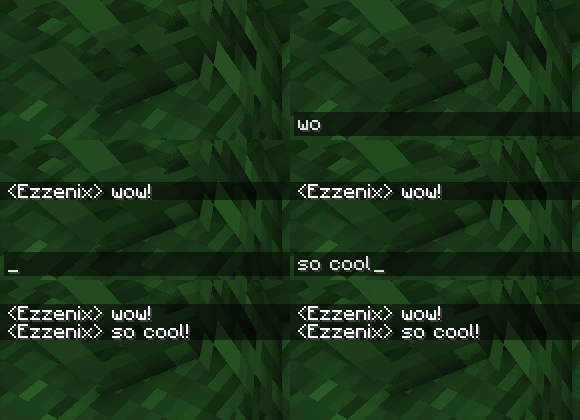
Makes chat messages appear with a smooth animation.
FabricNeoForgeForgeQuilt
- Loaders
- FabricNeoForgeForgeQuilt
- Downloads on Modrinth
- 23.7M
- Followers on Modrinth
- 2.4K
- versions
- 135
- Updated
- October 5, 2026Oct 5
- Published
- in 2023
Preview · swipe
At a glance
Runs on Fabric, NeoForge, Forge and Quilt
For Minecraft 1.20–26.3
Client only — no need to install it on the server
Latest version — 1.3.4+neoforge-26.3 from October 5, 2026
License MIT — free
Where it's neededGame versions1.20–26.3
In gamerequiredOn servernot needed
Install in the game only; not needed on the server
✨ Chat Animation
- Improves chat visuals by adding smooth animations.
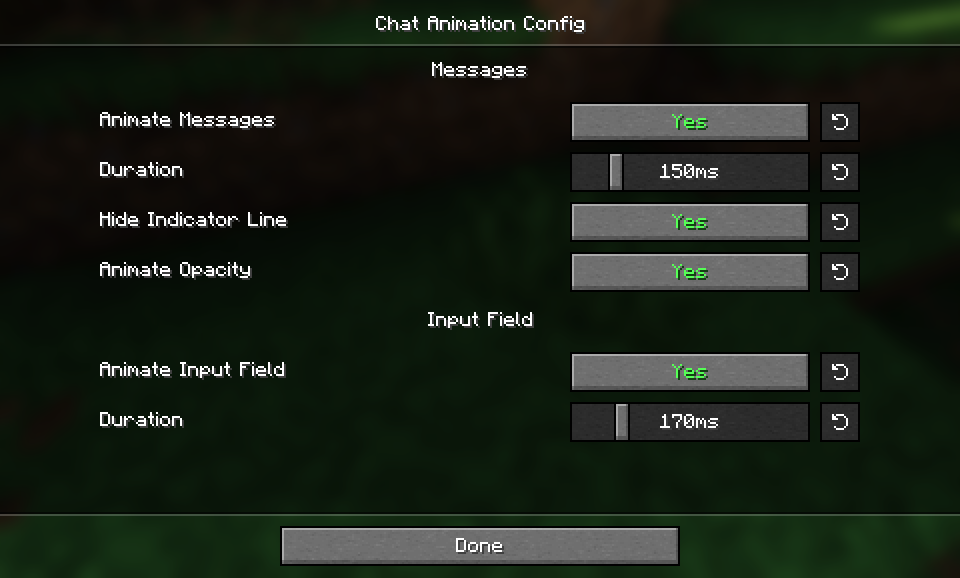
- Optionally removes the message indicator line to the left of messages.
- Configuring the mod on Fabric is possible with Mod Menu.


Check out my other mod: Smooth Gui
FAQ
How to install Chat Animation [Smooth Chat]?
Install Fabric for your Minecraft version, download Chat Animation [Smooth Chat] for the same version and loader, put the file into the mods folder and launch the game with the loader profile.
Which Minecraft versions does Chat Animation [Smooth Chat] support?
Chat Animation [Smooth Chat] has builds for Minecraft 1.20–26.3.
Is Chat Animation [Smooth Chat] needed on the server?
Client only — no need to install it on the server
License and source
MIT Licensefree to use and share with credit to the author
Similar mods
All decoration mods →


More mods by this author
 Smooth Gui↓ 2.9M
Often needed together
 Compatibility layer for VoiceMessages and ChatAnimation↓ 325
 TheBr0kEn↓ 302