
Create: Routes
Write once, follow anywhere. Name a run of stops as a route, and every schedule follows it with a single entry — edit the route once and every train updates.
- Loaders
- NeoForgeForge
- Downloads on Modrinth
- 695
- Followers on Modrinth
- 5
- versions
- 4
- Updated
- August 26, 2026Aug 26
- Published
- in 2026
At a glance
Needed both in the game and on the server
Write once, follow anywhere.
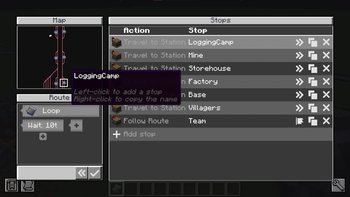
Create: Routes gives the stops a home of their own. Name a run of stops as a route. Edit the route and every train following it picks the change up.
Following a route
Add a Follow Route entry to any schedule and that one entry stands for the whole run.
- Rev — run the route's stops back to front.
- Skip — drop the last stop.
An out-and-back line is two entries pointing at one route.
Shared defaults
Wait conditions belong to the route. A stop that sets none of its own borrows them, so the wait is set once at the top instead of on all twelve stops.
Nesting
A route can follow another route. Define a trunk once and every branch running over it shares that one definition — fix the trunk and you fix all of them.
The editor
Open it from the Follow Route entry's Configure route button. Pick stops straight off the railway map, drag to reorder.
FAQ
How to install Create: Routes?
Install NeoForge for your Minecraft version, download Create: Routes for the same version and loader, put the file into the mods folder and launch the game with the loader profile.
Which Minecraft versions does Create: Routes support?
Create: Routes has builds for Minecraft 1.20.1, 1.21.1.
Is Create: Routes needed on the server?
Needed in the game and on the server
Similar mods
All utility mods →


More mods by this author
 Create: Transit↓ 806