
- Loaders
- NeoForge
- Downloads on Modrinth
- 849
- Followers on Modrinth
- 5
- version
- 1
- Updated
- August 9, 2026Aug 9
- Published
- in 2026
At a glance
Needed both in the game and on the server
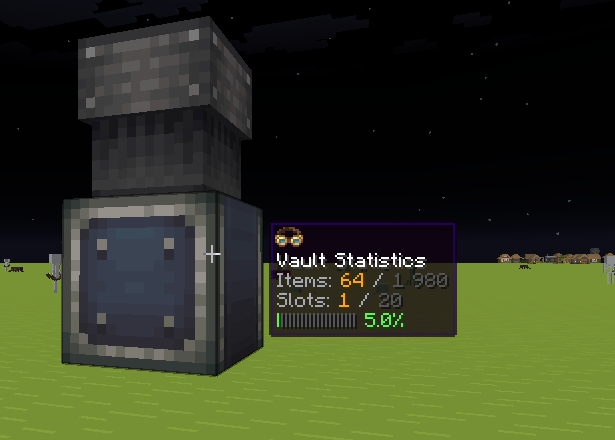
Create: Vault Statistics
Ever build a big Create Item Vault and have absolutely no idea how full it is without opening it up? This tiny addon fixes that.
Just put on Create's goggles and look at a vault — its stats show up right in the goggle overlay, the same little box Create already uses to show fluid levels in tanks or heat in blaze burners. No new blocks, no new items, no extra menus. It just works.
What you get
- Items — current item count / maximum capacity
- Slots — occupied slots / total slots (correctly scales with multiblock vault size — a 3×3 vault shows its real numbers, not the base vault's)
- A fullness bar that fades from green to red as the vault fills up
- Large numbers are shortened for readability (
77k,128m, ...) instead of a wall of digits
How it works
The mod hooks directly into Create's own goggle overlay system, so the info box you see looks and behaves exactly like every other Create tooltip — same styling, same position, same fade-in animation. It's not a custom UI bolted on top; it's using Create's native rendering.
Requirements
- Create 6.0 or newer (the version that introduced the Item Vault)
Supported versions
| Minecraft | Loader | Status |
|---|---|---|
| 1.21.1 | NeoForge | ✅ Available |
More loaders and Minecraft versions are planned — see the GitHub repo for progress.
Source & issues
Open source — code, issue tracker, and build instructions are on GitHub.
Credits
FAQ
How to install Create: Vault Statistics?
Install NeoForge for your Minecraft version, download Create: Vault Statistics for the same version and loader, put the file into the mods folder and launch the game with the loader profile.
Which Minecraft versions does Create: Vault Statistics support?
Create: Vault Statistics has builds for Minecraft 1.21.1.
Is Create: Vault Statistics needed on the server?
Needed in the game and on the server


