
Dynamic Trims Updated
Dynamically render Armor Trim patterns! Updated fork of Bawnorton's mod.
- Loaders
- FabricNeoForgeQuilt
- Downloads on Modrinth
- 811
- Followers on Modrinth
- 3
- versions
- 40
- Updated
- October 3, 2026Oct 3
- Published
- in 2026
At a glance
Install in the game only; not needed on the server
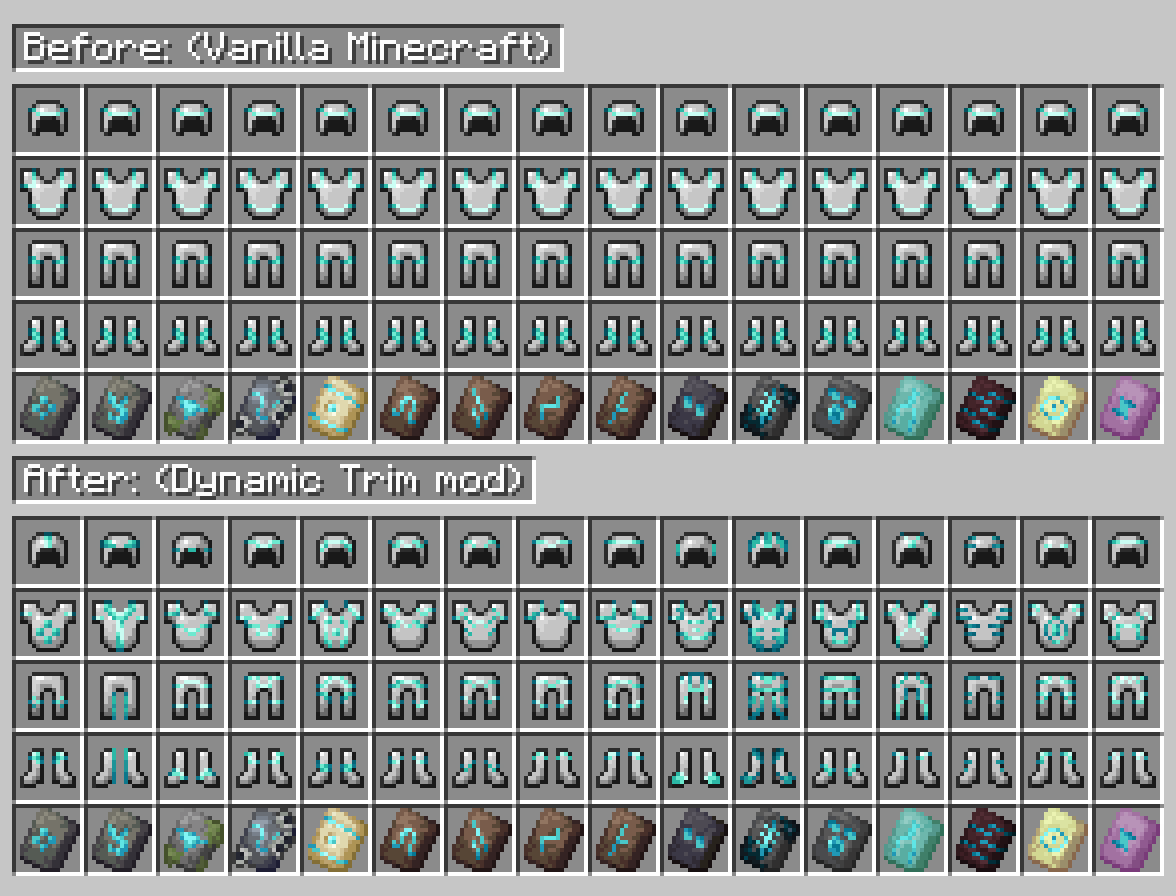
Dynamic Trims
Pattern-aware armor trim item and armor rendering for Minecraft.





Overview
Dynamic Trims makes armor trim item icons reflect their actual trim pattern instead of showing the same generic trim overlay for every pattern.
It keeps the mod focused on trim rendering, with shared common code and separate Fabric and NeoForge loader entrypoints.
Features
- Pattern-specific item icons - Different trim patterns render as different inventory icons.
- Armor trim rendering support - Keeps item and armor trim rendering consistent.
- Fabric and NeoForge builds - Loader-specific jars from shared common code.
- No dependency - Runs without extra required mods.
- Version branches - Each Minecraft version can stay isolated on its own branch.
Installation
- Download the correct loader jar for your Minecraft version.
- Place the jar in your
modsfolder. - Launch the game with Fabric Loader or NeoForge.
Use the branch/build that matches your Minecraft version.
Notice
Original mod made by Bawnorton, this is just an updated fork of it.
Why did I fork and updated this?
Trimica is a broader mod that does multiple things I am not interested in using. It also focuses on a narrower set of Minecraft versions, while this fork keeps separate branches for the versions I want to support.
Contact
FAQ
How to install Dynamic Trims Updated?
Install Fabric for your Minecraft version, download Dynamic Trims Updated for the same version and loader, put the file into the mods folder and launch the game with the loader profile.
Which Minecraft versions does Dynamic Trims Updated support?
Dynamic Trims Updated has builds for Minecraft 1.21.1–26.3.
Is Dynamic Trims Updated needed on the server?
Client only — no need to install it on the server


