
FadeClose
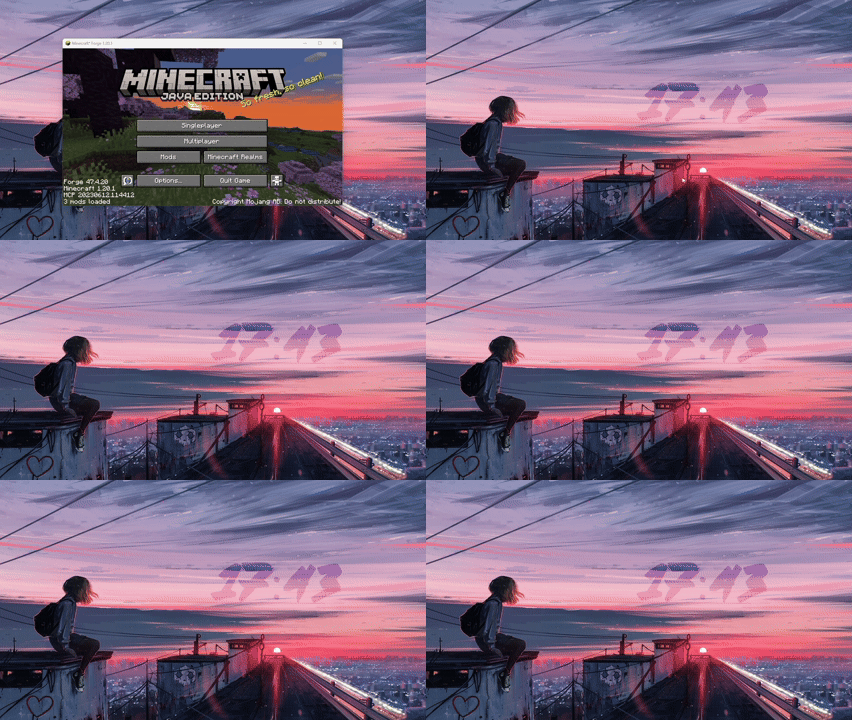
Adds a smooth fade-out animation when closing Minecraft, inspired by the game OneShot. Works with the X button, Alt+F4, and the in-game quit button.
- Loaders
- Forge
- Downloads on Modrinth
- 603
- Followers on Modrinth
- 2
- versions
- 4
- Updated
- September 23, 2026Sep 23
- Published
- in 2026
At a glance
Install in the game only; not needed on the server
FadeClose
Inspired by the indie game OneShot, this mod adds a smooth fade-out animation whenever you close Minecraft. Instead of the window abruptly shutting down, it will gradually become transparent and softly disappear — making the closing experience feel polished and satisfying.
How it works
The fade-out animation triggers no matter how you close the game:
Clicking the X button Pressing Alt+F4 Using the in-game Quit button
Compatibility
Minecraft: Java Edition 1.20.1 – 1.20.6 Mod loader: Forge Side: Client only — no server needed
FAQ
How to install FadeClose?
Install Forge for your Minecraft version, download FadeClose for the same version and loader, put the file into the mods folder and launch the game with the loader profile.
Which Minecraft versions does FadeClose support?
FadeClose has builds for Minecraft 1.20.1–1.20.6.
Is FadeClose needed on the server?
Client only — no need to install it on the server


