
- Loaders
- FabricNeoForgeForge
- Downloads on Modrinth
- 1.2K
- Followers on Modrinth
- 5
- versions
- 46
- Updated
- July 7, 2026Jul 7
- Published
- in 2026
At a glance
Install in the game only; not needed on the server
Flow Sort
Flow Sort keeps your inventory organized automatically, without extra clicks.
Items are sorted as you play: new stacks settle into place, split stacks merge together, and your main inventory stays clean while your hotbar is left untouched.
Automatic or manual
Prefer full control? Auto-sorting can be turned off at any time. You can still sort manually with buttons, middle-click, or a keybind.
Features
- Automatic inventory sorting
- Manual sort buttons for vanilla chests and many chest-like modded storage screens
- Instant stack merging
- Sort opened chests and storage screens
- Middle-click sorting for the hovered inventory area
- Hotbar-safe sorting
- Simple configuration
- Clean compatibility with popular storage mods
Sort as you loot
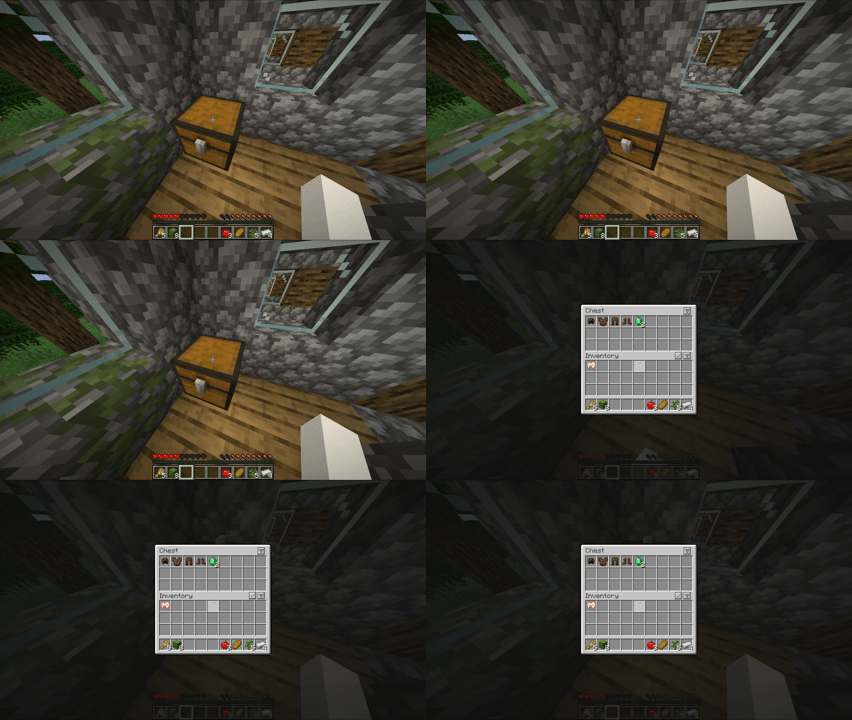
Open a chest and Flow Sort cleans it up instantly.
Before / After
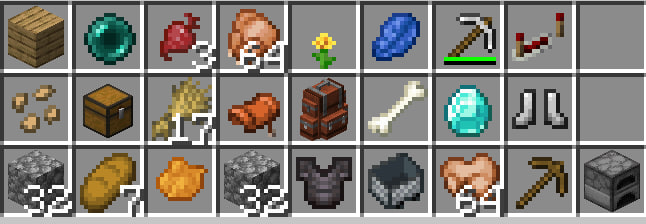
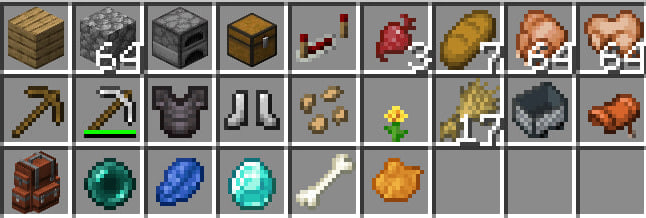
Controls
- Middle mouse button: sort the inventory area under your cursor
- K: sort your inventory
- Buttons: sort manually or toggle auto-sorting
Keybinds can be changed in Minecraft's controls menu.
Buttons

The check button toggles automatic sorting. The list button sorts the current inventory area instantly.
Configuration
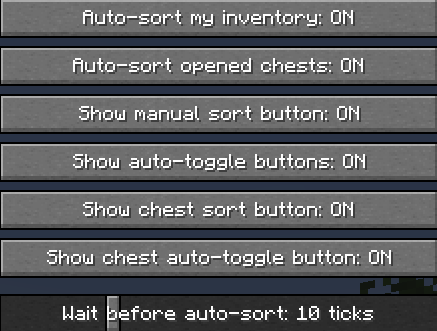
Flow Sort can be adjusted from the in-game config screen. On Fabric, this screen is available through Mod Menu.
- Auto-sort my inventory: automatically keeps your main inventory sorted.
- Auto-sort opened chests: sorts supported storage screens when you open or update them.
- Show manual sort button: shows the list button for instant manual sorting.
- Show auto-toggle buttons: shows the check button for quickly turning auto-sort on or off.
- Show chest sort button: shows a manual sort button for opened storage screens.
- Show chest auto-toggle button: shows an auto-sort toggle for opened storage screens.
- Wait before auto-sort: controls how long Flow Sort waits before sorting after changes.
Compatibility
Flow Sort works client-side and supports vanilla chests, shulker boxes, and many chest-like modded storage screens.
If another mod already provides its own sorting buttons, Flow Sort avoids adding duplicate buttons where possible while keeping hotkeys and automatic sorting available.
Requirements
- Fabric: Fabric API
- Optional (Fabric): Mod Menu for in-game configuration on Fabric.
FAQ
How to install Flow Sort?
Install Fabric for your Minecraft version, download Flow Sort for the same version and loader, put the file into the mods folder and launch the game with the loader profile.
Which Minecraft versions does Flow Sort support?
Flow Sort has builds for Minecraft 1.18.2–1.20.1, 1.20.4, 1.20.6–1.21.4, 1.21.11–26.2.
Is Flow Sort needed on the server?
Client only — no need to install it on the server
Similar mods
All storage mods →


More mods by this author
 Loot Rewind↓ 386