
Fluid Void Fading
Renders fluids flowing into the void, seamlessly
FabricNeoForgeQuilt
- Loaders
- FabricNeoForgeQuilt
- Downloads on Modrinth
- 174K
- Followers on Modrinth
- 260
- versions
- 27
- Updated
- July 17, 2026Jul 17
- Published
- in 2023
Comparison With/Without · swipe
At a glance
Runs on Fabric, NeoForge and Quilt
For Minecraft 1.21.8, 1.21.11–26.2 …
Client only — no need to install it on the server
Latest version — 2.2.0+26.2-neoforge from July 17, 2026
License LGPL-3.0-or-later — free
Where it's neededGame versions1.21.4–1.21.5, 1.21.8, 1.21.11–26.2 …
In gamerequiredOn servernot needed
Install in the game only; not needed on the server
Renders fluids smoothly flowing into the void, instead of being cut instantly, making sky type worlds look much nicer and dynamic.
A must-have for every Skyblock pack or packs featuring dimensions up in the sky, clientside only!
Notable Features
- client-only required
- automatic compat with all modded fluids
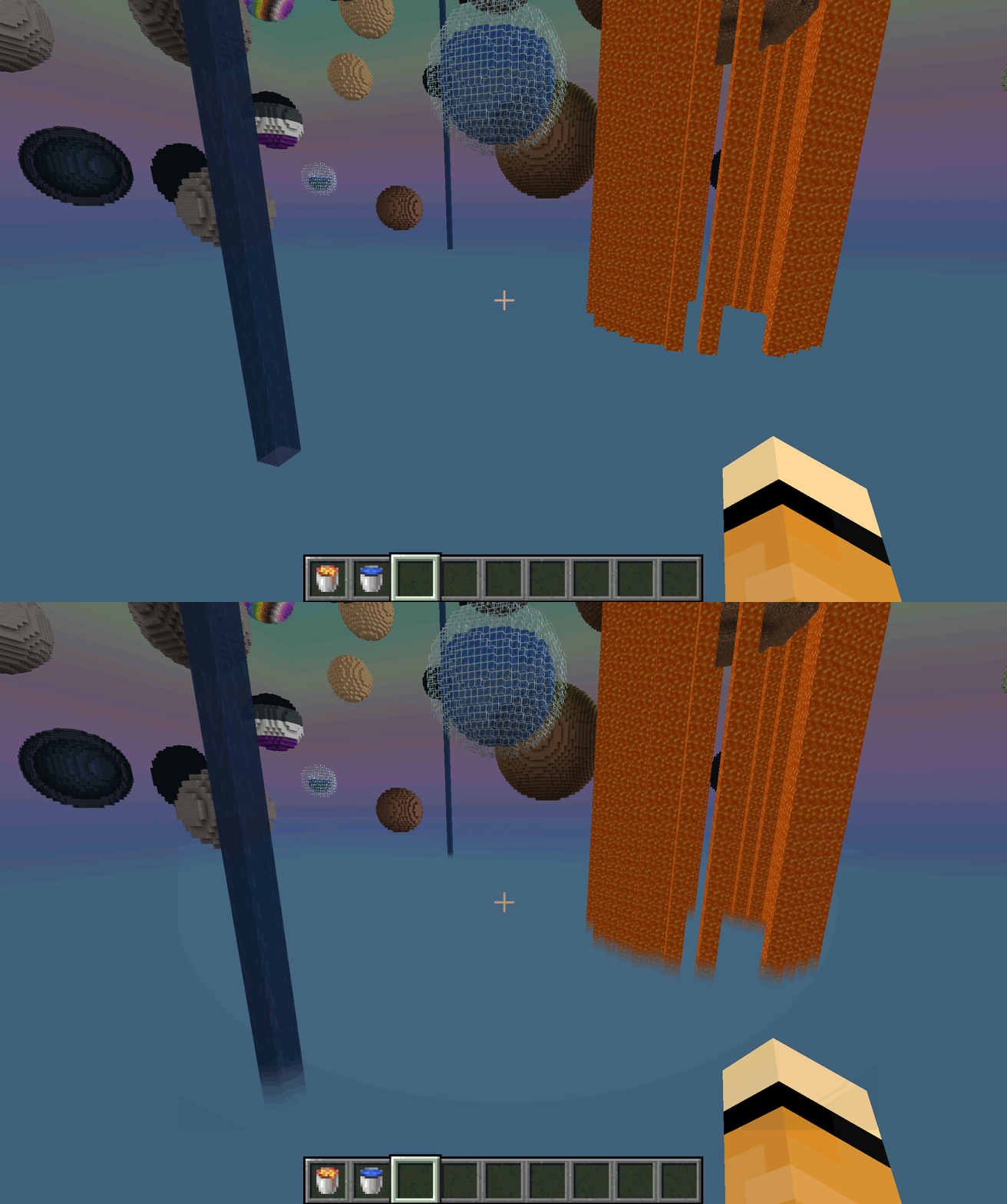
Comparison: With and Without Fluid Void Fading
By default, fluids flowing into the bottom of the world will get cut up harshly, leaving a ugly floating block behind With Fluid Void Fading added, it gets a transparent tail as it smoothly blends into nothingness
Troubleshooting
- Should a fluid not render transparent (its texture is not transparent by default, like lava), add it's name to the configuration file
- Currently does not work with Sodium
FAQ
How to install Fluid Void Fading?
Install Fabric for your Minecraft version, download Fluid Void Fading for the same version and loader, put the file into the mods folder and launch the game with the loader profile.
Which Minecraft versions does Fluid Void Fading support?
Fluid Void Fading has builds for Minecraft 1.20.6–1.21.1, 1.21.4–1.21.5, 1.21.8, 1.21.11–26.2 ….
Is Fluid Void Fading needed on the server?
Client only — no need to install it on the server
License and source
GNU Lesser General Public License v3.0 or laterfree to use and share; changes to the mod itself must be published under the same license


