
LinkPreview
See what links in chat are about before clicking them, safely and automatically.
- Loaders
- FabricQuilt
- Downloads on Modrinth
- 388
- Followers on Modrinth
- 2
- versions
- 11
- Updated
- June 17, 2026Jun 17
- Published
- in 2026
At a glance
Install in the game only; not needed on the server





Why see a boring link when you could see this?
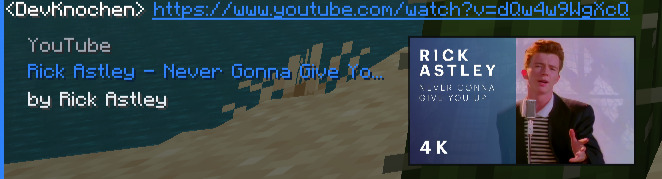
Titles. Thumbnails. Descriptions. Right there in your chat.
🔗 Paste a link, get a preview
Send a link in chat and LinkPreview will automatically fetch and display a rich embed. Just like in Discord.
Supported sites include:
| Site | Preview includes | |
|---|---|---|
| 🌐 | Most Websites | Page title and description |
| 🖼️ | Images | Inline preview of the image itself |
| 🎬 | YouTube | Video title, channel name, and thumbnail |
| 🎵 | Spotify | Track title, artist name, and thumbnail |
🔒 The site never sees your IP. To fetch link previews, LinkPreview connects to an external Cloudflare server on your behalf.
📥 Getting started
🎮 Minecraft Client
- Download LinkPreview and the Fabric API.
- Drop it in your
mods/folder. - Boot up Minecraft.
- Send a link in chat. That's it!
⚠️ Only download from Modrinth. Don't trust random sites!
🐛 Something broken?
Open an issue on GitHub. Describe your issue, include what version you're on, what other mods you have, and any crash logs. We'll sort it out.
📩 Contact
Reach out at contact@normik.de
Enjoyed it? A ❤️ on Modrinth or a ⭐ on GitHub genuinely makes our day.
FAQ
How to install LinkPreview?
Install Fabric for your Minecraft version, download LinkPreview for the same version and loader, put the file into the mods folder and launch the game with the loader profile.
Which Minecraft versions does LinkPreview support?
LinkPreview has builds for Minecraft 1.20–26.2.
Is LinkPreview needed on the server?
Client only — no need to install it on the server
Similar mods
All social mods →


Often needed together
 Fabric API↓ 279M