
MaterialMaps
Normal and heights maps support for block and items in resourcepacks without needing a shader
- Loaders
- Fabric
- Downloads on Modrinth
- 221
- Followers on Modrinth
- 6
- versions
- 3
- Updated
- September 19, 2026Sep 19
- Published
- in 2026
At a glance
Install in the game only; not needed on the server
MaterialMaps
Make your textures look bumpy instead of flat. No shader pack required.
Client-side · Sodium-dependent
In Minecraft, every block face is a perfectly flat square. Stone, bricks, gravel, the texture looks rough, but the surface itself is smooth, so light hits all of it exactly the same way. That is why blocks can look like stickers.
MaterialMaps fixes that.
Many HD resource packs already include an extra hidden image for each texture that says "this pixel sticks out, that one is a dent".
Normally only a shader pack can read those.
MaterialMaps reads them itself, so every bump catches the light from the right side and casts its own little shadow. Stone looks carved. Bricks look stacked. Gravel looks like actual gravel.
- No shader pack needed, no Iris, no OptiFine, no giant FPS hit
- Still looks like vanilla, no bloom, no color changes, no fancy skies. Just depth
- Works with the packs you already have, if your pack supports it, turn the mod on and you're done
Do I need a special resource pack?
Yes, MaterialMaps only adds detail where the pack provides it. HD packs like Prime's HD Textures do.
With a plain vanilla pack, nothing will change.
Still in heavy development !
MaterialMaps works, but it is young. Compatibility with large rendering mods is not guaranteed yet.
Bug reports are very welcome.
Comparison
Screenshots taken with Prime's HD Textures 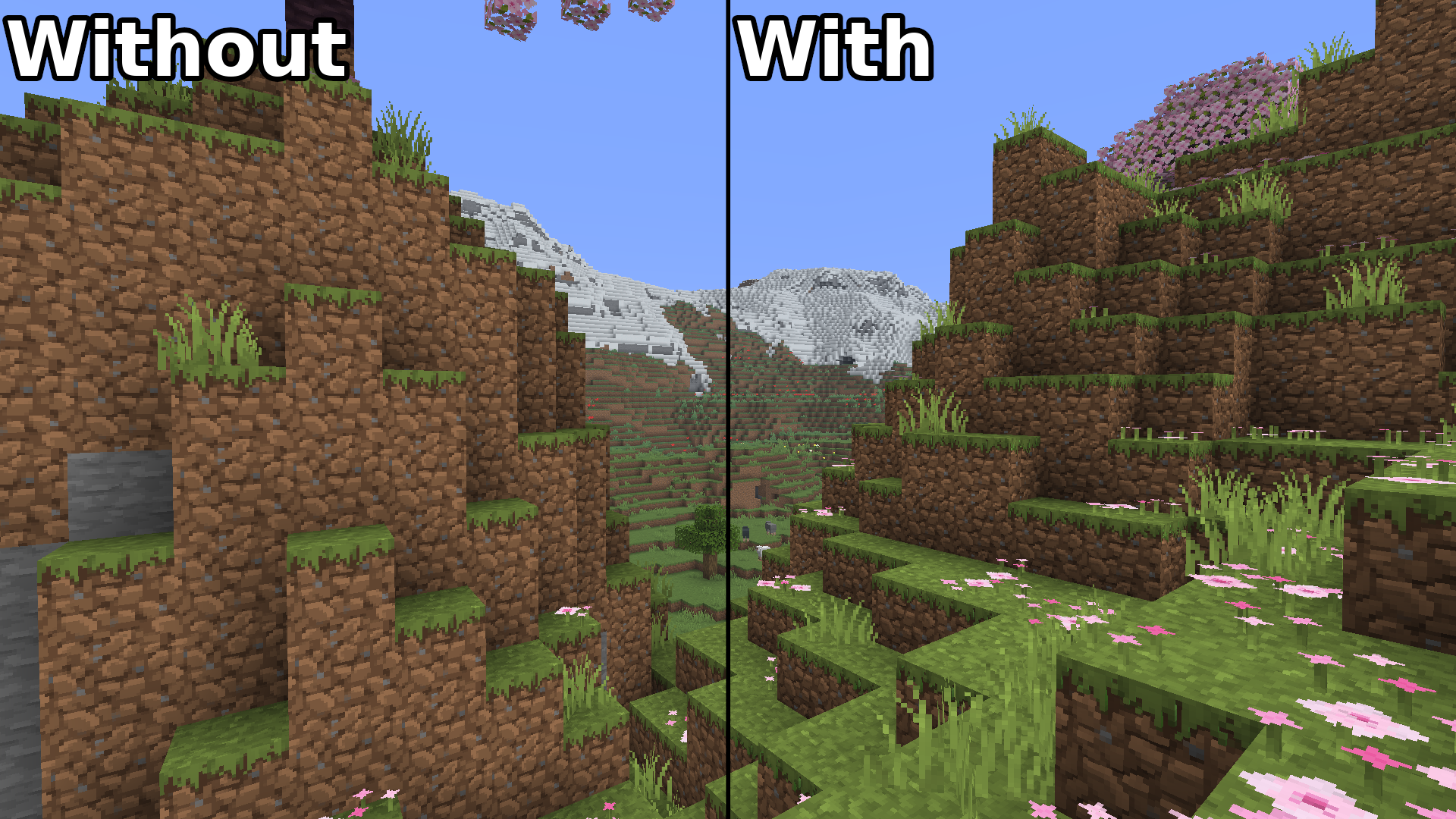
Features
- Block normal maps: applied directly to terrain through a dedicated rendering path, so vanilla chunk geometry is left untouched.
- Item normal maps: held, dropped, and inventory items get the same treatment.
- Height maps: when a texture has an
_h.pngbut no_n.png, MaterialMaps derives a tangent-space normal map in memory during resource reload. - LabPBR 1.3 support: paired
_n.pngand_s.pngmaps are recognised; normal X/Y and ambient occlusion are read from the LabPBR normal map, and its alpha channel is preserved as embedded height data. - Dimension-aware lighting: sun and moon direction follow the dimension you are in.
- Experimental parallax: bounded height sampling on nearby solid and cutout faces, with optional recess-edge shading and voxel-like texel relief.
- Vanilla fallback: anything MaterialMaps cannot render safely is handed straight back to vanilla, with the reason recorded.
Compatibility
| Mod | Status |
|---|---|
| Sodium | Required |
| Iris | Optional. When an Iris shader pack is active, MaterialMaps disables itself to avoid conflicts. |
| Fabric API | Required |
MaterialMaps is client-side only, you can join any server with it.
Configuration
Open the settings from ModMenu, or from Video Settings -> MaterialMaps when Sodium is installed.
Rendering : toggle block and item normal maps, height-map derivation, and the vanilla fallback.
Lighting : Normal Strength controls how strongly normal maps perturb the surface, Ambient Strength sets the minimum detail lighting, and Directional Strength sets the directional contrast.
Experimental : parallax, parallax depth scale, recess edges, and voxel-like texel relief.
Debug : normal-map, world-normal, and lighting debug views for blocks and items, plus render statistics.
Commands
For diagnosing a pack in-game:
/materialmaps summary [blocks|items]   overview of what was detected
/materialmaps inspect <material>       show the maps found for one texture, block, or item
/materialmaps validate                 list resource-pack warnings and errors
/materialmaps renderstats              rendering diagnostics
/materialmaps dump                     write the full material index to a file
/materialmaps reload                   rebuild the index and normal atlases
For pack creators
Naming convention
Place your maps next to the base texture, using the _n and _h suffixes:
assets/minecraft/textures/block/stone.png
assets/minecraft/textures/block/stone_n.png
assets/minecraft/textures/block/stone_h.png

assets/minecraft/textures/item/iron_pickaxe.png
assets/minecraft/textures/item/iron_pickaxe_n.png
Rules worth knowing:
- Explicit normal maps always take priority over height maps.
- Height maps are only used to derive normals when
Height Mapsis enabled and no_n.pngexists. - A map must match its base texture's dimensions, or it is skipped.
- LabPBR packs can supply
_n.png+_s.pngpairs. - Only
textures/blockandtextures/itemare scanned.
Run /materialmaps validate to catch orphan maps and dimension mismatches while you work, and enable Strict Validation in the settings to treat more problems as hard errors.
Parallax notes
The experimental parallax option applies bounded height sampling to nearby solid and cutout block faces. It fades out between 24 and 32 blocks and stays disabled for translucent layers. Cutout blocks keep their original alpha-tested silhouette. This is a lightweight prototype — there is no true geometry or silhouette displacement.
Test pack
A small development resource pack is included in the repository as materialmaps-test-pack. Run the client, enable it in the resource-pack screen, then inspect a diamond, an iron ingot, or a stick to see the item path at work.
Requirements
- Minecraft 26.2
- Fabric Loader 0.19.3+
- Fabric API
AI Usage
Not every line of code from this project is 100% human
AI has been used as a research tool and for programming assistance
FAQ
How to install MaterialMaps?
Install Fabric for your Minecraft version, download MaterialMaps for the same version and loader, put the file into the mods folder and launch the game with the loader profile.
Which Minecraft versions does MaterialMaps support?
MaterialMaps has builds for Minecraft 26.2.
Is MaterialMaps needed on the server?
Client only — no need to install it on the server
Similar mods
All decoration mods →


Often needed together
 Fabric API↓ 291M