
MCclip
McClip — Instant Replay & Gameplay RecorderMcClip continuously captures your Minecraft gameplay in a background rolling buffer without dragging down your framerate. Instead of rendering video on the main game thread, it downscales frames asynchronously on
- Loaders
- Fabric
- Downloads on Modrinth
- 250
- Followers on Modrinth
- 0
- versions
- 2
- Updated
- July 28, 2026Jul 28
- Published
- in 2026
At a glance
Install in the game only; not needed on the server
###McClip — Instant Replay & Gameplay
RecorderMcClip continuously captures your Minecraft gameplay in a background rolling buffer without dragging down your framerate. Instead of rendering video on the main game thread, it downscales frames asynchronously on the GPU and offloads compression to your graphics card's dedicated hardware encoder via a separate process. If the encoder ever lags, the mod drops a frame rather than making your game stutter.Key Features & Controls:
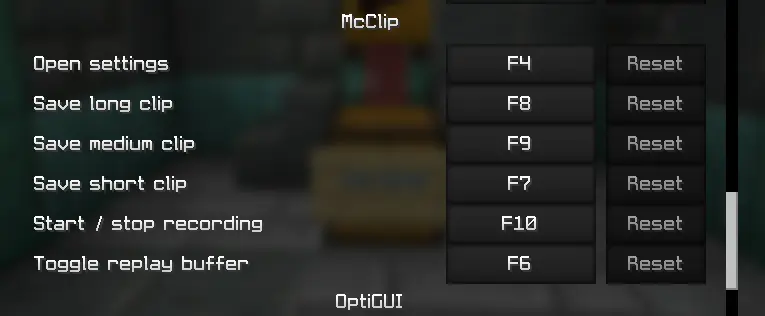
- F7: Save short clip (15s by default)
- F9: Save medium clip (30s by default)
- F8: Save long clip (60s by default)
- F10: Start / stop continuous long recording
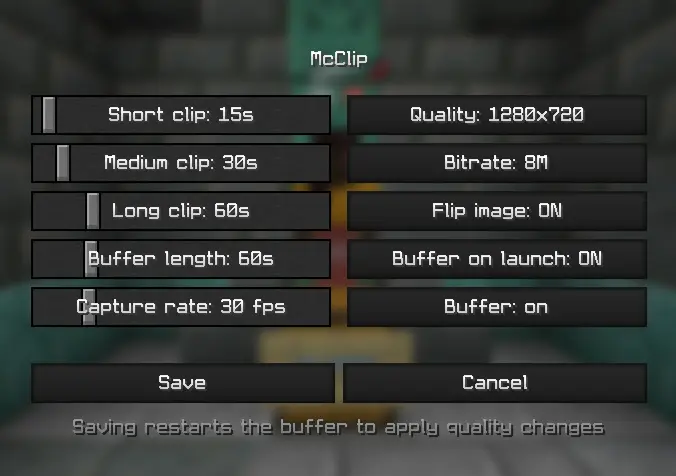
- F6: Toggle the replay buffer on/offCustomization: Adjust clip lengths, capture quality, and encoder settings directly in config/mcclip.properties (Requires ffmpeg).
 McClip**
⚠️ Disclaimer: While the core features and video pipeline are ready, this mod is relatively new. Installing it could potentially cause game crashes.
FAQ
How to install MCclip?
Install Fabric for your Minecraft version, download MCclip for the same version and loader, put the file into the mods folder and launch the game with the loader profile.
Which Minecraft versions does MCclip support?
MCclip has builds for Minecraft 1.21.11.
Is MCclip needed on the server?
Client only — no need to install it on the server
Similar mods
All social mods →


More mods by this author
 ItemHandEditor↓ 267