
- Loaders
- Fabric
- Downloads on Modrinth
- 237
- Followers on Modrinth
- 2
- versions
- 2
- Updated
- August 3, 2026Aug 3
- Published
- in 2026
At a glance
Needed both in the game and on the server
Description
This mod can turn blocks into mini models. You can even put a mountain into a block.
The Mini Models only serve a decorative purpose. Blocks such as bookshelves and redstones have no practical use.
How to use
Holding the Mini Model Tool in hand, right-click on a block as the starting point, and right-click on another block as the ending point. All blocks within this range will be collected as mini models.
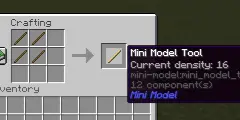
You can press Shift + scroll the mouse wheel to switch the density of the Tool. The scale of Mini Model equals 1/density. This method can switch the density to values of 8, 16, 32, and 64. But the value of density can be any integer in [1, 128]. You can use command "/minimodel density " to set the density more freely.
You can also use command "/minimodel " to collect blocks. This method is convenient for blocks that cannot be right-click interacted with, such as water.
These commands do not require OP permission, so you do not need to enable cheating to use them.
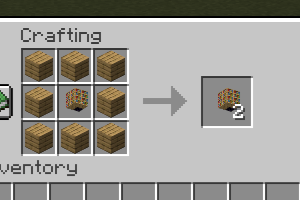
You can easily replicate Mini Models using 8 wooden planks without the need for re-collection.
FAQ
How to install Mini Model?
Install Fabric for your Minecraft version, download Mini Model for the same version and loader, put the file into the mods folder and launch the game with the loader profile.
Which Minecraft versions does Mini Model support?
Mini Model has builds for Minecraft 26.1.2–26.2.
Is Mini Model needed on the server?
Needed in the game and on the server


