
PerformanceHUD
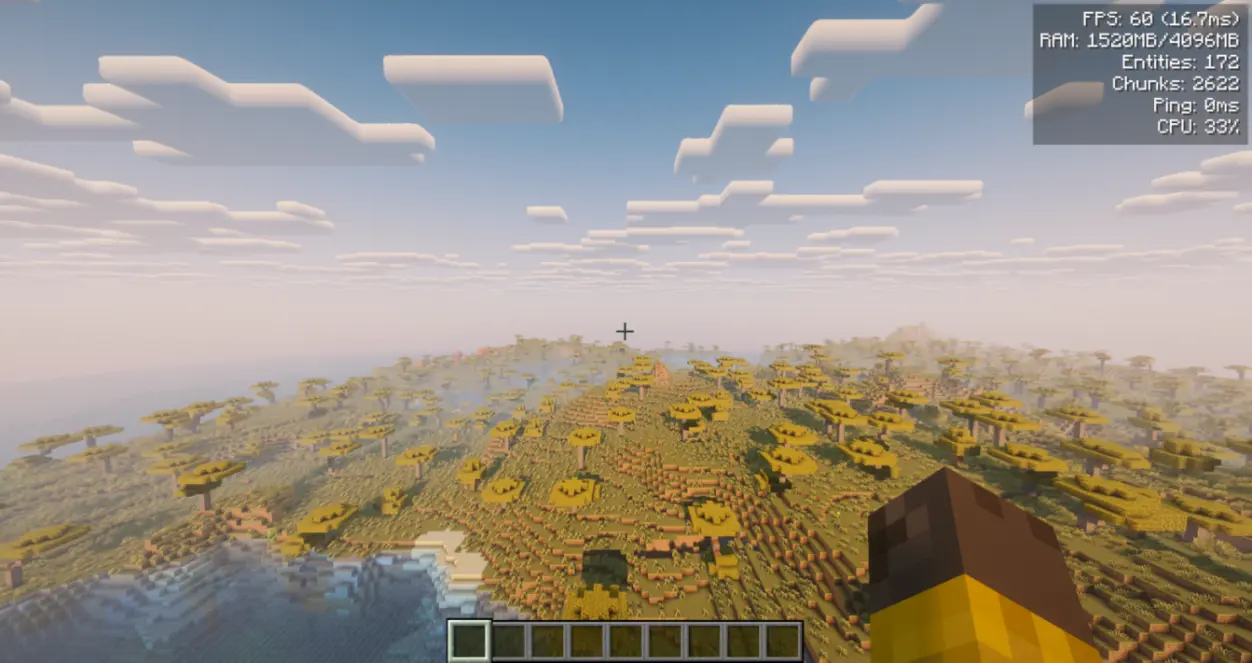
Lightweight client-side HUD showing FPS, RAM, entities, chunks, ping, and CPU in one customizable corner overlay.
- Loaders
- FabricNeoForgeForge
- Downloads on Modrinth
- 10.9K
- Followers on Modrinth
- 5
- versions
- 44
- Updated
- October 7, 2026Oct 7
- Published
- in 2026
At a glance
Install in the game only; not needed on the server


A lightweight client-side performance HUD that shows FPS, RAM, entities, loaded chunks, ping, and CPU usage in a single clean corner overlay. No more screenshots cluttered with three different mods — one toggleable panel, one hotkey, done.
Client-side only — do not install on the server. A dedicated server does not need this mod and will not write config/performancehud.json if the jar is present anyway. Works in singleplayer — just drop it in your mods folder.
Fabric needs Fabric API and Architectury API. NeoForge needs Architectury API. Forge needs no additional dependencies.
Free to use in any modpack — public or private, no permission needed.
What it does
- One overlay — a compact HUD in the top-right corner with up to 6 live metrics.
- Toggle with
F8— hide or show the whole panel with one keybind (changeable in Controls). The HUD also hides whenF1hides the rest of the interface. - Per-metric switches — turn individual lines on or off so you only see what you care about.
- Safe with other HUDs — client overlay only; does not change world or server logic, and is safe to remove at any time.
Metrics shown
- FPS — current frame rate with frame time in ms (e.g.
120 (8.3ms)). - RAM — used / max heap in MB.
- Entities — entity count in the loaded world.
- Chunks — currently loaded client chunks.
- Ping — your latency in ms when available; otherwise
-. - CPU — system CPU load percentage when available.
- If a value cannot be read, that line shows
-and the reason is logged once.
Configuration
- In-game screen:
/phud openor/performancehud open. On Forge/NeoForge it is also available from the Mods menu. - Customization: background opacity, screen margins (X/Y), and line spacing.
- File:
config/performancehud.json. A typo’d file is kept asconfig/performancehud.json.bakbefore defaults are written, so settings are not silently lost. - Keybind: default
F8toggle in the vanilla Controls menu.
Commands
Use /performancehud or the short alias /phud.
/phud open— open the config screen/phud status— print current settings to chat/phud reload//phud reset— manage the config file- `/phud
— toggle metrics or adjust visuals from chat (e.g./phud showFps false,/phud xMargin 10,/phud textColor 16777215`)
Details
- Available in English, Russian, German, Spanish, French, Italian, Japanese, Korean, Brazilian Portuguese, and Simplified Chinese.
Feedback
Please report any bugs, errors, or feature suggestions on Discord: https://discord.gg/HTkn94BXmA
More mods by Nikrecs: DynamicRenderDistance · CropGrowthHUD
My other mods that I recommend.
FAQ
How to install PerformanceHUD?
Install Fabric for your Minecraft version, download PerformanceHUD for the same version and loader, put the file into the mods folder and launch the game with the loader profile.
Which Minecraft versions does PerformanceHUD support?
PerformanceHUD has builds for Minecraft 1.20.1, 1.21.1, 1.21.11–26.1, 26.1.2–26.3 ….
Is PerformanceHUD needed on the server?
Client only — no need to install it on the server
Similar mods
All management mods →


More mods by this author
 AutoSwap↓ 30.3K
 LeashAll↓ 22.9K
 Rope↓ 6.4K
Often needed together
 Architectury API↓ 106M