
Ping Display
A clean, client-side mod that displays your exact latency on the HUD and replaces the vanilla Tab bars with precise numerical ping.
- Loaders
- Fabric
- Downloads on Modrinth
- 222
- Followers on Modrinth
- 0
- versions
- 3
- Updated
- July 15, 2026Jul 15
- Published
- in 2026
At a glance
Install in the game only; not needed on the server
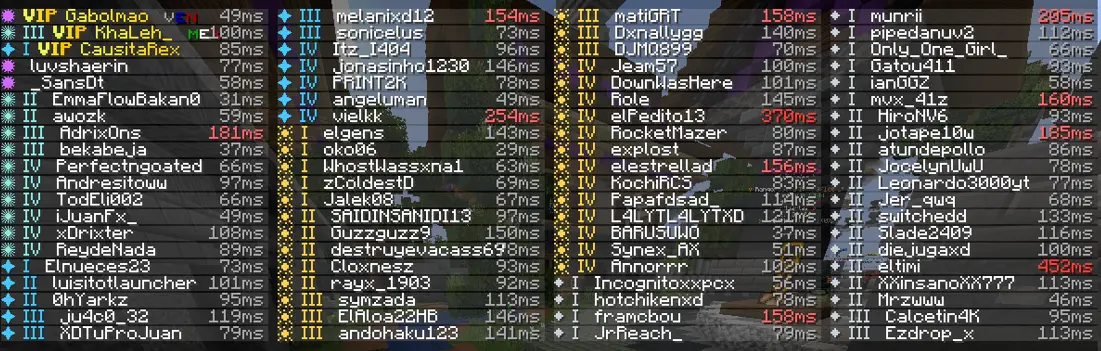

Falcon's Ping Display
Falcon's Ping Display is a sleek, lightweight, and fully client-side quality-of-life mod that displays your real-time network latency (ping) in milliseconds across multiple parts of your interface.
✨ Features
- Multi-Location Display: View your exact ping in milliseconds directly on your main HUD, inside the player Tab list, and next to player nametags.
- Highly Customizable: Keeps your interface clean and informative without cluttering your view.
- Optimized & Client-Side: Extremely lightweight with zero impact on FPS. Works perfectly on any multiplayer server without needing the server to have the mod installed!
🕹️ Usage
Once installed, your ping will automatically render in your interface when joining any multiplayer server. Designed to look clean and native to the Minecraft vanilla style!
📦 Installation & Compatibility
- Mod Loader: Built exclusively for Fabric.
- Environment: Client-side only. You do not need to install this on servers!
- Requirements: Requires Fabric API.
- Modpacks: You are 100% free to include this mod in any modpack!
FAQ
How to install Ping Display?
Install Fabric for your Minecraft version, download Ping Display for the same version and loader, put the file into the mods folder and launch the game with the loader profile.
Which Minecraft versions does Ping Display support?
Ping Display has builds for Minecraft 1.20.1, 1.21.1, 1.21.4.
Is Ping Display needed on the server?
Client only — no need to install it on the server


