
TinyBuilds
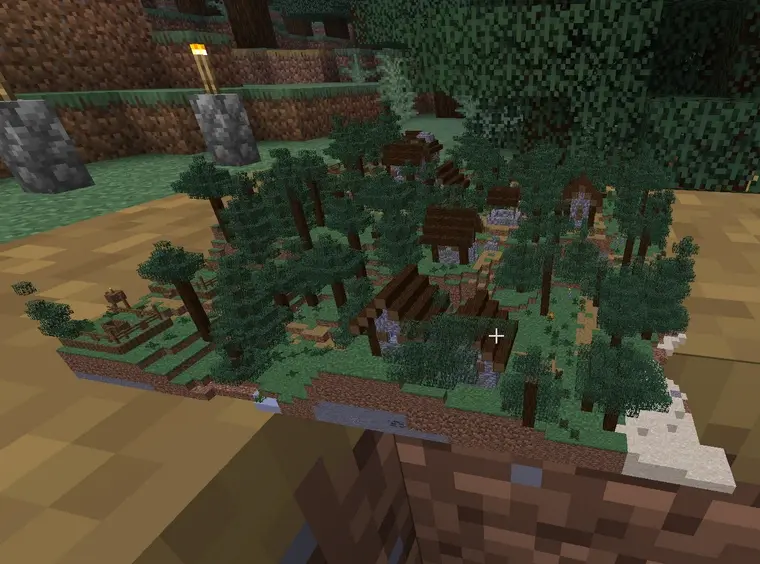
Show off tiny (or very large) versions of your Minecraft builds with block displays - generally without killing the client!
- Loaders
- FabricPaper
- Downloads on Modrinth
- 200
- Followers on Modrinth
- 2
- versions
- 2
- Updated
- July 11, 2026Jul 11
- Published
- in 2026
At a glance
Install on the server only; players don't need it
TinyBuilds
A Paper plugin and Fabric mod that spawns scaled-down (or if you want, scaled-up) block display copies of your Minecraft builds.
Smarts
While VERY large builds will likely still make client FPS drop, both the number of displays spawned and actions done for rotation are optimized about as much as they can be, so this will generally work much more smoothly than similar plugins or mods on both the server and client.
Requirements
- Paper 1.21+, or Fabric on Minecraft 26.2
- WorldEdit
Commands
Make a WorldEdit selection of the build, stand where the copy should appear, then:
| Command | Description |
|---|---|
| `/tinybuilds place [maxMergeSize]` | Spawn a copy of your selection at the given scale (e.g. 0.1). maxMergeSize merges equal blocks into fewer, larger displays (recommended as 2). |
| `/tinybuilds remove ` | Remove a group and its display entities. |
| `/tinybuilds rotation ` | Rotate the group around its center (radians per second, 0 to stop). |
Permission: tinybuilds.command (Paper) / op (Fabric)
FAQ
How to install TinyBuilds?
Install Fabric for your Minecraft version, download TinyBuilds for the same version and loader, put the file into the mods folder and launch the game with the loader profile.
Which Minecraft versions does TinyBuilds support?
TinyBuilds has builds for Minecraft 1.21.8–26.2.
Is TinyBuilds needed on the server?
Server only — players don't need to install it


