
Book Extractor
Lets you export all text from any book, save it to your clipboard and files and then import into another book.
- Loaders
- Fabric
- Downloads on Modrinth
- 425
- Followers on Modrinth
- 1
- versions
- 5
- Updated
- October 2, 2026Oct 2
- Published
- in 2026
At a glance
Install in the game only; not needed on the server
Book Extractor
Book Extractor is a client-side Fabric mod that lets you export the full readable text of books directly from the book screen.
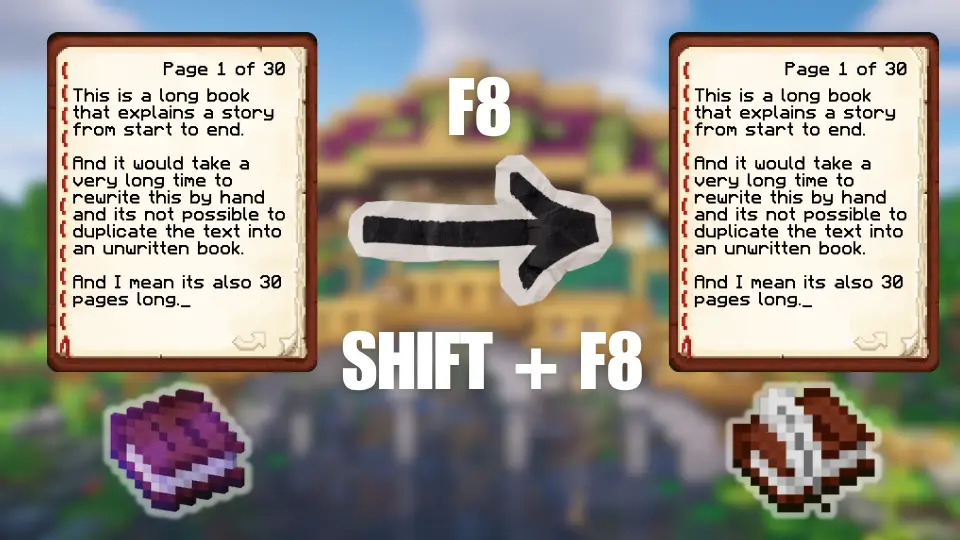
While viewing a signed book, book and quill, or lectern book, press F8 to:
- copy the book’s text to your clipboard
- save it as a UTF-8
.txtfile in your .minecraft folder underbook-extractor/exports/
The export includes:
- book type
- source
- title
- author
- page count
- export timestamp
- clearly separated page text
It preserves page order, blank pages, and line breaks, and exports the plain text the client can actually see.
Press Shift+F8 while editing a book and quill to import the same exported format back from your clipboard into the open writable book.
Features
- Client-side only
- Works on multiplayer without server installation
- Supports signed books, writable books, and lectern books
- Exports to both clipboard and file
- Imports back into writable books from clipboard
Usage
- Open a supported book screen
- Press
F8to export the current book - Press
Shift+F8in a book and quill to import from your clipboard
How It Works
Check out my other mods


FAQ
How to install Book Extractor?
Install Fabric for your Minecraft version, download Book Extractor for the same version and loader, put the file into the mods folder and launch the game with the loader profile.
Which Minecraft versions does Book Extractor support?
Book Extractor has builds for Minecraft 26.1.2–26.3.
Is Book Extractor needed on the server?
Client only — no need to install it on the server


