
- Loaders
- Fabric
- Downloads on Modrinth
- 6K
- Followers on Modrinth
- 7
- versions
- 17
- Updated
- October 26, 2026Oct 26
- Published
- in 2026
At a glance
Install in the game only; not needed on the server
Chatglot
 Chatglot is a Fabric client-side mod that translates Minecraft chat messages on the fly.
A translate button (✍ by default) is added to each chat message. Click it, or let auto-translate handle it, and the translated result is shown in chat either as a new line or by replacing the original message.
Client-side only. No server installation is required.
Features
- Translate button appended to every chat message (configurable label)
- Click-to-translate or automatic chat translation
- Works out of the box — the default provider uses Google Translate's free web API, with no API key, account, or setup
- Local translation cache — repeated messages are shown instantly without another request
- Result shown as a new line or replaces the original chat message
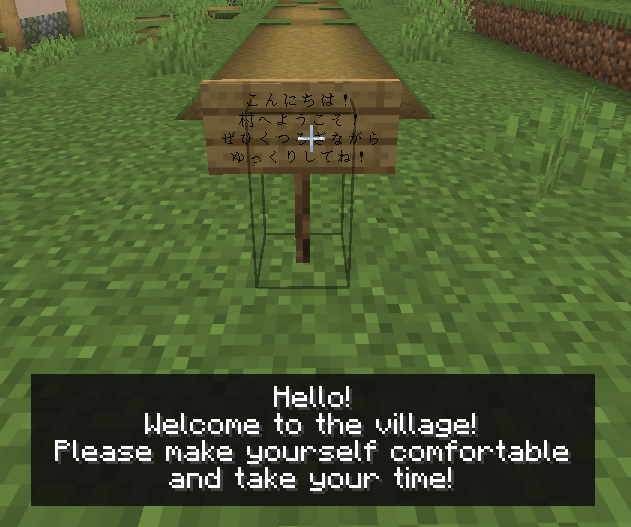
Sign and hanging sign translation
- Look at a sign and press
Gto translate its text
- Look at a sign and press
Book translation
- In a written book or on a lectern, press
Gor clickTranslateto translate the current page - Book and quill pages can be translated with the
Translatebutton (page contents are never changed)
- In a written book or on a lectern, press
Chat input translation
- Choose an outgoing language in the chat input and preview a translation of your draft before sending
- Apply the preview with
Tabor a click
- Open the settings screen with
F8or/chatglot config - Translate a specific chat message with `/chatglot translate `
Translation Providers
Chatglot supports multiple translation backends. Switch between them in the settings screen.
| Provider | Requires |
|---|---|
default | Nothing. Uses Google Translate's free unofficial web API (not the paid Cloud Translation API). It may be limited or changed without notice. |
gas | Your own Google Apps Script web app URL |
deepl | DeepL API key |
google | Google Cloud Translation API key |
openai | OpenAI API key |
gemini | Gemini API key |
anthropic | Anthropic API key |
azure | Azure Translator API key + region |
codex | Browser OAuth (one-time, token stored locally) |
translategemma_local | Windows only. Downloads llama.cpp + a TranslateGemma GGUF model, then runs a local backend over localhost |
Recommended Providers
Default: Best for getting started. Free, needs no setup, and supports auto-translate. Because it relies on an unofficial API, Google may rate-limit it during heavy use; switch to another provider if that happens.GAS: Good if you want a free setup with your own Google account. Google Apps Script documents up to5,000Translate calls per day for consumer accounts, though quotas can change. See Apps Script quotas.Codex: Recommended if you already subscribe to ChatGPT. OpenAI states that Codex is included with ChatGPT Plus, Pro, Business, Edu, and Enterprise plans, with plan-based limits. See Using Codex with your ChatGPT plan.Azure: A good option if you want an official API with a free tier. Azure TranslatorF0includes2 millioncharacters free per month according to Microsoft's pricing page. See Azure Translator pricing.TranslateGemma: A strong option if your PC has enough headroom for local inference. After setup, it runs locally overlocalhost, can be fast, and does not require a paid API for each request. It does require downloading thellama.cppruntime and a TranslateGemma GGUF model.
Configuration
The config file is located at config/chatglot/chatglot.json.
Key settings:
enabled— Enable or disable the mod entirelyautoTranslateEnabled— Toggle automatic translationoutgoingTargetLanguage— Default language for translating your own chat draft (default: English)targetLanguage— e.g.JA,EN,EN-US,ZH-HANS(defaults to your Minecraft language)provider— Choose your translation backendoverwriteOriginalWithTranslation— Replace original message instead of adding a new lineappendTranslateButton— Show or hide the✍buttontranslateButtonLabel— Customize the button labelshowTranslationPrefix— Show or hide the translated-message prefixrequestTimeoutSeconds— Network timeout (5-240seconds)maxConcurrentTranslations— Max parallel translation requests (1-16)useSharedAppDataSettings— Share API keys, model settings, and local backend settings through%LOCALAPPDATA%translationCacheEnabled— Enable the local translation cache (default:true)translationCacheMaxEntries— Maximum number of cached translations (default:5000)
Translation Cache
Successful translations are saved to config/chatglot/translation-cache.json and reused for the same text, language, and provider settings. The oldest entries are removed once the limit is reached. Clear the cache with /chatglot cache clear or the button in the settings screen.
The cache stores the original text, including chat messages, in plain text on your PC. API keys and other credentials are never stored in it.
TranslateGemma Local Backend
translategemma_local is a Windows-only local translation option. It does not run inference inside the Minecraft JVM. Instead, it uses a separate local backend process over 127.0.0.1 / localhost.
When you use the TranslateGemma setup buttons in the config screen, Chatglot:
- Downloads a prebuilt
llama.cppWindows runtime - Downloads a TranslateGemma GGUF model file
- Starts
llama-server.exelocally and sends translation requests to that local server
The default model is mradermacher/translategemma-4b-it-GGUF using translategemma-4b-it.Q4_K_M.gguf.
By default, Chatglot stores the local backend runtime, model, logs, and state inside:
config/chatglot/local-backend/when shared AppData settings are disabled%LOCALAPPDATA%/ChatglotLocal/when shared AppData settings are enabled
You can also override the runtime path, model path, download URL, or shared directory from the config screen.
Shared Settings Storage
If useSharedAppDataSettings is enabled, Chatglot stores shared settings in %LOCALAPPDATA% so multiple launch profiles can reuse them.
This may include:
- API keys for supported translation providers
- Codex token file location and related model settings
- TranslateGemma local backend settings such as runtime path, model path, port, and shared directory
Shared settings are stored locally on your PC. They are not uploaded anywhere just because this option is enabled.
Privacy Notice — External Data Transmission
This mod sends chat text to external translation services. The destination depends on the provider you select.
Translating a chat draft sends the text in the input field only when you press the translate button. Typing or opening the language picker does not send the draft. Results already in the local cache are shown without sending a request.
defaultprovider: Chat text is sent to Google's unofficial web translation API (translate.googleapis.com). It is free and needs no setup, but Google may limit or change access without notice. See Google Privacy Policy.gasprovider: Chat text is sent to the Google Apps Script web app URL that you configure. Requests are processed through Google's infrastructure. See Google Apps Script Additional Terms and Google API Services User Data Policy.openaiprovider: Chat text is sent to the OpenAI API using your API key. See OpenAI data controls.codexprovider: Uses browser-based OAuth, stores the token locally, and then uses that token to send chat text to OpenAI services. The mod also fetches the available model list fromhttps://modelapi.yoima.com/api/codex-models/list. No chat content is sent to that model-list endpoint.geminiprovider: Chat text is sent to the Gemini API. For Google AI Studio / Gemini API usage, review the provider terms here: Gemini API Terms.deeplprovider: Chat text is sent to the DeepL API. See DeepL Privacy Policy.anthropicprovider: Chat text is sent to Anthropic services using your API key. See Anthropic Privacy Policy.azureprovider: Chat text is sent to Azure Translator using your API key. See Data, privacy, and security for Azure Translator.googleprovider: Chat text is sent to Google Cloud Translation using your API key. See Google Cloud Privacy Notice.translategemma_localprovider: Chat text is sent only to a local backend running on127.0.0.1/localhost. During setup, this mod downloads thellama.cppruntime and the TranslateGemma GGUF model from a third-party hosting source configured by the mod.
Source & License
Source code: GitHub — yoima-jp/Chatglot
License: MIT
FAQ
How to install Chatglot - Chat Translation?
Install Fabric for your Minecraft version, download Chatglot - Chat Translation for the same version and loader, put the file into the mods folder and launch the game with the loader profile.
Which Minecraft versions does Chatglot - Chat Translation support?
Chatglot - Chat Translation has builds for Minecraft 1.21.4, 1.21.11–26.3.
Is Chatglot - Chat Translation needed on the server?
Client only — no need to install it on the server
Similar mods
All social mods →


More mods by this author
 OBS Recording Monitor↓ 2.3K
 Universal Config↓ 1.1K
 Mod Deck↓ 949
Often needed together
 Fabric API↓ 293MMod Deck↓ 949