
Command Safety
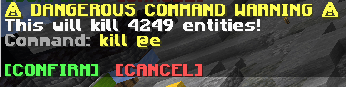
Warns the player when running potentially dangerous commands ('/kill @e' etc).
- Loaders
- FabricNeoForgeForgeQuilt
- Downloads on Modrinth
- 2.4K
- Followers on Modrinth
- 8
- versions
- 28
- Updated
- July 10, 2026Jul 10
- Published
- in 2025
At a glance
Install on the server only; players don't need it
Command Safety Mod
Have you ever accidentally killed all entities in your world with a single command? Or maybe you've cleared all the scores of a player when you didn't mean to?
This mod helps you avoid such mishaps, by requiring the player to confirm commands that have the potential to break a lot of things.
Very useful when working on large projects, especially when multiple people (that potentially have less experience with commands) are involved.
The commands & the conditions of when they require confirmation:
/fill,/clone- When selecting an area of more than 10 000 blocks.
/execute,/kill,/effect,/tp,/teleport,/give,/clear,/gamemode- When affecting more than 50 entities (players, ravagers, item frames).
- When affecting more than 25 living entities (players, ravagers, ...).
- When affecting more than 1 player.
/scoreboard- When affecting more than 50 score holders (players / entities).
- When using the
/scoreboard players reset ..command without selecting an objective.
Config:
You can use the /confimcmd config command to change the limits of when commands require confirmation, or you can also modify the config files themselves (./config/confirmcommand.properties).
/confirmcmd
- `/confirmcmd config ` - Gets the value of a config.
- `/confirmcmd config ` - Sets the value of a config.
Possible values for `` are: max_blocks, max_players, max_living_entities, max_entities, max_score_holders
FAQ
How to install Command Safety?
Install Fabric for your Minecraft version, download Command Safety for the same version and loader, put the file into the mods folder and launch the game with the loader profile.
Which Minecraft versions does Command Safety support?
Command Safety has builds for Minecraft 1.14–1.18.2, 1.19.1–26.3.
Is Command Safety needed on the server?
Server only — players don't need to install it


