
Creative dimension
This datapack/mod adds the creative dimension—a parallel dimension to the overworld where you can unleash your creativity in creative mode.
- Loaders
- FabricNeoForgeForgeQuilt
- Downloads on Modrinth
- 251
- Followers on Modrinth
- 2
- versions
- 2
- Updated
- September 24, 2026Sep 24
- Published
- in 2026
At a glance
Needed on the server; optional in the game
Free 24/7 Minecraft Server (ad)
Get now a free Minecraft server with freemchost
✔️ 24/7 hosting (All paid plans are 24/7 and also some free plans)
✔️ Full access (you have full access to your files)
✔️ 24gb RAM
✔️ Custom Jars allowed (You can upload literally every version)
✔️ Less Ads
✔️ You can renew your server at any time
⚠️Your Server expires after 48h if you don't renew it (but you can upgrade your server to a cheap paid tier (starting at 0.59€/monthly) for autorenew)
Creative Dimension
This datapack/mod adds the creative dimension—a parallel dimension to the overworld where you can unleash your creativity in creative mode.
How to use
- Craft a Creative Core using following recipe:
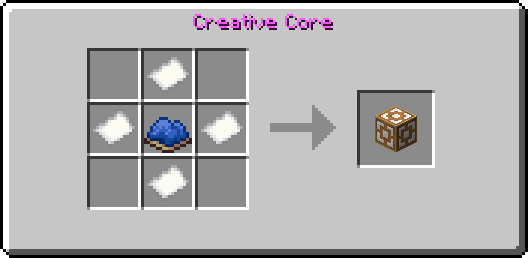
You can also run instead (does not work in 26.3) /loot give [target] loot creativedim:creative_core
- Store all your items in for example in a chest because when you leave the creative dimension your inventory will be wiped
- Holdrightclick the item for 5-10sec in the overworld (a warning will appear)
- After that you will ported into the creative dimension and your gamemode will be set to creative
- Holdrightclick the item for 5-10sec again
- You will now ported back into the overworld and your inventory will be cleared

Importan to know ⚠️
- After switching back to the overworld your inventory will be deleted to prevent cheating (to save your items store them for example in the enderchest before going to the creative dimension)
Following items are disabled in the creative dimension to prevent cheating
- Eye of ender
- Enderchest
- This pack is only required on the server side (you need only to install it on your server or the host world)
Credits ♥️
🖌️Thanks to Foxeddev for making the cool Icon♥️
💡Big thanks to Kyoko883 for the full idea of the creative dimension ♥️
Join my Discord🎮
- to get help🛟
- report bugs🐛
- suggest something💡
- ask me other questions❓
- get the latest news about my mods / datapacks📰 You can join here: https://discord.gg/r2NkP67T9r
FAQ
How to install Creative dimension?
Install Fabric for your Minecraft version, download Creative dimension for the same version and loader, put the file into the mods folder and launch the game with the loader profile.
Which Minecraft versions does Creative dimension support?
Creative dimension has builds for Minecraft 1.21.4–26.3.
Is Creative dimension needed on the server?
Needed on the server; optional in the game
Similar mods
All game mechanics mods →


Often needed together
 Fabric API↓ 291M