
Forec chunk loading
Keep the chunk loaded while you’re logged out using a craftable item in Survival.
- Loaders
- Fabric
- Downloads on Modrinth
- 53
- Followers on Modrinth
- 0
- version
- 1
- Updated
- August 21, 2026Aug 21
- Published
- in 2026
At a glance
Install on the server only; players don't need it
Force Chunk Loading
Craft a configurable player head that keeps its chunk loaded. It works server-side with vanilla clients.
Features
- Configurable player-head skin, recipe, particles, and sounds.
- Chunk loading survives server restarts.
- Marker heads are protected from non-player destruction by default.
- Breaking a marker drops a reusable marker item.
- No client mod is required.
Requirements
| Minecraft | Fabric Loader | Fabric API | Java |
|---|---|---|---|
26.1.2 | 0.19.3+ | 0.155.2+26.1.2 | 25+ |
Installation
- Install Fabric Loader and Fabric API on the dedicated server.
- Put the
force_chunk_loadingJAR in the server'smodsfolder. - Start the server once to create the config.
- Edit the config if needed, then restart the server.
The client does not need this mod installed.
Use
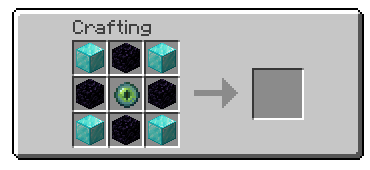
Craft and place the player head shown above. The chunk is force-loaded after successful placement, with an activation message, sound, and optional enchanted particles.
Break the marker to deactivate it. In survival, the complete marker item drops and can be placed again. By default, explosions, pistons, commands, and other non-player changes restore the marker instead of removing it.
Configuration
Show configuration
Edit this file while the server is stopped:
config/force_chunk_loading.json| Setting | Default | Purpose |
|---|---|---|
allowPlacement | true | Allow marker placement. |
placementPermissionLevel | 0 | Required permission level, from 0 to 4. |
allowPlayerRemoval | true | Allow players to break markers. |
allowNonPlayerRemoval | false | Let non-player changes remove markers permanently. |
showEnchantedParticles | true | Show particles around active markers. |
sounds.enabled | true | Enable activation/deactivation sounds. |
sounds.activation | minecraft:entity.player.levelup | Placement sound ID. |
sounds.deactivation | minecraft:entity.enderman.teleport | Removal sound ID. |
head.texture | Earth texture | Base64 value from profile.properties[].value. |
recipe.enabled | true | Enable the generated recipe. |
recipe.pattern | DOD, OEO, DOD | Up to three rows of three characters. |
recipe.ingredients | D, O, E | Maps characters to namespaced item IDs. |
placementPermissionLevel: 0 allows everyone. Levels 1–4 require higher Minecraft permissions.
Use a registered namespaced sound ID. Set sounds.enabled to false to keep actionbar messages but disable sounds.
Change only head.texture to choose another skin. The command's custom name, lore, and head ID are not copied.
Restart the server after changing configuration.
License
MIT. See LICENSE.
FAQ
How to install Forec chunk loading?
Install Fabric for your Minecraft version, download Forec chunk loading for the same version and loader, put the file into the mods folder and launch the game with the loader profile.
Which Minecraft versions does Forec chunk loading support?
Forec chunk loading has builds for Minecraft 26.1.2.
Is Forec chunk loading needed on the server?
Server only — players don't need to install it


