
Nicks
This mod allows you to client-Side change Nicknames+Skins to whatever you want.
- Loaders
- Fabric
- Downloads on Modrinth
- 1.5K
- Followers on Modrinth
- 1
- versions
- 3
- Updated
- August 3, 2026Aug 3
- Published
- in 2026
At a glance
Install in the game only; not needed on the server
🎭 Nicks 🎭
For any suggestions or Bug Reports, Please DM @SupRani on Discord.
Take full control over how you see other players - disguise any username, change their skin, all from one in-game menu or Command. Completely client-side, no server-side support needed, for Multiple people at the same Time.
✏️ Custom /nick (Client-Side)
Disguise anyone on your screen instantly. Change any player's visible name to whatever you want, allowing you to easily organize friends, mock opponents, or stream without revealing real usernames.
👥 Skin Swapping
It doesn’t just stop at text. When you change a player's nickname, the mod automatically fetches and applies the official skin of that new name. Look around the world and see your customized roster exactly how you set them to be.
💾 Unlimited Slots
Add as many nicknames as you want. There are zero limits or slot restrictions on how many unique player overrides you can save and maintain at the same time.
🖥️ The GUI
This is not your average Minecraft settings screen. Nicks features a fully custom-built, modern dark UI with scrollable split panels, direct text fields, and instant status updates - manage your entire list inside the game with zero config file hunting.
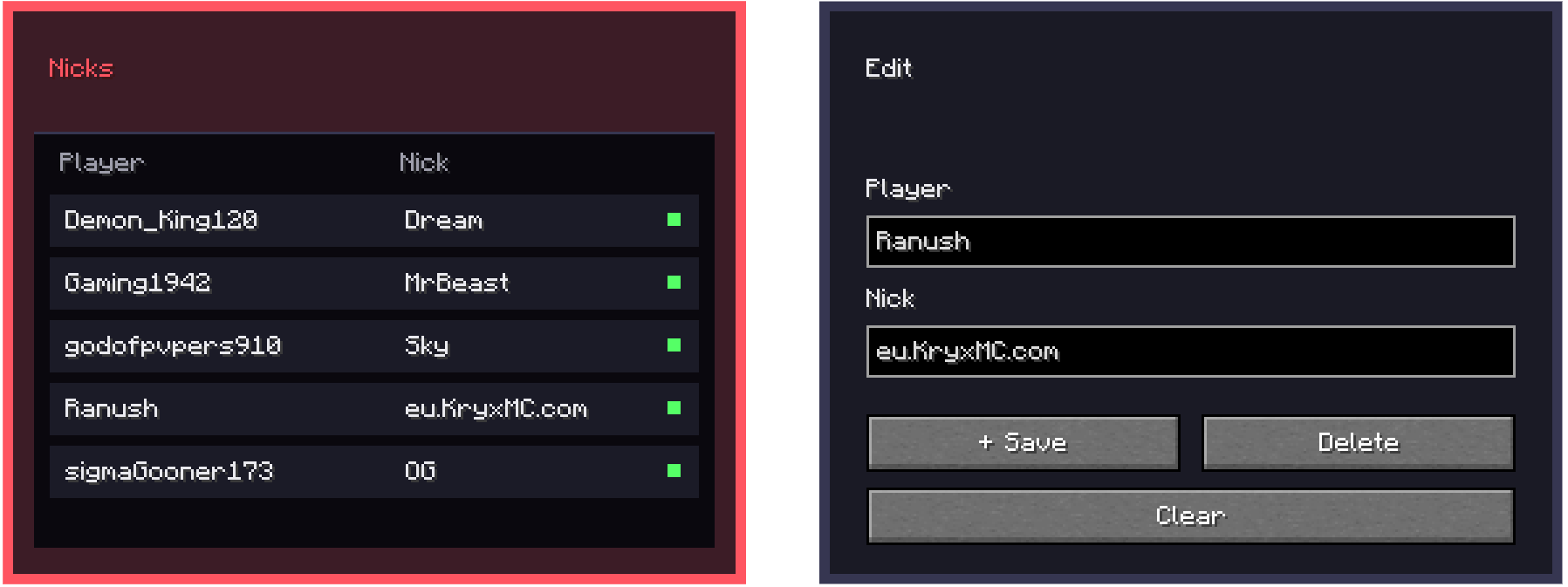
to open the GUI, all you need to do is do /nick
FAQ
How to install Nicks?
Install Fabric for your Minecraft version, download Nicks for the same version and loader, put the file into the mods folder and launch the game with the loader profile.
Which Minecraft versions does Nicks support?
Nicks has builds for Minecraft 1.21.11.
Is Nicks needed on the server?
Client only — no need to install it on the server
Similar mods
All game mechanics mods →


More mods by this author
 CustomCrosshair↓ 11.5K
 Setting↓ 141