
PackTimer
Timer with many features and an simple interface I will add more features to it soon™
FabricNeoForgeForgeQuilt
- Loaders
- FabricNeoForgeForgeQuilt
- Downloads on Modrinth
- 2.7K
- Followers on Modrinth
- 4
- versions
- 18
- Updated
- October 3, 2026Oct 3
- Published
- in 2024
Timer in Hotbar — Timer in English (Version 1.2.0) · swipe
At a glance
Runs on Fabric, NeoForge, Forge and Quilt
For Minecraft 1.18–26.3
Needed on the server; optional in the game
Latest version — 1.2.6+mod from October 3, 2026
License CC-BY-4.0 — free
Where it's neededGame versions1.18–26.3
In gameoptionalOn serverrequired
Needed on the server; optional in the game
PackTimer

Update
If you update, run the function /function timer:update if there are any problems!
Features
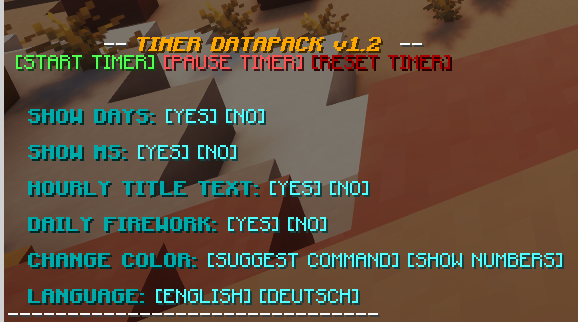
- Timer with Day Counter
- Milliseconds Counter :D
- Easy to use
- English and german language options
- 16 different colors supported
- Simple to install and update
Tags
Disabling the interface:
/tag PLAYERNAME add timer.disable_interfaceDisabling the timer:
/tag PLAYERNAME add timer.disable_timerHow to use
- Make sure you have commands enabled or have OP on a server.
- Type:
/trigger timer.interface - Change some settings or start the timer!
Installation
- Install the Datapack (note: In Minecraft the Datapack may appear to be "unsupported", but it still works if you downloaded the correct version.)
- Make sure you have commands enabled
- Run the command
/trigger timer.interface
FAQ
How to install PackTimer?
Install Fabric for your Minecraft version, download PackTimer for the same version and loader, put the file into the mods folder and launch the game with the loader profile.
Which Minecraft versions does PackTimer support?
PackTimer has builds for Minecraft 1.18–26.3.
Is PackTimer needed on the server?
Needed on the server; optional in the game
License and source
Creative Commons Attribution 4.0 Internationalfree to share with credit to the author and the license
Similar mods
All game mechanics mods →


More mods by this author
 Faster Happy Ghasts↓ 19.9K
 GSSW↓ 96