
QuickCommand
This is a mod for quickly and consecutively executing multiple arbitrary commands in the game. All commands can be executed by clicking the corresponding buttons in the chat box.
- Loaders
- Fabric
- Downloads on Modrinth
- 5.4K
- Followers on Modrinth
- 9
- versions
- 85
- Updated
- February 19, 2026Feb 19
- Published
- in 2024
At a glance
Works both in the game and on the server — install where you need it
QuickCommand
This is a mod for quickly and consecutively executing multiple arbitrary commands in the game. All commands can be executed by clicking the corresponding buttons in the chat box.
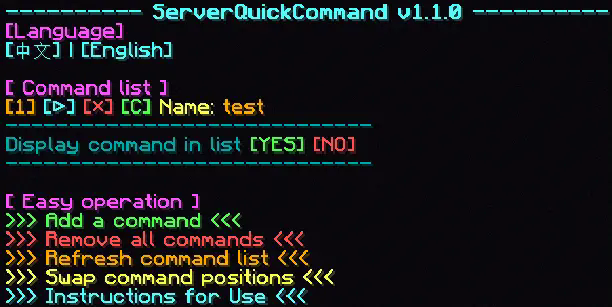
Short Key
Integrated a shortcut key to quickly open the interface in the chat box, defaulting to U, which can be changed in the game settings.
Commands
/quickCommand
- Open the quick command list.
**/quickCommand add **
- Add a quick command named with command .
- Example: /quickCommand add "Execute /seed" "/seed"
- Add a quick command to execute /seed.
**/quickCommand remove **
- Remove the quick command named .
- Example: /quickCommand remove "Execute /seed"
- Remove the quick command named "execute /seed command".
/quickCommand removeAll
- Remove all quick commands.
/quickCommand removeAll confirm
- Confirm to remove all quick commands.
/quickCommand listWithRun
- Open the quick command list.
**/quickCommand swap **
- Swap the display positions of and in the list.
/quickCommand displayCommandInList <true/false>
- Whether to display commands in the list.
/quickCommand help
- View the mod usage instructions.
FAQ
How to install QuickCommand?
Install Fabric for your Minecraft version, download QuickCommand for the same version and loader, put the file into the mods folder and launch the game with the loader profile.
Which Minecraft versions does QuickCommand support?
QuickCommand has builds for Minecraft 1.17.1, 1.18.2, 1.19.4–1.21.1, 1.21.4–1.21.11 ….
Is QuickCommand needed on the server?
Works on either side — install it in the game, on the server, or both
Similar mods
All game mechanics mods →


More mods by this author
 Carpet AMS Addition↓ 540K
 Fuzz↓ 35.4K
 AnimatedFreeze↓ 9.7K
Often needed together
 Fabric API↓ 291M