
QuickQuit
Adds hotkeys to instantly quit your world/server to the main menu (or close the game entirely), with an optional confirmation step and a client-side /quickquit command to schedule a quit after a delay.
- Loaders
- Fabric
- Downloads on Modrinth
- 62
- Followers on Modrinth
- 2
- version
- 1
- Updated
- August 13, 2026Aug 13
- Published
- in 2026
At a glance
Install in the game only; not needed on the server
QuickQuit
QuickQuit is a mod that lets you leave your world or server instantly with a single keypress — no more digging through the pause menu when you need to log off fast.
Found bugs or have questions? Join our Discord server!

✨ Features
- Instant Quit hotkey (default
F8) — press it while in a world/server and you're immediately back at the title screen (or the game closes entirely, depending on your settings). - Mod menu hotkey (default
P) — opens QuickQuit's own settings screen from anywhere in-game. - Optional confirmation — turn on "Confirm Before Quitting" in the settings if you'd rather press the Quit key twice (within a few seconds) instead of quitting instantly. Off by default.
- Choose what "quit" means — pick whether the Quit key sends you to the Title Screen or fully closes the game.
/quickquitcommand — a client-side command that works on any server, even without operator permissions:- `/quickquit seconds|minutes|hours` — schedule a quit after a delay.
/quickquit cancel— cancel a scheduled quit./quickquit status— check whether a quit is currently scheduled.
- Fully localized — available in English and Russian, following your game's language automatically.
📖 How to use
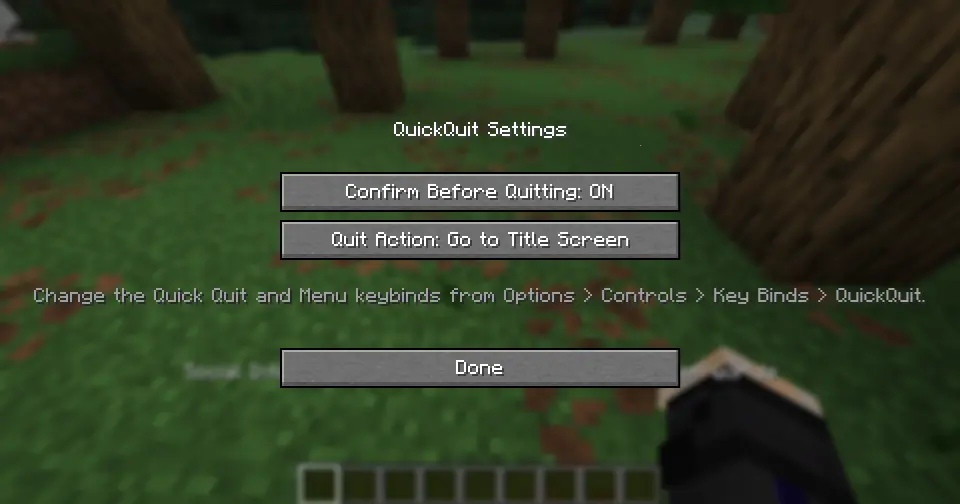
- Change the keybinds (optional). Go to
Options > Controls > Key Binds > QuickQuitto rebind the Quit key (defaultF8) and the Menu key (defaultP) to whatever you like. - Open the settings screen. Press the Menu key (
Pby default) at any time — in a world, in a menu, doesn't matter — to open QuickQuit's settings. Configure your quit behavior.
- Toggle Confirm Before Quitting on if you want a safety check before you leave.
- Set Quit Action to either return to the Title Screen or Close the Game completely.
- Quit instantly. While in a world or on a server, press the Quit key (
F8by default). If confirmation is off, you're out immediately. If confirmation is on, you'll see a message in chat — press the key again within a few seconds to confirm. Schedule a delayed quit. Type a command like:
/quickquit 5 minutes
/quickquit 30 seconds
/quickquit 2 hours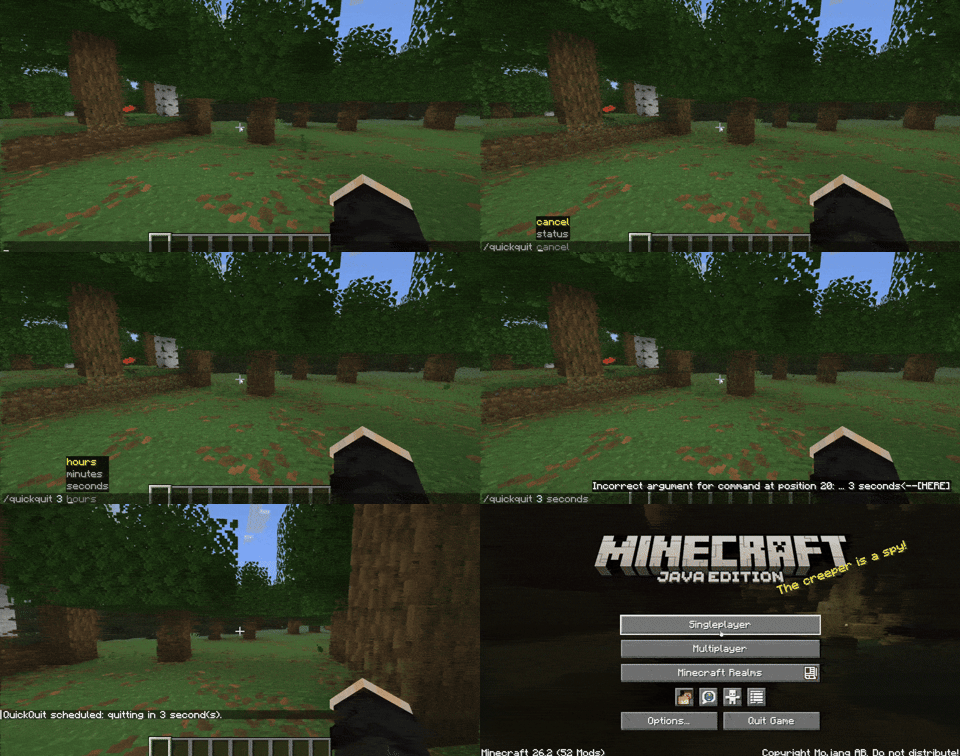
QuickQuit will automatically quit for you once the timer runs out. Use
/quickquit statusto check the countdown, or/quickquit cancelto call it off.
ℹ️ Notes
- No configuration file editing needed — everything is adjustable from the in-game settings screen.
FAQ
How to install QuickQuit?
Install Fabric for your Minecraft version, download QuickQuit for the same version and loader, put the file into the mods folder and launch the game with the loader profile.
Which Minecraft versions does QuickQuit support?
QuickQuit has builds for Minecraft 26.2.
Is QuickQuit needed on the server?
Client only — no need to install it on the server
Similar mods
All game mechanics mods →


More mods by this author
 [KSE] Keyboard Sound Effects↓ 6.5K
 Dynamic RPG HUD↓ 567
 Auto Totem↓ 31.2K
Often needed together
 Fabric API↓ 291M